
【MT4・MT5】ライン描画ツール『9C6Line_TOOL』

Product outline
Community(0)
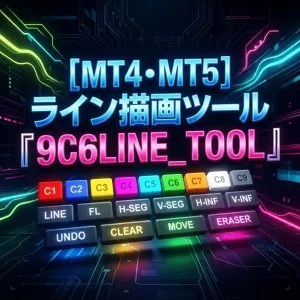
【MT4・MT5】ライン描画ツール『9C6Line_TOOL』 Indicators/E-books
【MT4・MT5】ライン描画ツール『9C6Line_TOOL』
マルチタイムフレーム(MTF)分析を直接チャートに書き込み。【他チャートへもライン反映】
Sales Result 0 items
Reviews ★ 0.0 (0)
Category:
How to provide:
Indicator
Sales from:
10/06/2026
Last Updated:
10/31/2026
Version:
1.00
Web Authentication:
Enable
Available company:

Follow 0 ❘ Followers 1
Seller's last login time: 11/27/2026 17:32:57
Read more seller information
¥3,500 (taxed)
Provider/Distributor:
Sales site:

●Payment

Mastercard Visa JCB Bank FamilyMart D2 D1

◆ 9C6LINE_TOOL 取扱説明書 ◆ 


【 注意 】                                                     
無料版は、MT4用のみです                                                    
有料版と無料版では仕様が異なります。                                              
この取扱説明書は、有料版の内容となります。                                           
有料版は、オプションから購入いただけます。 

1. 概要

「9C6LINE_TOOL」は、MetaTrader 4 (MT4) 上で直感的なライン描画と複数チャート間同期を実現するプロユースツールです。
チャート上に常駐するフローティング操作パネルから、ワンクリックで9色のカラー切り替えや6種類のライン描画を実行できます。
同一通貨ペア・同一グループ番号を設定した別チャート(別時間足)とリアルタイムに描画・移動・削除が完全連動します。


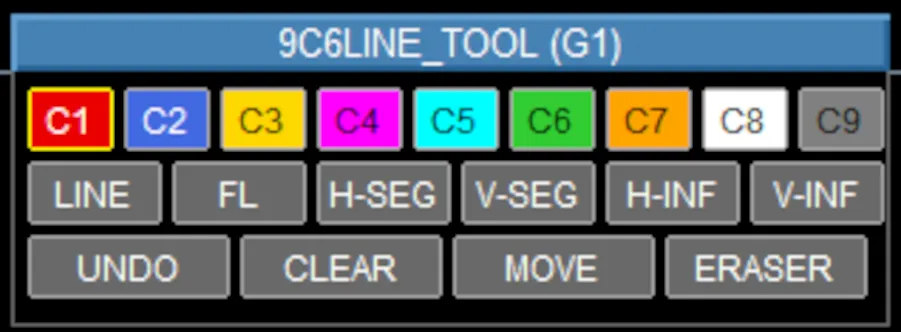
2. パネルレイアウト

チャート上に表示される操作パネルの構成図です。

3. 各部機能と操作方法

① タイトルバー

  • パネル名と現在適用中の「同期グループ番号(例: G1)」を表示します。
  • タイトルバーをマウスでドラッグ&ドロップすることで、チャート画面内の自由な位置へ移動できます。

② カラーパレット(上段: 9色)

  • C1 〜C9:パラメーター設定画面で指定した9色を瞬時に切り替えます。
  • 現在選択されているボタンは枠線が黄色にハイライトされます。

③ 描画モード(中段: 6種)

クリックして有効化(黄色枠表示)すると描画待機状態になります。再度クリックすると待機状態が解除されます。

ボタン モード名 操作方法と動作
LINE 連続折れ線 チャート上を連続クリックすることで、折れ線を順番に描画します。
FL 自由線(フリーライン) チャート上をドラッグした軌跡をそのまま滑らかな手書き線として描画します。
H-SEG 2点間水平線 始点と終点の2点をクリックし、指定した区間だけの水平線を描画します。
V-SEG 2点間垂直線 始点と終点の2点をクリックし、指定した価格幅だけの垂直線を描画します。
H-INF 水平無限線 クリックした価格位置に、チャート端まで伸びる水平線を描画します。
V-INF 垂直無限線 クリックした日時に、縦いっぱいに伸びる垂直線を描画します。

④ 操作ボタン(下段: 4種)

ボタン 機能 詳細
UNDO 1つ前を削除 直近に作成したライン(自由線の場合は1ストローク全体)を1つ消去します。
CLEAR 全削除 自グループで描画したすべてのラインを、同期中の全チャートおよびメモリから完全消去します。
MOVE 一括移動 有効化中、描画済みラインのいずれかをドラッグ移動すると、全ラインが同じ時間・価格幅で連動して平行移動します。
ERASER 消しゴム 有効化中、自由線(FL)の近くをクリックまたはドラッグ通過すると、触れたストロークを丸ごと消去します。

4. 主な特徴・システム仕様

  1. マルチタイムフレーム・グループ同期
    グローバル変数を介してラインデータを共有します。同じ通貨ペアかつ同じグループ番号を設定した全チャート間で、描画・編集・削除が即座に同期されます。
  2. 時間足変更時の高速化
    5分足や4時間足など、時間足を切り替えた際のUI再構築および不要な全スキャン処理をスキップし、フリーズや描画遅延を防止しています。
  3. 自由線(FL)の高精度サンプリング
    ローソク足の境目(時間軸)に縛られない高精度なピクセル補間を採用し、カクつきのない滑らかな曲線の描画が可能です。
  4. チャート誤スクロール防止
    フリーハンド描画(FL)中および消しゴム(ERASER)使用中は、MT4標準のドラッグスクロールを自動で一時停止し、意図しない画面ズレを防ぎます。

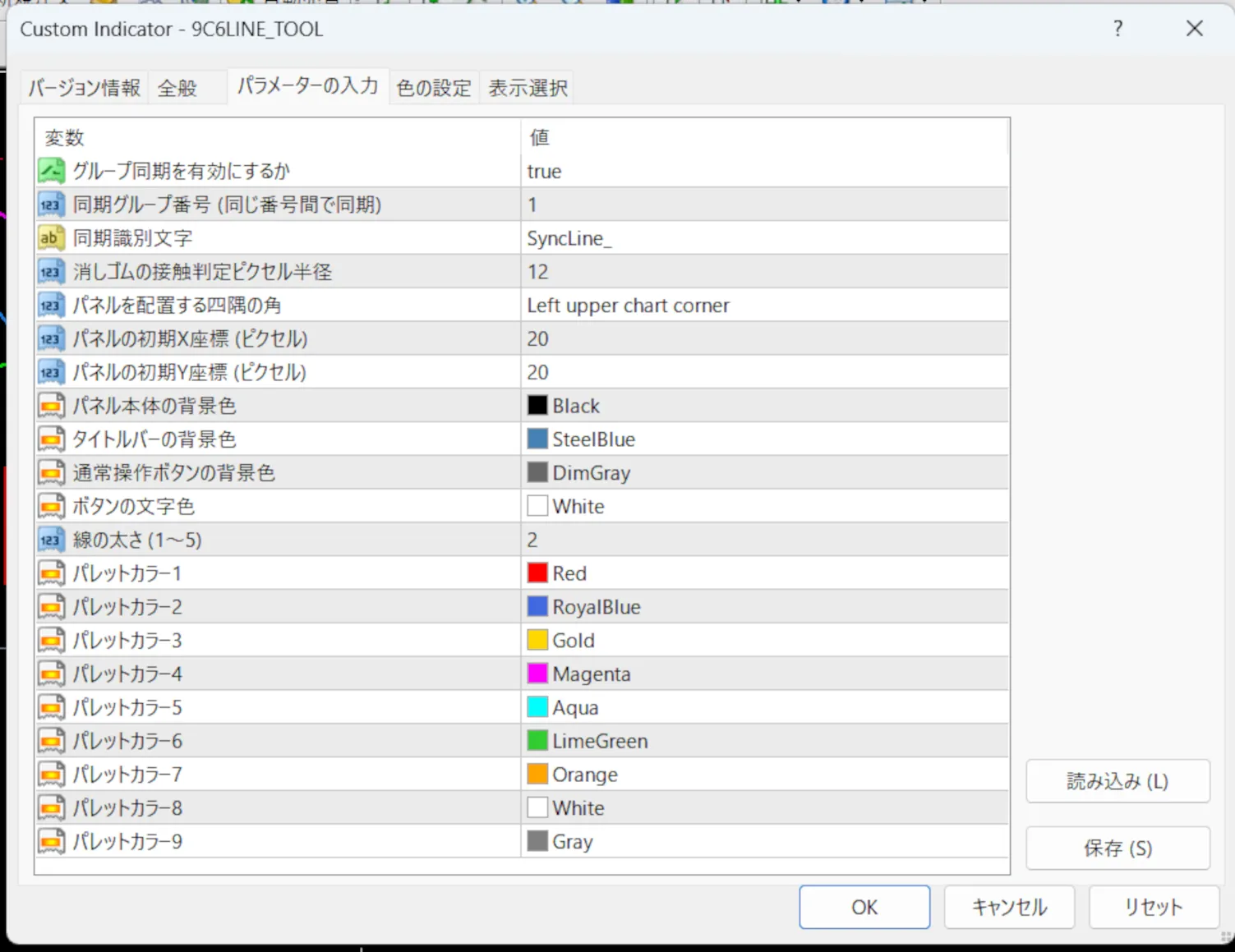
5. パラメーター設定一覧
設定項目 初期値 内容説明
全チャート同期有効 true チャート間同期の有効/無効(falseで単一チャートのみで動作)
同期グループ番号 1 同期対象を分ける識別番号(異なる番号間では同期されません)
同期プレフィックス "SyncLine_" 共有メモリ(GlobalVariable)で使用する管理用識別文字列
消しゴム感知範囲 12 消しゴム(ERASER)の接触判定半径(ピクセル単位)
ボタン配置の四隅 CORNER_LEFT_UPPER パネルを配置する画面の基準角(左上・右上・左下・右下)
ボタンX座標 20 基準角からのX方向オフセット(ピクセル単位)
ボタンY座標 20 基準角からのY方向オフセット(ピクセル単位)
パネル背景色 clrBlack 操作パネル本体の背景色
タイトルバー色 clrSteelBlue パネル最上部ヘッダーの背景色
ボタン背景色 clrDimGray 操作ボタンの背景色
ボタン文字色 clrWhite 操作ボタンの文字色
線の太さ 2 描画する各ラインのデフォルト太さ(1〜5)
カラー1 〜 9 各種カラー パレット [C1] 〜 [C9] に割り当てる描画色
¥3,500 (taxed)
Provider/Distributor:
Sales site:

●Payment

Mastercard Visa JCB Bank FamilyMart D2 D1
Product outline
Community(0)
Best Seller Ranking

For those using GogoJungle for the first time Easy 3 steps to use the product!

At GogoJungle, we provide services to enrich your investment life for our members. In addition, product purchases are limited to members. Why not register as a member now and make use of GogoJungle!

01
Enter user information and register as a member
02
Follow the instructions to make a purchase
03
Download from My Page
■ Important Matters and Risk Warnings Regarding Investment Products 【Financial Instruments Business Operator】
GogoJungle Inc.
Registration: Director-General of the Kanto Local Finance Bureau (Financial Instruments Business) No. 1960
【Member Association】
Investment Trusts Association, Japan
【Fees and Expenses】
The use of software, e-books, investment advisory services, etc., provided on our platform involves purchase prices determined for each product.
Additionally, when conducting actual financial instrument transactions (such as FX or CFD trading), costs such as transaction fees and spreads (the difference between the sell and buy price) may be incurred through the connected brokerage firms.
【Margin and Risk of Loss】
Transactions such as FX (Foreign Exchange Margin Trading) and CFD (Contract for Difference) allow for trading in amounts exceeding the deposited margin.
Therefore, due to sudden fluctuations in target indices (currency, commodity prices, etc.), there is a risk of incurring losses that exceed the deposited margin (loss exceeding principal).
Furthermore, financial instrument transactions involve risks such as price fluctuations, which may result in losses falling below or exceeding the initial investment principal.
【Nature of Services and Trading Entity】
The Company operates a platform (marketplace) providing investment software and information; we do not engage in the buying, selling, mediation, brokerage, or agency of financial instruments on behalf of customers.
The services and information provided are intended as reference for investment decisions and do not guarantee future profits or specific results.
While some services include investment advice, they do not constitute a mandate or solicitation to trade specific financial instruments.
Final investment decisions and the execution of trades must be made at the customer’s own risk and discretion.
