
RSI Cross Signals Optimized v8.10【お試し版】

Product outline
Community(0)
RSI Cross Signals Optimized v8.10【お試し版】  Indicators/E-books
RSI Cross Signals Optimized v8.10【お試し版】 Trial Version
RSI・移動平均・MACDから選べる4種類のシグナルを、ヒストグラムと矢印でひと目に。
Sales Result 0 items
Reviews 0.0 (0)
How to provide:
Indicator
Sales from:
09/22/2026
Last Updated:
-
Version:
-
Web Authentication:
Enable
Available company:
Seller's last login time: 9/22/2026 20:41:57
Read more seller information
30 days
Trial version
Calculated from the date of purchase
No feature limitations! Try everything.
※After the period ends, it will automatically stop working.
10 left
(0 users using)
Provider/Distributor:
Sales site:

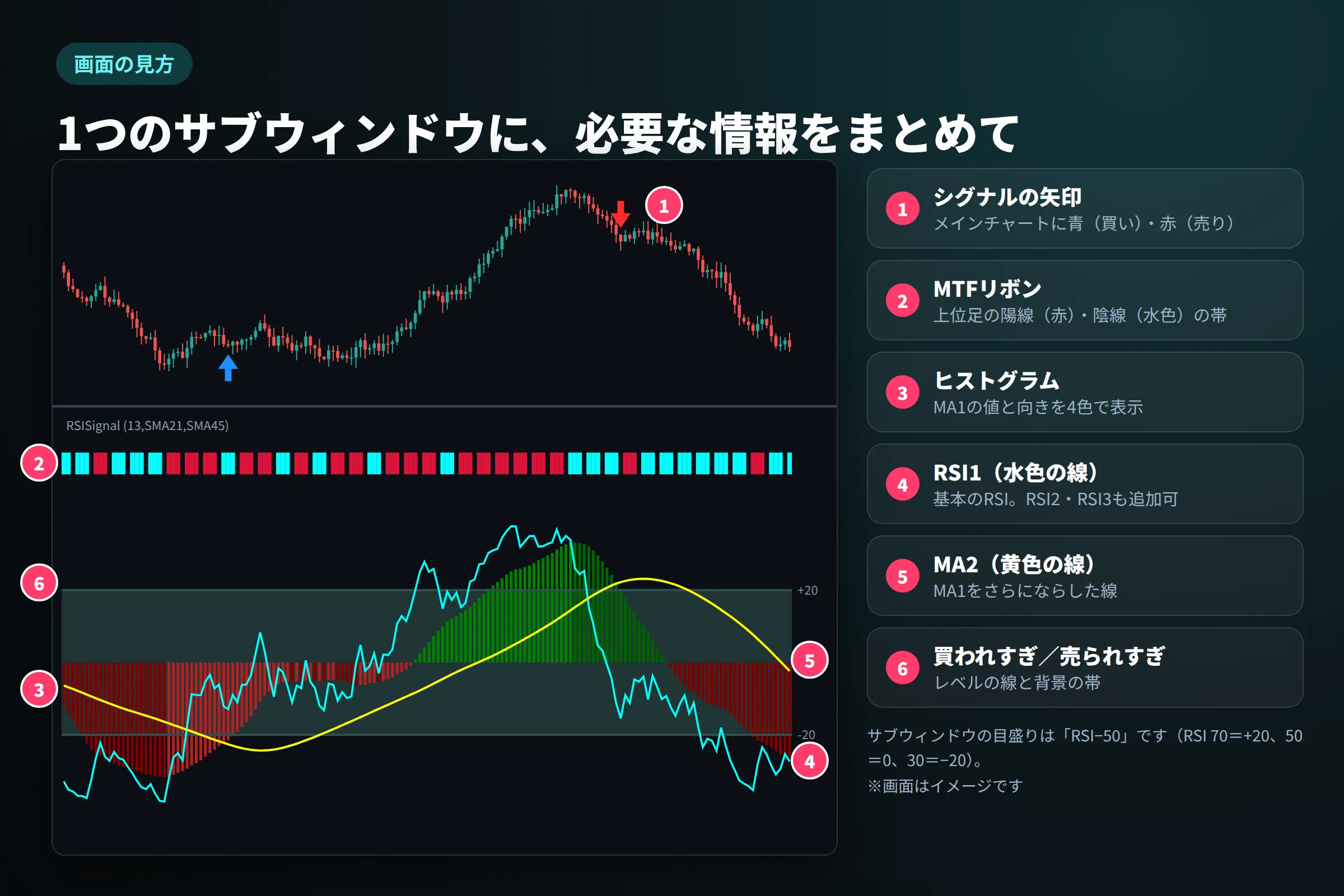
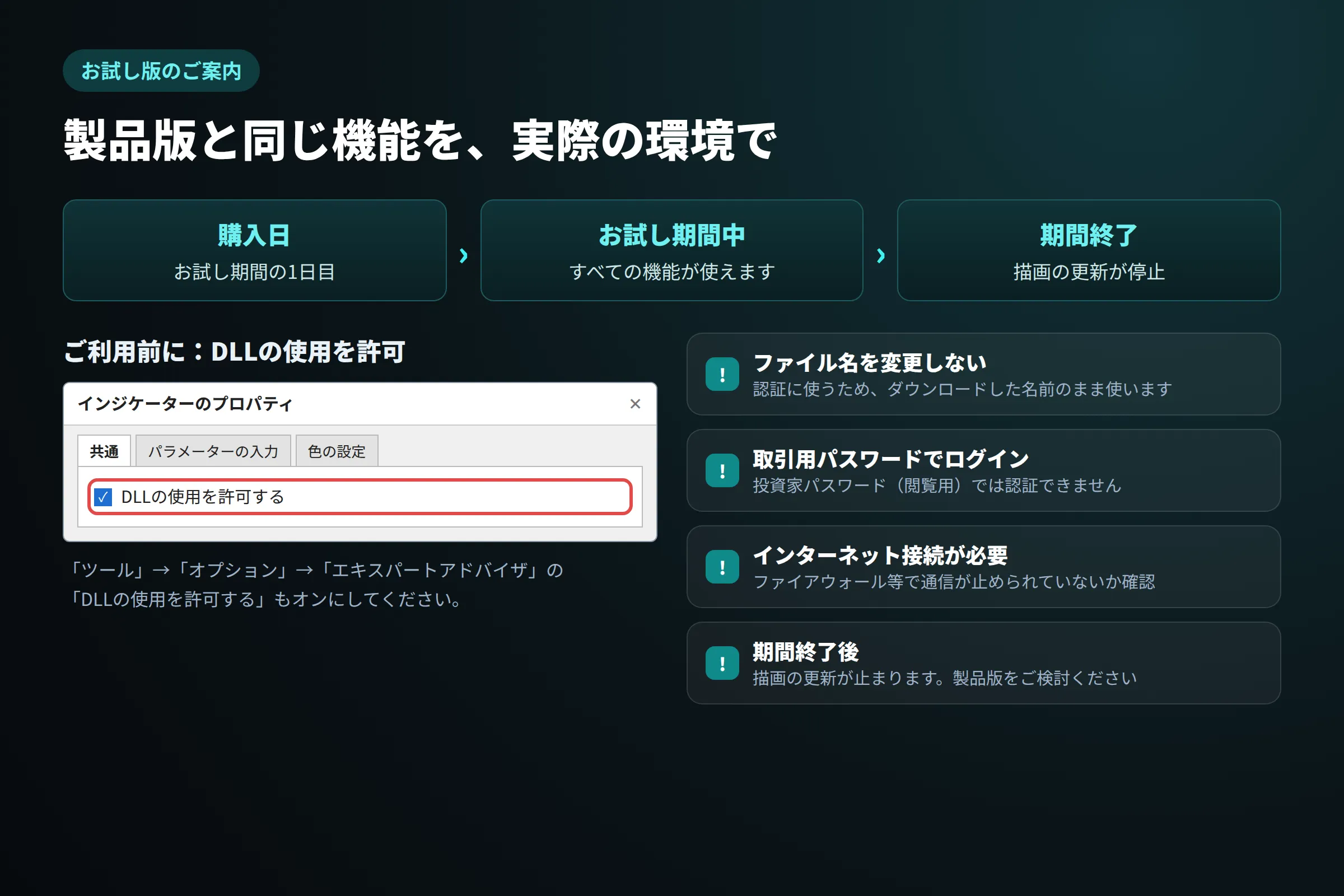
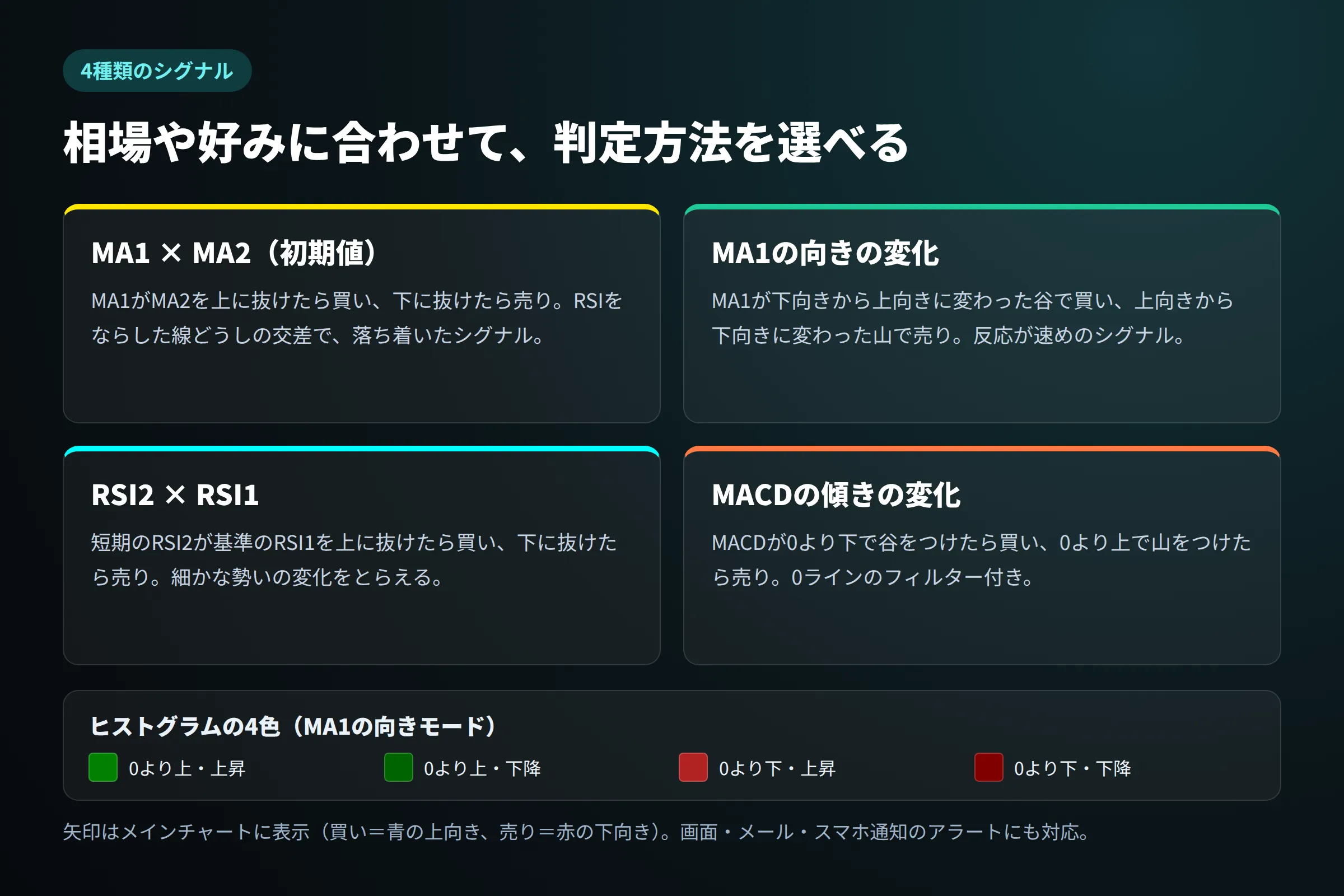
■ RSI Cross Signals Optimized v8.10【お試し版】 RSI・移動平均・MACDから選べる4種類のシグナルを、ヒストグラムと矢印でひと目に。 上位足の向きはMTFリボンで確認できます。 ※機能は製品版と同じです。お試し期間は購入日を1日目として数えます。 ━━━━━━━━━━━━━━━━━━━━ ■ 概要 ━━━━━━━━━━━━━━━━━━━━ RSI Cross Signals Optimized v8.10 は、RSIとRSIの移動平均を1つのサブウィンドウにまとめ、4種類の条件から選べるシグナルを矢印とアラートでお知らせするMT5用インジケーターです。Dean Feng氏のアイデア(RSI Cross Signals)をもとにMT5用に作り直し、動作を最適化しました。 ヒストグラムは勢いの強まり・弱まりを4色で表示。v8.10では、上位足の陽線・陰線を色の帯で表示するMTFリボンを追加し、上位足の向きと下位足のシグナルを1つの画面で見比べられるようになりました。 このお試し版は、ご購入前にご自身の環境で実際に動作を試していただくための商品です。 ━━━━━━━━━━━━━━━━━━━━ ■ 主な機能 ━━━━━━━━━━━━━━━━━━━━ ◆ RSIを最大3本+移動平均2本 基本のRSI1、短期のRSI2、追加のRSI3を表示できます。さらにRSI1をならしたMA1と、MA1(またはRSI1)をならしたMA2を表示します。移動平均はSMA・EMA・SMMA・LWMAから選べます。 ◆ 4種類のシグナル MA1×MA2、MA1の向きの変化、RSI2×RSI1、MACDの傾きの変化(0ラインのフィルター付き)の4種類から、シグナルの条件を選べます。 ◆ 矢印とアラート シグナルが出た足に、メインチャート上で青(買い)・赤(売り)の矢印を表示。画面・メール・スマホ通知でお知らせします。初期状態は確定足だけで判定するため、一度出た矢印は消えません。 ◆ 4色のヒストグラム MA1(またはRSI1)を、中心より上か下か、上昇中か下降中かで4色に塗り分けます。勢いの強まり・弱まりがひと目で分かります。 ◆ MTFリボン(v8.10) 上位足のローソク足が陽線か陰線かを、サブウィンドウ上端の色の帯で表示。1区画が上位足1本分なので、上位足の向きとシグナルを見比べられます。 ◆ レベルと背景の帯 買われすぎ・売られすぎの線を2組まで表示し、その範囲を背景の帯で示します。範囲外の設定値は自動でチェックし、エラーとして知らせます。 ━━━━━━━━━━━━━━━━━━━━ ■ お試し版について ━━━━━━━━━━━━━━━━━━━━ ・購入日 = お試し期間の1日目 ・お試し期間中 = すべての機能が使えます ・期間終了 = 描画の更新が停止します ※お試し期間の日数は、本商品ページの「お試し期間」欄をご確認ください。土日は相場が動かないため、早めに設定してお使いください。 【製品版との違い】 ・機能:お試し版も製品版と同じ(すべての機能) ・利用できる期間:お試し版は購入日を1日目としてお試し期間の日数まで/製品版はお試し期間の制限なし ・期間終了後:お試し版は描画の更新が停止 ・WEB認証:お試し版は必要(DLLの許可・インターネット接続) 【ご利用前の準備(GogoJungle WEB認証)】 1. 「ツール」→「オプション」→「エキスパートアドバイザ」で「DLLの使用を許可する」をオンにする 2. チャートに設定するときに、「共通」タブで「DLLの使用を許可する」をオンにする 3. ファイル名は変更しない(「_」以降を認証に使うため) 4. 投資家パスワード(閲覧用)ではなく、取引用パスワードでログインする 5. ファイアウォールやセキュリティソフトでMT5の通信が止められていないか確認する 6. パラメーター「Authentication_display」がtrueのとき、認証成功のメッセージがチャート左上に表示されます(失敗のメッセージは常に表示) 【認証メッセージと対処】 ・Authentication failure - Please allow use of DLL : by GogoJungle  → DLLの使用を許可してください(オプションとインジケーターの共通タブ) ・Invalid file name. Please download again from our site : by GogoJungle  → ファイル名が変わっています。再ダウンロードしてください ・Authentication failure - Error connecting to server : by GogoJungle  → インターネット接続・ファイアウォールを確認してください ・This is investor password. Please input real password.  → 取引用パスワードでログインしてください ━━━━━━━━━━━━━━━━━━━━ ■ 推奨環境 ━━━━━━━━━━━━━━━━━━━━ ・取引ツール:MetaTrader 5(Windows版) ・銘柄:FX通貨ペア・貴金属・株価指数CFDなど(特定の銘柄に限定しない汎用仕様) ・時間足:すべての時間足(MTFリボンは今の時間足と同じか長い時間足を選んだときに表示) ・必要な過去データ:初期設定で約90本以上 ・DLLの使用:必要(お試し版のWEB認証のため) ・インターネット接続:必要(認証のため) ・ログイン:取引用パスワードでログインした口座(投資家パスワードでは認証できません) ━━━━━━━━━━━━━━━━━━━━ ■ パラメーター一覧(パラメーター名/初期値/内容) ━━━━━━━━━━━━━━━━━━━━ 【RSIの設定(RSI Params)】 ・RSI1(初期値:13)… 基本となるRSI1の期間 ・RSI2(初期値:3)… 短期のRSI2の期間 ・RSI3(初期値:0(使わない))… 追加のRSI3の期間(0=使わない) ・RSI_Price(初期値:終値(Close))… RSIの計算に使う価格 ・Overbought1(初期値:70)… 買われすぎレベル1 ・Oversold1(初期値:30)… 売られすぎレベル1 ・Overbought2(初期値:70)… 買われすぎレベル2(点線) ・Oversold2(初期値:30)… 売られすぎレベル2(点線) 【移動平均の設定(MA Params)】 ・MA1Period(初期値:21)… MA1(RSI1の移動平均)の期間 ・MA1Method(初期値:単純(SMA))… MA1の計算方法 ・MA2Period(初期値:45)… MA2の期間 ・MA2Method(初期値:単純(SMA))… MA2の計算方法 ・MA2Type(初期値:MA of MA1(MA1の移動平均))… MA2の元にするデータ 【MACDの設定(MACD Params)】 ・MACDFastPeriod(初期値:12)… MACDの短期EMAの期間 ・MACDSlowPeriod(初期値:26)… MACDの長期EMAの期間 ・MACDSignalPeriod(初期値:9)… MACDのシグナル線の期間 ・MACDAppliedPrice(初期値:終値(Close))… MACDの計算に使う価格 【表示のON/OFF(Enable/Disable)】 ・InpRSILine1(初期値:true)… RSI1の線を表示するか ・InpRSILine2(初期値:false)… RSI2の線を表示するか ・InpRSILine3(初期値:false)… RSI3の線を表示するか ・InpMALine1(初期値:false)… MA1を線で表示するか ・InpMALine2(初期値:true)… MA2を線で表示するか ・InpRSILevel1(初期値:true)… レベル1の線を表示するか ・InpRSILevel2(初期値:false)… レベル2の線を表示するか ・InpZeroLine(初期値:false)… 中心線(RSI 50)を表示するか 【ヒストグラム(Histogram)】 ・HistType(初期値:MA1 Histogram)… ヒストグラムに表示するもの ・HistColorType(初期値:MA1 Direction)… ヒストグラムの色の決め方(MA1のとき) 【背景(Background)】 ・Background(初期値:true)… 背景の帯を表示するか ・BackgroundFull(初期値:false)… 背景をサブウィンドウ全体にするか 【シグナルとアラート(Signals)】 ・SignalType(初期値:MA1 Crosses MA2)… シグナルの種類 ・ScreenAlert(初期値:false)… 画面のアラートを出すか ・EmailAlert(初期値:false)… メールでお知らせするか ・MobileAlert(初期値:false)… スマホにプッシュ通知するか ・AlertOnCurrentBar(初期値:false)… 形成中の足でも判定するか 【矢印(Arrows)】 ・ShowArrows(初期値:false)… シグナルの矢印を表示するか ・VisibleBarArrow(初期値:true)… 画面に見えている範囲だけ矢印を処理するか ・ArrowWidth(初期値:1)… 矢印の太さ(大きさ) ・ArrowGap(初期値:Small)… 矢印とローソク足の間隔 【MTFリボン(MTF Ribbon)】 ・InpMTFRibbonShow(初期値:false)… MTFリボンを表示するか ・InpMTFRibbonTF(初期値:H1)… リボンに使う上位足の時間足 ・InpMTFRibbonUpColor(初期値:Crimson(赤))… 陽線の帯の色 ・InpMTFRibbonDownColor(初期値:Aqua(水色))… 陰線の帯の色 【お試し版の認証(GogoJungle WEB認証)】 ・Authentication_display(初期値:true(表示する))… 認証結果のメッセージを表示するか ※詳しい説明は付属の取扱説明書に掲載しています。「======= RSI Params =======」などの項目は見出しです。線の色・太さはMT5の「色の設定」タブで変更できます。 ━━━━━━━━━━━━━━━━━━━━ ■ こんな方におすすめ ━━━━━━━━━━━━━━━━━━━━ ✓ RSIを使った売買の判断を、決まったルールで確認したい方 ✓ シグナルの条件を、相場や好みに合わせて選びたい方 ✓ RSIのダマシを減らすため、ならした線で判断したい方 ✓ 上位足の陽線・陰線を見ながら、下位足のタイミングを計りたい方 ✓ チャートから離れていても、アラートでシグナルを受け取りたい方 ✓ 購入前に、ご自身の環境で動作を確かめたい方 ━━━━━━━━━━━━━━━━━━━━ ■ 注意事項・免責 ━━━━━━━━━━━━━━━━━━━━ ・本インジケーターは相場の分析を補助するツールです。将来の利益を保証するものではありません。シグナルや矢印は売買の目安です。 ・外国為替証拠金取引・CFD取引などは元本を上回る損失が生じる可能性があります。投資は必ずご自身の判断と責任で行ってください。 ・本インジケーターの使用により生じたいかなる損失・損害についても、制作者および販売者は一切の責任を負いません。 ・自動売買(注文)の機能はありません。矢印とアラートは初期状態ではOFFです(「Enable Arrows」をtrueにすると使えます)。 ・「Alert For Unfinished Bar」をtrueにすると、形成中の足で出た矢印が足の確定までに消えることがあります。 ・お試し期間は、購入日を1日目として数えます。期間が終わると描画の更新が停止し、矢印やアラートも新しく出なくなります。 ・通信障害、取引ツールやサーバーの不具合などにより、正しく表示されない場合やアラートが届かない場合があります。

30 days
Trial version
Calculated from the date of purchase
No feature limitations! Try everything.
※After the period ends, it will automatically stop working.
10 left
(0 users using)
Provider/Distributor:
Sales site:
Product outline
Community(0)
Best Seller Ranking
Recommended Products (Campaigns)

For those using GogoJungle for the first time Easy 3 steps to use the product!

At GogoJungle, we provide services to enrich your investment life for our members. In addition, product purchases are limited to members. Why not register as a member now and make use of GogoJungle!

01
Enter user information and register as a member
02
Follow the instructions to make a purchase
03
Download from My Page
■ Important Matters and Risk Warnings Regarding Investment Products 【Financial Instruments Business Operator】
GogoJungle Inc.
Registration: Director-General of the Kanto Local Finance Bureau (Financial Instruments Business) No. 1960
【Member Association】
Investment Trusts Association, Japan
【Fees and Expenses】
The use of software, e-books, investment advisory services, etc., provided on our platform involves purchase prices determined for each product.
Additionally, when conducting actual financial instrument transactions (such as FX or CFD trading), costs such as transaction fees and spreads (the difference between the sell and buy price) may be incurred through the connected brokerage firms.
【Margin and Risk of Loss】
Transactions such as FX (Foreign Exchange Margin Trading) and CFD (Contract for Difference) allow for trading in amounts exceeding the deposited margin.
Therefore, due to sudden fluctuations in target indices (currency, commodity prices, etc.), there is a risk of incurring losses that exceed the deposited margin (loss exceeding principal).
Furthermore, financial instrument transactions involve risks such as price fluctuations, which may result in losses falling below or exceeding the initial investment principal.
【Nature of Services and Trading Entity】
The Company operates a platform (marketplace) providing investment software and information; we do not engage in the buying, selling, mediation, brokerage, or agency of financial instruments on behalf of customers.
The services and information provided are intended as reference for investment decisions and do not guarantee future profits or specific results.
While some services include investment advice, they do not constitute a mandate or solicitation to trade specific financial instruments.
Final investment decisions and the execution of trades must be made at the customer’s own risk and discretion.