

Share


【お試し版】Gonzo Nexus v5.05
Specialとは違うタイミングを狙う、XAUUSD専用の半裁量EA Nexus本体の2ロジックとNexus+の1ロジックが、それぞれ別の条件で相場を見ます。売買は自動。必要なときはパネルから手動で注文や決済もできます。 v5.05ではNormalモードの安定性を高め、同じ上昇局面での買いの繰り返しと、一部の大きな損失につながっていた取引を見直しました。
XAUUSD / GOLD MetaTrader 5 半裁量EA v5.05 日本語 / EnglishGonzo Nexusについて
Gonzo Nexusは、Specialとは違う条件でXAUUSDを売買する半裁量EAです。Nexusだけで使うことも、Specialと一緒に使うこともできます。
Nexus本体には2つ、Nexus+には1つ、合計3つのエントリーロジックがあります。Nexus+は、含み損を救うための追加注文ではありません。Nexus本体とは別に、新しい取引チャンスを探します。
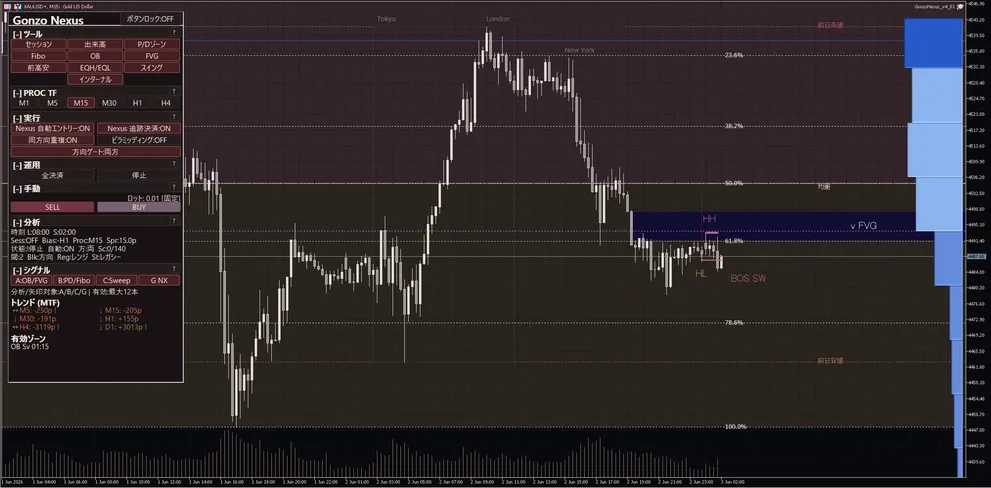
売買は自動で行えます。A/B/C/G NXのサインや相場情報を見ながら、パネルから手動で注文・決済することもできます。
リアル口座での取引履歴
v5.05以降も「週末・ロールオーバー保護」のSetファイルを適用して計測を継続していきます。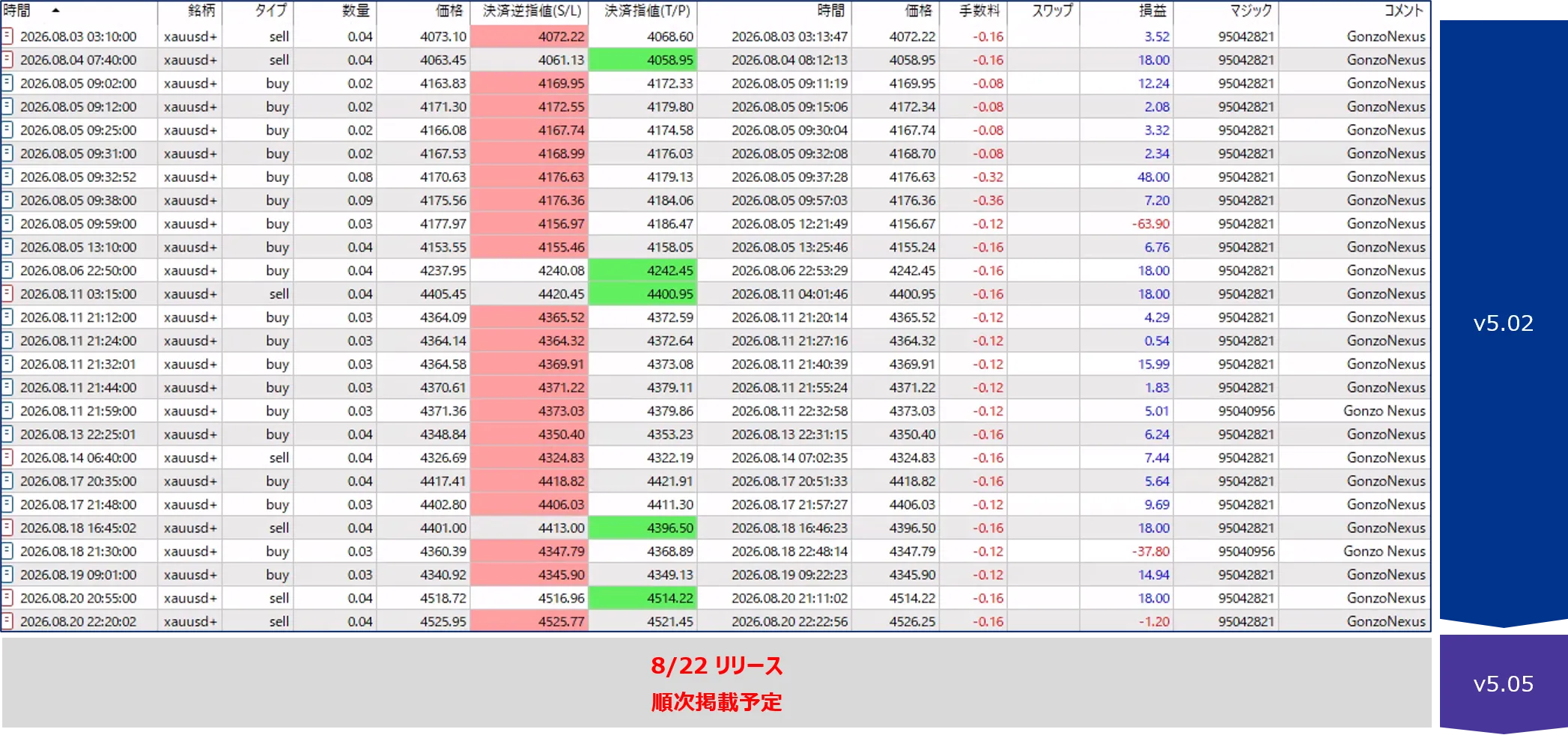
合計3つのエントリーロジック
v5.05には、Nexus本体の2ロジックとNexus+の1ロジック、合計3つの独立したエントリーロジックが入っています。
Special・Nexus・Flankerの違い
| 商品 | 特徴 | エントリーロジック |
|---|---|---|
| Gonzo Special | Gonzoシリーズの基準となる多機能モデル | Special独自の条件 |
| Gonzo Nexus | Specialとは違うタイミングを狙うモデル | 合計3つ(Nexus本体2+Nexus+1) |
| Gonzo Flanker | Specialと同じ売買管理で、別の値動きを狙うモデル | 合計7つ(買い4+売り3) |
v5.02からv5.05で変わったこと
主な仕様
| 項目 | 内容 |
|---|---|
| 対象 | XAUUSD / GOLD |
| プラットフォーム | MetaTrader 5 |
| 時間足 | 好きな時間足で使えます。初期設定ではM15を使って相場を分析します。 |
| 売買方向 | 買いのみ/売りのみ/両方/停止 |
| エントリーロジック | 合計3つ(Nexus本体2+Nexus+1) |
| 最大同時保有数 | 1または2。NexusとNexus+を合わせた上限です。 |
| ロット計算 | 固定ロット/1ポジションあたりのRisk% |
| スプレッド上限 | 価格差0.22(初期値)。0以下で無効。 |
| 時間制御 | 週末リスク制御/日次ロールオーバー制御 |
| 操作・表示 | 自動売買、手動BUY/SELL、全決済、サイン、通知、チャート分析 |
| 表示言語 | 日本語/英語 |
チャートの時間足は自由です
MT5上部で選ぶ時間足は、チャートの見た目を変えるためのものです。どの時間足へNexusをセットしても、自動売買のロジックは変わりません。
初期設定
損失を抑えるための管理
エントリー時には、急変や通信断が起きた場合にも備えてSLを設定します。保有中は値動きを継続して確認し、条件に応じてSLの調整や早めの決済を行います。
v5.05では、同じ上昇局面で買いを重ねた末に大きな損失となる動きを抑え、一部の大きな損失につながっていた取引の損切り位置も見直しました。
バックテスト結果
I社とV社で、初期設定・掲載BT再現用SET・週末/ロールオーバー保護SETの3パターンを検証しました。すべて固定0.01 lot、スプレッド上限0.22です。分析表示は初期値のまま(Sessionsなど5種類ON、OB・FVGなど残り5種類OFF)で、売買結果には影響しません。操作パネル表示はSETに含めていないため、EAの設定画面でON/OFFを選べます。I社とV社はブローカー、口座通貨、検証期間が異なるため、結果を合算せず分けて掲載しています。
| 検証環境・期間 | 設定 | 読み込むSETファイル | 最大同時保有 | 週末・日次ロールオーバー制御 |
|---|---|---|---|---|
| I社/USD口座 2019.01.01~2025.12.31 初期証拠金5,000 USD/1:500 | 初期設定 | SET読み込みなし | 1 | OFF |
| I社/USD口座 2019.01.01~2025.12.31 初期証拠金5,000 USD/1:500 | 掲載BT再現用 | GonzoNexus_v5_05_Backtest_MaxPositions2.set | 2 | OFF |
| I社/USD口座 2019.01.01~2025.12.31 初期証拠金5,000 USD/1:500 | 週末・ロールオーバー保護 | GonzoNexus_v5_05_MaxPositions1_Weekend_Rollover_Protection_ON.set | 1 | 金曜18:00~月曜01:00、毎日23:00~01:00は新規停止。停止前からのポジションは利益時のみ決済 |
| V社/JPY口座 2023.12.11~2026.08.13 初期証拠金1,000,000円/1:200 | 初期設定 | SET読み込みなし | 1 | OFF |
| V社/JPY口座 2023.12.11~2026.08.13 初期証拠金1,000,000円/1:200 | 掲載BT再現用 | GonzoNexus_v5_05_Backtest_MaxPositions2.set | 2 | OFF |
| V社/JPY口座 2023.12.11~2026.08.13 初期証拠金1,000,000円/1:200 | 週末・ロールオーバー保護 | GonzoNexus_v5_05_MaxPositions1_Weekend_Rollover_Protection_ON.set | 1 | 金曜18:00~月曜01:00、毎日23:00~01:00は新規停止。停止前からのポジションは利益時のみ決済 |
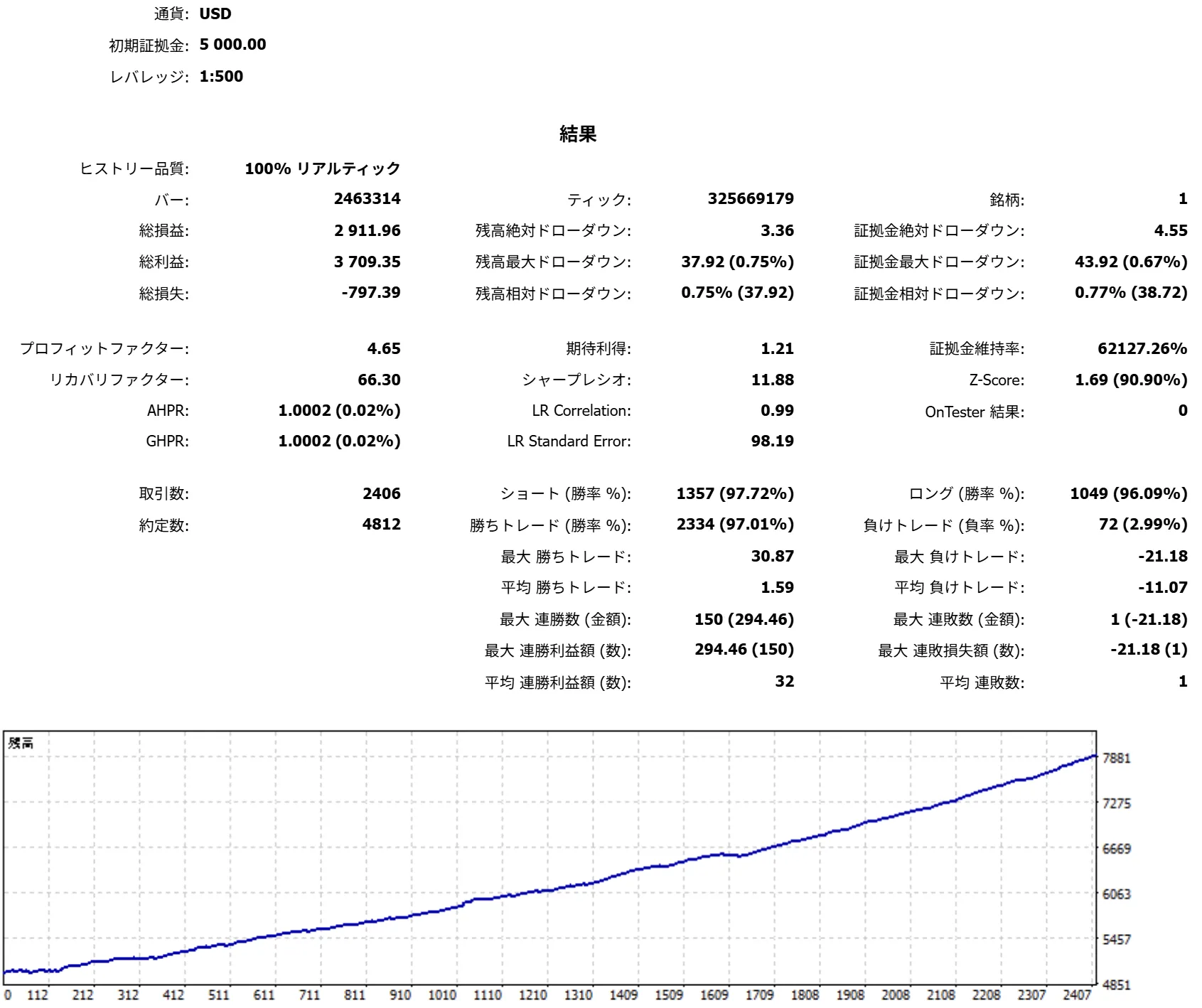
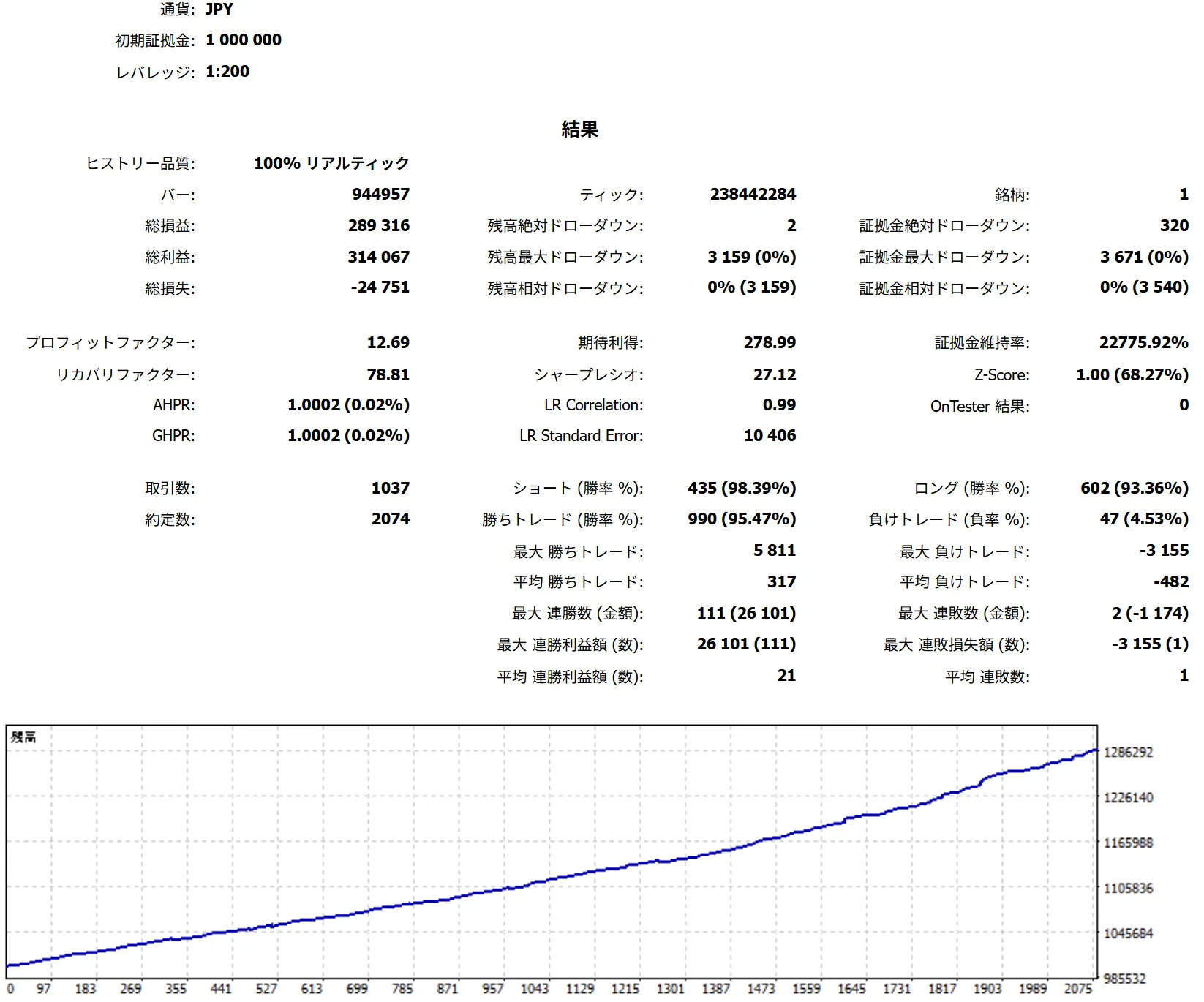
| 環境・設定 | 取引数 | 勝率 | PF | RF | 総損益 | 最大有効証拠金DD (金額) |
|---|---|---|---|---|---|---|
| I社/初期設定 | 2,338 | 97.05% | 4.71 | 65.05 | +2,857.17 USD | 43.92 USD |
| I社/掲載BT再現用 | 2,406 | 97.01% | 4.65 | 66.30 | +2,911.96 USD | 43.92 USD |
| I社/週末・ロールオーバー保護 | 2,184 | 97.57% | 4.74 | 62.97 | +2,476.50 USD | 39.33 USD |
| V社/初期設定 | 1,024 | 95.51% | 12.58 | 78.01 | +286,358円 | 3,671円 |
| V社/掲載BT再現用 | 1,037 | 95.47% | 12.69 | 78.81 | +289,316円 | 3,671円 |
| V社/週末・ロールオーバー保護 | 922 | 96.42% | 11.79 | 62.62 | +229,860円 | 3,671円 |
最大有効証拠金DDは、保有中の含み損も含めて資産が最も大きく減った金額です。PFは総利益が総損失の何倍か、RFは総損益が最大DDの何倍かを示します。
V社の3結果は、テスター画面上は履歴品質100%ですが、ログには過去レートの一部欠損・不一致が残っているため参考値として掲載しています。正式な掲載BTの基準はI社です。
日本語操作マニュアル
1. 初回セットアップ
| 手順 | 操作 |
|---|---|
| 1 | 本体ファイルをMT5のMQL5\Expertsへ保存します。 |
| 2 | MT5を再起動するか、ナビゲータを更新します。 |
| 3 | 利用するブローカーのXAUUSD/GOLDチャートへNexusをセットします。 |
| 4 | アルゴリズム取引を許可し、まず固定0.01 lotで動作を確認します。 |
2. 時間足は3つの役割に分かれます
Nexusでは、チャートに表示する時間足、相場分析に使う時間足、売買ロジックが内部で使う時間足は別です。MT5上部の時間足を変えても、自動売買の判断は変わりません。
| 役割 | 何が変わるか | 利用者の設定 |
|---|---|---|
| チャートの時間足 | ローソク足の見え方 | 自由に選べます |
| 相場分析の時間足 | A/B/C/G NXのサインや分析表示 | 初期値M15。好みに合わせて変更できます |
| 売買ロジックの時間足 | 自動エントリーと保有中の管理 | Nexusが内部で使い分けます |
3. 最初に確認する設定
| 設定 | 内容 |
|---|---|
| マジックナンバー | 初期値95042821。ほかの自動売買ツールとは違う番号にしてください。 |
| 取引方向 | 買いのみ/売りのみ/両方/停止を選べます。 |
| ロット計算モード | 固定ロットまたはRisk%を選択します。 |
| 最大エントリースプレッド | 初期値0.22。ASKとBIDの価格差が上限を超えると新規エントリーを見送ります。0以下で無効です。 |
| 他Gonzo製品との同時運用 | ONにすると、指定した別製品が保有中の間は新規エントリーを止めます。初期値はOFFです。 |
| 最大ポジション保有数 | 1または2。上限であり、常に2ポジションを持つ意味ではありません。 |
| 操作パネルを表示 | OFFでパネルのみを非表示にします。自動売買と相場分析は継続します。 |
4. 3つのロジックと最大同時保有数
Nexus本体には2つ、Nexus+には1つ、合計3つのエントリーロジックがあります。それぞれが別の条件とタイミングを見ています。Nexus+は、含み損を救うための追加注文ではありません。
| 構成 | ロジック数 | 役割 |
|---|---|---|
| Nexus本体 | 2つ | それぞれ異なる条件で取引機会を探します |
| Nexus+ | 1つ | Nexus本体とは別のタイミングを狙います |
最大同時保有数は、3つのロジックすべてを合わせた上限です。「1」なら同時に1ポジションまで、「2」なら同時に2ポジションまで保有できます。
5. パネルでできること
パネルでは、自動売買の状態を確認しながら、自動エントリー、自動決済、取引方向、手動注文、全決済を操作できます。
| 操作 | 内容 |
|---|---|
| 自動売買 | Nexusによる注文をまとめて許可・停止します |
| 自動エントリー | 新規注文だけを許可・停止します |
| 自動決済 | 保有中のポジションをNexusが追跡・決済するかを切り替えます |
| 取引方向 | 買いのみ、売りのみ、両方、停止から選べます |
| BUY/SELL | 自分の判断で手動注文を出します。注文前にロットを確認してください |
| 全決済 | Nexusが管理しているポジションをまとめて決済します |
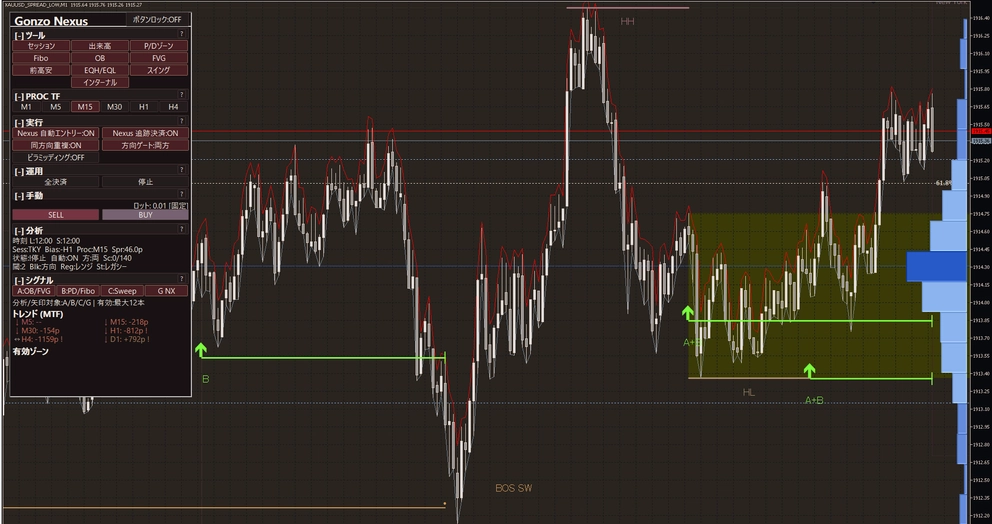
6. サインとチャート分析
A/B/C/G NXは、それぞれ違う見方で相場の状態を知らせるサインです。複数のサインが重なったときだけ通知する設定もできます。
| サイン | 見ているもの |
|---|---|
| A | 値動きの起点になった価格帯や、急な値動きでできた価格の空白 |
| B | 現在価格が直近の値幅の上側か下側か、押し・戻りの深さ |
| C | 直近の高値や安値を一度抜けたあとに戻る動き |
| G NX | Nexus独自の相場分析 |
チャートに表示される主な用語は、次の意味です。必要な表示だけONにできます。
| 表示 | チャートで確認できること |
|---|---|
| Sessions | 東京・ロンドン・ニューヨークなど、現在の取引時間帯 |
| Volume | 値動きが集まりやすかった価格帯 |
| P/D | 現在価格が直近の値幅の上側か下側か |
| Fibo | 直近の値幅に対する戻りの目安 |
| Previous H/L | 前日の高値・安値など、意識されやすい価格 |
| OB | 強い値動きの起点になった価格帯 |
| FVG | 急な値動きで売買が薄くなった価格帯 |
| EQH/EQL | ほぼ同じ高さに並んだ高値/安値 |
| Swing | 大きめの波で見た高値・安値の流れ |
| Internal | 大きな波の中にある細かな高値・安値の流れ |
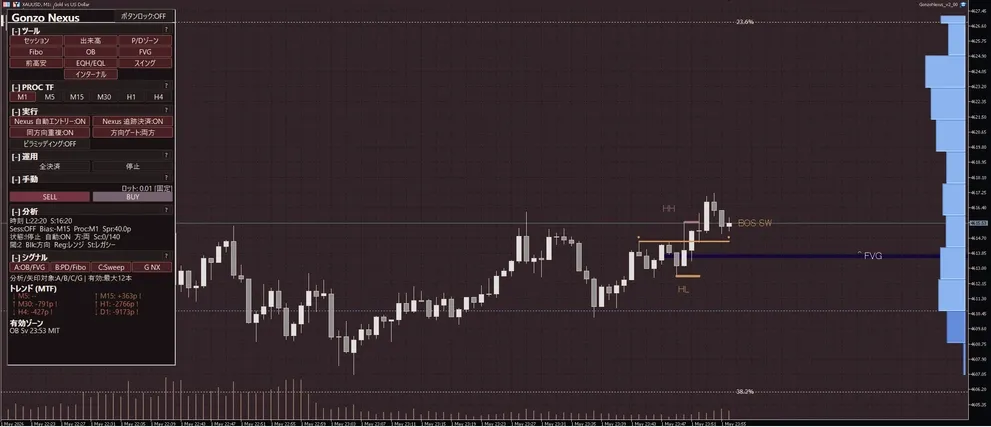
7. ロットとRisk%
固定ロット:すべての自動エントリーで指定したロットを使用します。初期値は0.01 lotです。
Risk%:口座残高または有効証拠金と、その取引の損切り位置からロットを計算します。1.00なら、損切りになったときの損失を口座の約1%に収めることを目安にします。
Risk%は1ポジションごとの設定です。最大同時保有数を2にして2ポジションを持った場合は、2つのポジションを合わせた損失額で考える必要があります。
| 例 | 損切りになった場合の目安 |
|---|---|
| 口座10万円・Risk 1%・1ポジション | 約1,000円 |
| 口座10万円・Risk 1%・2ポジション | 2つとも損切りなら、合計で約2,000円 |
実際の損失額は、急な値動き、注文の滑り、窓開け、手数料によって目安からずれることがあります。初めは固定0.01 lotで動作を確認し、Risk%へ切り替える場合も低い設定から試してください。
8. 半裁量での使い方
Nexusは、すべて任せる使い方だけでなく、相場を見てから自分で注文する使い方にも対応しています。
| 使い方 | 設定と操作 |
|---|---|
| 自動で運用する | 自動売買・自動エントリー・自動決済をONにします。取引方向とロットも確認してください |
| サインだけを見る | 自動エントリーをOFFにします。サインや分析表示はそのまま確認できます |
| 自分で注文する | 相場を見て、パネルのBUY/SELLから注文します。注文前にロットと自動決済の状態を確認してください |
通知はポップアップ、スマホ通知、メール、サウンドから選べます。単独のサインだけでなく、A+Bなど複数のサインが重なったときだけ通知することもできます。
9. 日次・週末の取引を止める設定
日次ロールオーバー制御と週末リスク制御を使うと、スプレッドが広がりやすい時間帯や週末をまたぐ前に、新規エントリーを止められます。初期設定はどちらもOFFです。
| 設定 | できること | 初期値 |
|---|---|---|
| 週末リスク制御 | 金曜の指定時刻から新規注文を止め、日曜または月曜の指定時刻から再開します | OFF |
| 日次ロールオーバー制御 | 日付が変わる前後の指定時間だけ新規注文を止めます | OFF |
| 保有中の対応 | そのまま保有、利益になったら決済、指定時刻に決済から選べます | そのまま保有 |
10. 設定一覧
| 設定グループ | 主な設定 |
|---|---|
| 共通設定・ロット | マジックナンバー、取引方向、固定ロット/Risk%、残高/有効証拠金 |
| エントリースプレッド | 新規エントリーを許可する価格差の上限。初期値0.22 |
| ほかのGonzo製品との併用 | 別製品が保有中のときに新規エントリーを止めるか、対象にするマジックナンバー |
| 自動売買 | 自動売買、自動エントリー、自動決済、最大同時保有数 |
| 週末リスク制御 | 金曜の新規停止時刻、再開曜日・時刻、保有中の対応、決済時刻 |
| 日次ロールオーバー制御 | 新規停止開始、日付変更時刻、再開時刻、保有中の対応 |
| 相場分析・サイン | 分析時間足、A/B/C/G NXの表示 |
| 通知 | ポップアップ、スマホ、メール、サウンド、通知するサインの組み合わせ |
| チャート表示 | パネル、Sessions、Volume、P/D、Fibo、Previous H/L、OB、FVG、EQH/EQL、Swing、Internal |
| 手動注文 | パネルから出す手動注文にSL/TPを付けるか。初期値はOFF |
| 表示言語 | 日本語/英語 |
11. 付属SETとほかのGonzo製品との併用
付属SETは2種類あります。
- BT再現用:
GonzoNexus_v5_05_Backtest_MaxPositions2.set
固定0.01 lot、最大同時保有数2、スプレッド上限0.22、週末・ロールオーバー制御OFF。掲載BTと同じ売買設定です。操作パネル表示は変更しません。 - 週末・ロールオーバー保護:
GonzoNexus_v5_05_MaxPositions1_Weekend_Rollover_Protection_ON.set
固定0.01 lot、最大同時保有数1。金曜18:00から月曜01:00までと、毎日23:00から01:00まで新規エントリーを止めます。停止前から持っているポジションは、利益になった場合だけ決済し、損失中のポジションを時刻だけで強制決済しません。操作パネル表示は変更しません。
時刻はブローカーのサーバー時間です。SETを読み込んだ後も、利用環境に合わせてスプレッド上限、マジックナンバー、時刻設定を確認してください。
SpecialやFlankerと同じ口座でも使えます。それぞれ違うマジックナンバーにしてください。同時保有を避けたい場合は、「他Gonzo製品との同時運用」をONにして、対象商品のマジックナンバーを指定します。
12. よくある質問
| 質問 | 回答 |
|---|---|
| ロジックはいくつありますか? | Nexus本体2つとNexus+1つ、合計3つです。 |
| Nexus+は買い増しですか? | いいえ。含み損を救うための追加注文ではなく、Nexus本体とは別のエントリーロジックです。 |
| Specialが必要ですか? | いいえ。Nexus単体で使用できます。 |
| SpecialやFlankerと同じ口座で使えますか? | 使用できます。マジックナンバーを分けてください。同時保有を避けたい場合は「他Gonzo製品との同時運用」をONにします。 |
| 最大同時保有数2なら必ず2回入りますか? | いいえ。2は上限です。条件がそろわなければ1ポジションのまま、またはエントリーしません。 |
| Risk%は口座全体の上限ですか? | 1ポジションごとの目安です。2ポジション保有時は、2つを合わせた損失額で考えてください。 |
| Stableモードはどこですか? | v5.05ではNormalモードの安定性を改善し、Stableモードへ変更する必要がなくなったため、Normalモードに一本化しました。 |
| どの時間足で使えばいいですか? | チャートの時間足は自由です。初期設定ではM15を使って相場を分析します。 |
| 末尾付きの銘柄名でも使えますか? | 利用できます。ブローカーのXAUUSD/GOLD銘柄を選び、まず0.01 lotで確認してください。 |
| VPSは必要ですか? | 必須ではありません。24時間動かすならVPSがおすすめです。MT5を閉じている間や通信が切れている間は、Nexusも止まります。 |
13. 困ったとき
| 症状 | 確認項目 |
|---|---|
| エントリーしない | MT5のアルゴリズム取引、Nexusの自動売買・自動エントリー、取引方向、スプレッド上限、時間制御を確認してください。条件がそろっていないときはエントリーしません。 |
| 注文が拒否される | 最小ロット、ロット刻み、必要証拠金、取引時間、Expertsログを確認してください。 |
| パネルが表示されない | 「操作パネルを表示」をONにし、Nexusを付け直してください。 |
| SETが読み込めない | 使用中のNexusがv5.05か確認し、付属SETを読み直してください。 |
| スマホ通知が届かない | Nexusの通知設定だけでなく、MT5の「ツール→オプション→通知」でMetaQuotes IDが登録されているか確認してください。 |
English product page
Gonzo Nexus is a semi-discretionary MT5 EA for XAUUSD / GOLD. It looks for trades at different times from Gonzo Special and can be used on its own or alongside other Gonzo products.
Version 5.05 has three independent entry logics: two in the main Nexus engine and one in Nexus+. Nexus+ is not an averaging or rescue order. It waits for its own setup.
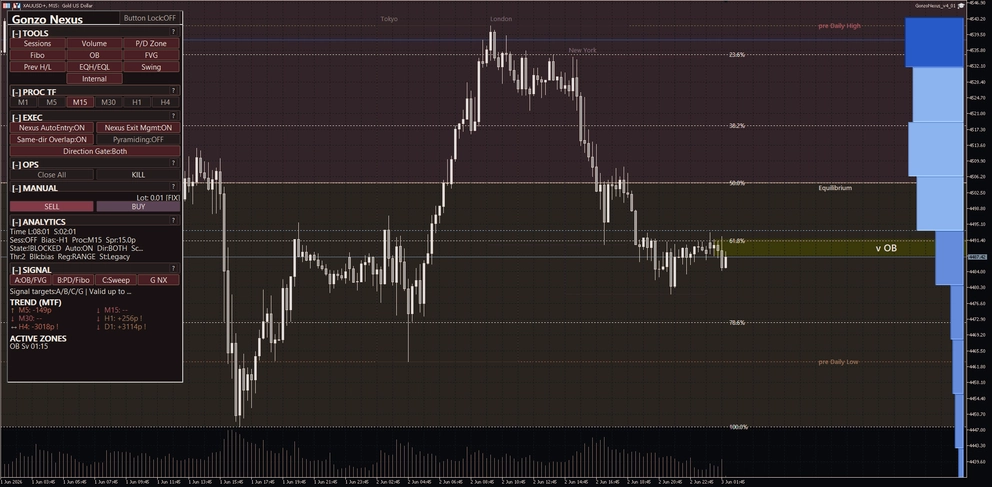
Trading can run automatically, while chart signals, analysis, notifications, and manual controls remain available from the panel.
Three entry logics
Changes from v5.02 to v5.05
- Reduced repeated BUY entries late in the same rising move.
- Reviewed the stop placement of trades that had produced several of the larger losses.
- Improved the stability of Normal mode and unified the product under Normal mode, removing the need to switch to Stable mode.
- Added a price-based maximum entry spread setting. The default is 0.22 and values of 0 or less disable the limit.
- Added an option to hide the control panel without affecting automated trading.
- Added an optional block that can stop new entries while another listed Gonzo product has an open position. It is OFF by default.
Main specifications
| Item | Details |
|---|---|
| Market | XAUUSD / GOLD |
| Platform | MetaTrader 5 |
| Timeframes | Use any chart timeframe. By default, market analysis uses M15. |
| Entry logics | 3 total (2 main Nexus + 1 Nexus+) |
| Maximum positions | 1 or 2 across Nexus and Nexus+ combined |
| Lot sizing | Fixed lot or risk per position |
| Time controls | Weekend risk control and daily rollover control |
| Interface | Japanese / English |
Chart timeframe and analysis timeframe
You may attach Nexus to any XAUUSD / GOLD chart timeframe. Changing the timeframe at the top of MT5 changes only the chart view; it does not change the automated trading logic.
| Role | How it works |
|---|---|
| Chart timeframe | Choose any timeframe you prefer to view. |
| Analysis timeframe | Used for analysis displays and A / B / C / G NX signals. The default is M15. |
| Trading timeframes | Selected internally by Nexus. No user change is required. |
Backtest results
Three configurations were tested at Company I and Company V: compiled defaults, the published-backtest SET, and the weekend/rollover protection SET. Every run uses fixed 0.01 lot and a 0.22 entry-spread limit. Analysis displays remain at their defaults (five displays including Sessions ON, and the other five including OB and FVG OFF) and do not affect trading results. Panel visibility is not included in either SET and can be selected in the EA inputs. Results are not pooled because the broker, account currency, and test period differ.
| Environment and period | Configuration | SET file | Max positions | Weekend / rollover control |
|---|---|---|---|---|
| Company I / USD 2019.01.01-2025.12.31 Deposit 5,000 USD / 1:500 | Defaults | No SET loaded | 1 | OFF |
| Company I / USD 2019.01.01-2025.12.31 Deposit 5,000 USD / 1:500 | Published backtest | GonzoNexus_v5_05_Backtest_MaxPositions2.set | 2 | OFF |
| Company I / USD 2019.01.01-2025.12.31 Deposit 5,000 USD / 1:500 | Weekend / rollover protection | GonzoNexus_v5_05_MaxPositions1_Weekend_Rollover_Protection_ON.set | 1 | No new entries Fri 18:00-Mon 01:00 or daily 23:00-01:00; positions opened before the stop close only when profitable |
| Company V / JPY 2023.12.11-2026.08.13 Deposit 1,000,000 JPY / 1:200 | Defaults | No SET loaded | 1 | OFF |
| Company V / JPY 2023.12.11-2026.08.13 Deposit 1,000,000 JPY / 1:200 | Published backtest | GonzoNexus_v5_05_Backtest_MaxPositions2.set | 2 | OFF |
| Company V / JPY 2023.12.11-2026.08.13 Deposit 1,000,000 JPY / 1:200 | Weekend / rollover protection | GonzoNexus_v5_05_MaxPositions1_Weekend_Rollover_Protection_ON.set | 1 | No new entries Fri 18:00-Mon 01:00 or daily 23:00-01:00; positions opened before the stop close only when profitable |
| Environment / configuration | Trades | Win rate | PF | RF | Net profit | Maximum equity DD (amount) |
|---|---|---|---|---|---|---|
| Company I / defaults | 2,338 | 97.05% | 4.71 | 65.05 | +2,857.17 USD | 43.92 USD |
| Company I / published backtest | 2,406 | 97.01% | 4.65 | 66.30 | +2,911.96 USD | 43.92 USD |
| Company I / protection | 2,184 | 97.57% | 4.74 | 62.97 | +2,476.50 USD | 39.33 USD |
| Company V / defaults | 1,024 | 95.51% | 12.58 | 78.01 | +286,358 JPY | 3,671 JPY |
| Company V / published backtest | 1,037 | 95.47% | 12.69 | 78.81 | +289,316 JPY | 3,671 JPY |
| Company V / protection | 922 | 96.42% | 11.79 | 62.62 | +229,860 JPY | 3,671 JPY |
Maximum equity DD is shown as a money amount and includes unrealized loss on open positions.
Company V is shown for reference: the report displays 100% real-tick quality, but its tester logs retain some historical-data gaps and mismatches. Company I is the primary published-backtest reference.
Backtests use historical data and do not guarantee future profits, win rate, or loss avoidance.
English operation guide
1. Installation
Place the Nexus file in MQL5\Experts, refresh the Navigator or restart MT5, attach Nexus to the broker's XAUUSD / GOLD chart, enable Algorithmic Trading, and begin with fixed 0.01 lot. You may use any chart timeframe.
2. Important settings
- Magic number: default 95042821. Keep it different from other automated trading tools.
- Lot sizing: fixed lot or risk per position.
- Maximum entry spread: default price difference 0.22; 0 or less disables the limit.
- Other Gonzo product block: optional and OFF by default.
- Maximum positions: 1 or 2 across all three entry logics combined.
- Panel display: hides only the panel; automated trading continues.
3. Panel controls
The panel lets you enable or stop automatic trading, automatic entry, and automatic position management separately. You can also select BUY only, SELL only, both directions, or no new trades; place manual BUY / SELL orders; and close Nexus-managed positions.
A / B / C / G NX are analysis signals. They do not mean that an automatic order will always be placed. Notifications can be sent for one signal or for selected combinations.
| Signal | What it shows |
|---|---|
| A | Order-block and fair-value-gap information |
| B | Premium / discount position and Fibonacci retracement |
| C | A move beyond a recent high or low followed by a return |
| G NX | Nexus-specific market analysis |
Optional chart tools include session zones, volume profile, premium / discount zones, Fibonacci levels, previous highs and lows, order blocks, fair-value gaps, equal highs and lows, and swing or internal market structure.
4. Three ways to use Nexus
| Use | Setup |
|---|---|
| Automatic trading | Keep automatic trading, entry, and close enabled. Check trade direction and lot size. |
| Signals only | Disable automatic entry. Signals and market-analysis displays remain available. |
| Manual entry | Use the panel BUY / SELL controls after checking the lot size and automatic-close status. |
5. Risk-percent sizing
Risk-percent sizing calculates the lot from balance or equity and the stop position of each trade. A setting of 1.00 targets approximately 1% loss if that position reaches its stop.
The percentage applies to each position. If the maximum is two and two positions are open, consider the possible loss of both positions together. Actual loss can differ because of gaps, slippage, commissions, or the broker's minimum volume.
6. Weekend and rollover controls
Both controls are OFF by default. Weekend control can stop new entries from a selected Friday time until a selected Sunday or Monday time. Daily rollover control can pause new entries around the change of day.
For positions already open, you may keep them, close them when profitable, or close them at a selected cutoff. The settings use broker server time, not the time on your computer.
7. Settings reference
| Group | Main settings |
|---|---|
| Common and lot | Magic number, trade direction, fixed lot or risk per position, balance or equity basis |
| Entry spread | Maximum price difference for a new entry; default 0.22 |
| Automatic trading | Automatic entry, automatic position management, and maximum positions |
| Time controls | Weekend and rollover entry pauses and open-position handling |
| Analysis and signals | Analysis timeframe and A / B / C / G NX displays |
| Notifications | Popup, mobile push, email, sound, and signal combinations |
| Display | Panel, analysis tools, and Japanese / English interface |
| Manual orders | Optional SL / TP attachment for panel orders; OFF by default |
8. Included SET files
Backtest SET: GonzoNexus_v5_05_Backtest_MaxPositions2.set
Fixed 0.01 lot, two maximum positions, a 0.22 entry-spread limit, and weekend/rollover controls OFF. It uses the same trading settings as the published backtests and does not change panel visibility.
Weekend/rollover protection SET: GonzoNexus_v5_05_MaxPositions1_Weekend_Rollover_Protection_ON.set
Fixed 0.01 lot and one maximum position. New entries stop from Friday 18:00 until Monday 01:00 and daily from 23:00 until 01:00. Positions opened before a stop may close when profitable; losing positions are not force-closed by time alone. This SET does not change panel visibility.
All times use broker server time. After loading either SET, check the magic number, spread limit, and time settings for your broker.
9. FAQ and troubleshooting
How many entry logics are included? Three: two in the main Nexus engine and one in Nexus+.
Is Nexus+ an averaging order? No. It is a separate entry logic with its own setup.
No entry: check MT5 Algorithmic Trading, Nexus auto trading, auto entry, trade direction, spread, and time controls. Nexus stays idle when no setup is present.
Chart timeframe: use any chart timeframe. The analysis display uses M15 by default.
Panel not visible: turn Panel display ON and reattach Nexus.
A VPS is optional, but recommended for 24-hour operation. Nexus stops when MT5 is closed or disconnected.
For those using GogoJungle for the first time Easy 3 steps to use the product!
At GogoJungle, we provide services to enrich your investment life for our members. In addition, product purchases are limited to members. Why not register as a member now and make use of GogoJungle!
