



【お試し版】Gonzo Flanker v1.02
Gonzo Specialと同じエンジンを使用ロング4種・ショート3種、計7つの独立ロジックが、それぞれ異なる相場条件でエントリーを狙います。Specialらしい素早いエントリーと短期決済の動きも受け継いでいます。Gonzo Specialとの取引重複率はわずか0.91%。同一口座で併用し、証拠金を効率よく活用できます。重複率は掲載BTと同じ環境で、同方向エントリーを前後15分の範囲で照合した結果です。XAUUSD / GOLD向けの半裁量EAです。自動売買のみでも利用でき、パネルから手動BUY/SELL、全決済、売買停止を操作できます。
XAUUSD / GOLDMetaTrader 5 半裁量EAv1.02GogoJungleGonzo Flankerについて
Flankerは、側面へ回り込む部隊を表す言葉です。Gonzo Specialを本隊と考え、Specialと同じタイミングへ入るのではなく、Specialが取引しない値動きを狙う商品として作りました。
掲載BTと同じ環境で、Specialとの同方向エントリー重複率は0.91%でした。Specialとは専用マジックもエントリー条件も異なり、Specialが取引しない局面を狙います。同一口座で併用し、証拠金を有効活用できます。
注文、TP、SL、保護、撤退はSpecial由来の基盤で毎ティック管理します。ピラミッディングはありません。最大同時保有数を2以上にした場合は、別々の戦略が同時に条件を満たしたときだけ複数ポジションになります。
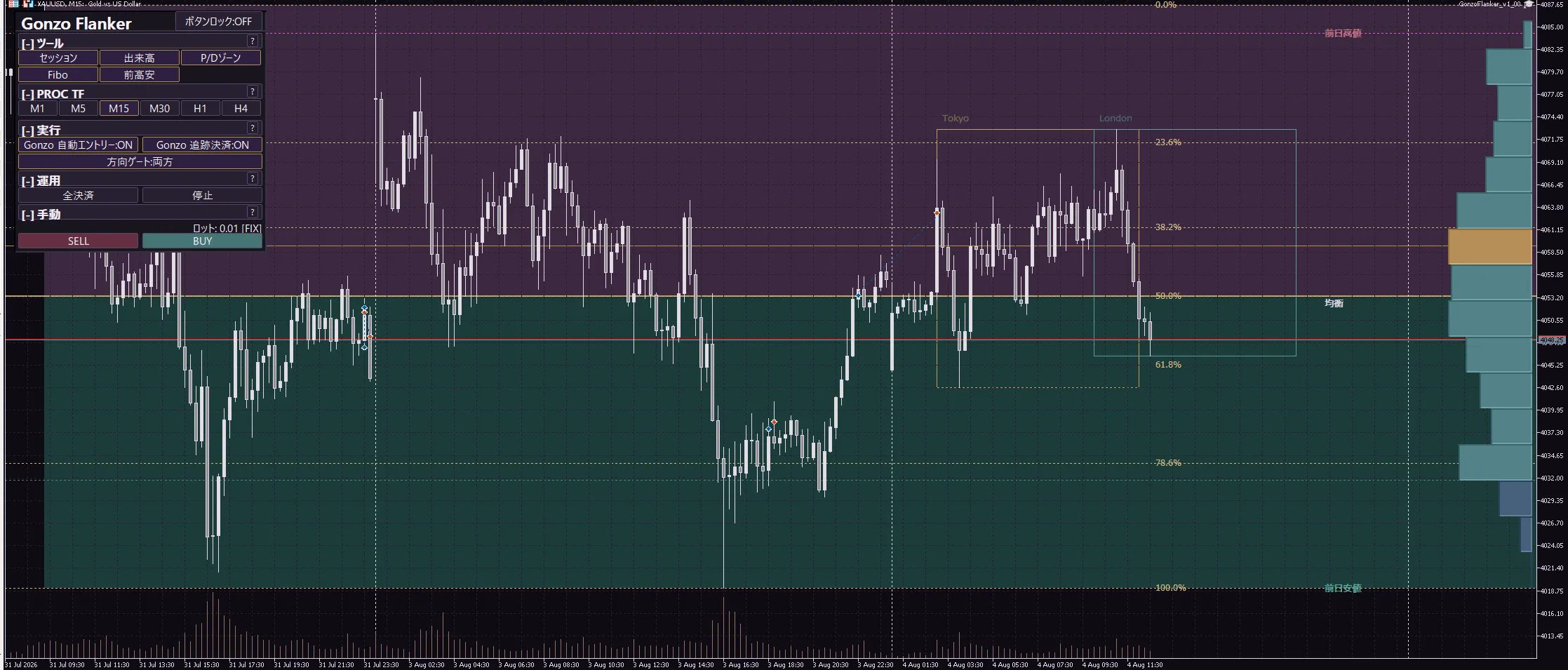
日本語商品ページ
Gonzo Flankerは、Gonzo Specialと同じエンジンで動くXAUUSD / GOLD向けの半裁量EAです。エントリーはSpecialとは別に設計し、ロング4種・ショート3種、計7つの独立ロジックが相場を監視します。注文、TP、SL、保護、撤退は毎ティックで処理します。半裁量機能を使わず、自動売買のみで運用することもできます。
v1.01からv1.02で変わったこと
エントリーは変えず、保有後の損失管理を改善
7つのエントリー条件、初期SL、ロット設定、同梱SETはv1.01から変更していません。v1.02では、エントリー後に期待した方向へ進んでいるか、逆行からの回復が続いているか、その回復が失敗して再び悪化していないかを確認し、取引の前提が崩れた場合だけ従来より早く撤退します。
時間や含み損だけで一律に切らない
単純に保有時間を短くしたり、一定の逆行だけで決済する仕組みではありません。保有中の利益方向・逆行方向への進み方と回復状態を組み合わせ、すでに反発へ向かっている取引には回復余地を残します。初期局面を過ぎた後も、従来どおり各ロジックの保護、撤退、SL管理を毎ティック継続します。
特定の月や取引だけを狙う条件は不使用
月、日付、取引番号、ブローカー名、直近の自己損益を使った条件は追加していません。過去・将来を問わず、同じ値動きの失敗パターンが発生した場合に働く共通の損失管理です。
長期BTでは、エントリーと利益取引を維持
v1.01とv1.02を同じ環境・同じ期間・同じ設定で照合した結果、掲載する4パターンすべてでエントリーは一致し、利益取引を損失へ変えたケースはありませんでした。変更された決済は既存の損失取引だけで、いずれも損失が縮小しています。
v1.00からv1.01で変わったこと
価格表示の桁数が異なる口座にも対応
スプレッド上限をASKとBIDの実際の価格差で指定する方式に変更しました。2桁・3桁など価格表示が異なるXAUUSD / GOLDでも同じ基準で判定します。初期値は0.19で、0以下にすると無効になります。
ほかのGonzo製品との同時保有を避ける設定を追加
登録したほかのGonzo製品が同じ口座でポジションを保有している間、Flankerの新規自動エントリーを見送れます。初期値はOFFです。ONにしても、Flankerがすでに保有しているポジションの管理と決済は続きます。
Risk%方式で最小ロット未満になった場合の扱いを変更
計算結果が0より大きいものの、ブローカーの最小ロットを下回る場合は、その最小ロットで発注します。この場合は指定したRisk%を上回る可能性があるため、少額口座では固定0.01 lotで想定される損失額を先に確認してください。
主な仕様
| 項目 | 内容 |
|---|---|
| 対象 | XAUUSD / GOLD |
| プラットフォーム | MetaTrader 5 |
| 商品区分 | 自動売買とパネルからの手動操作に対応する半裁量EA |
| 使用チャート | 任意(M1固定ではありません) |
| 分析基準時間足 | 初期値M15。パネルから変更できます。チャートの表示時間足とは別の設定です。 |
| 売買方向 | 買いのみ/売りのみ/両方/停止 |
| エントリー | ロング4種・ショート3種、計7ロジック |
| 最大同時保有数 | 1~7、MAX(8)から選択 |
| ピラミッディング | 非搭載。別ロジックの条件が重なった場合のみ複数保有 |
| ロット計算 | 固定ロット/戦略別リスク%/全戦略の最小ロットで統一 |
| 時間制御 | 日次ロールオーバー制御/週末リスク制御 |
| 操作 | 自動売買、手動BUY/SELL、全決済、売買停止、チャート補助表示 |
| 表示言語 | 日本語/英語 |
同梱ファイル
| ファイル | 用途 |
|---|---|
| GonzoFlanker_v1_02_release.ex5 | 半裁量EA本体。MT5のMQL5\Expertsへ保存します。 |
| GonzoFlanker_v1_02_Distribution_1Position.set | 最大同時保有数を1にしたSETです。 |
最大同時保有数MAX(8)は初期値です。専用SETを読み込む必要はありません。
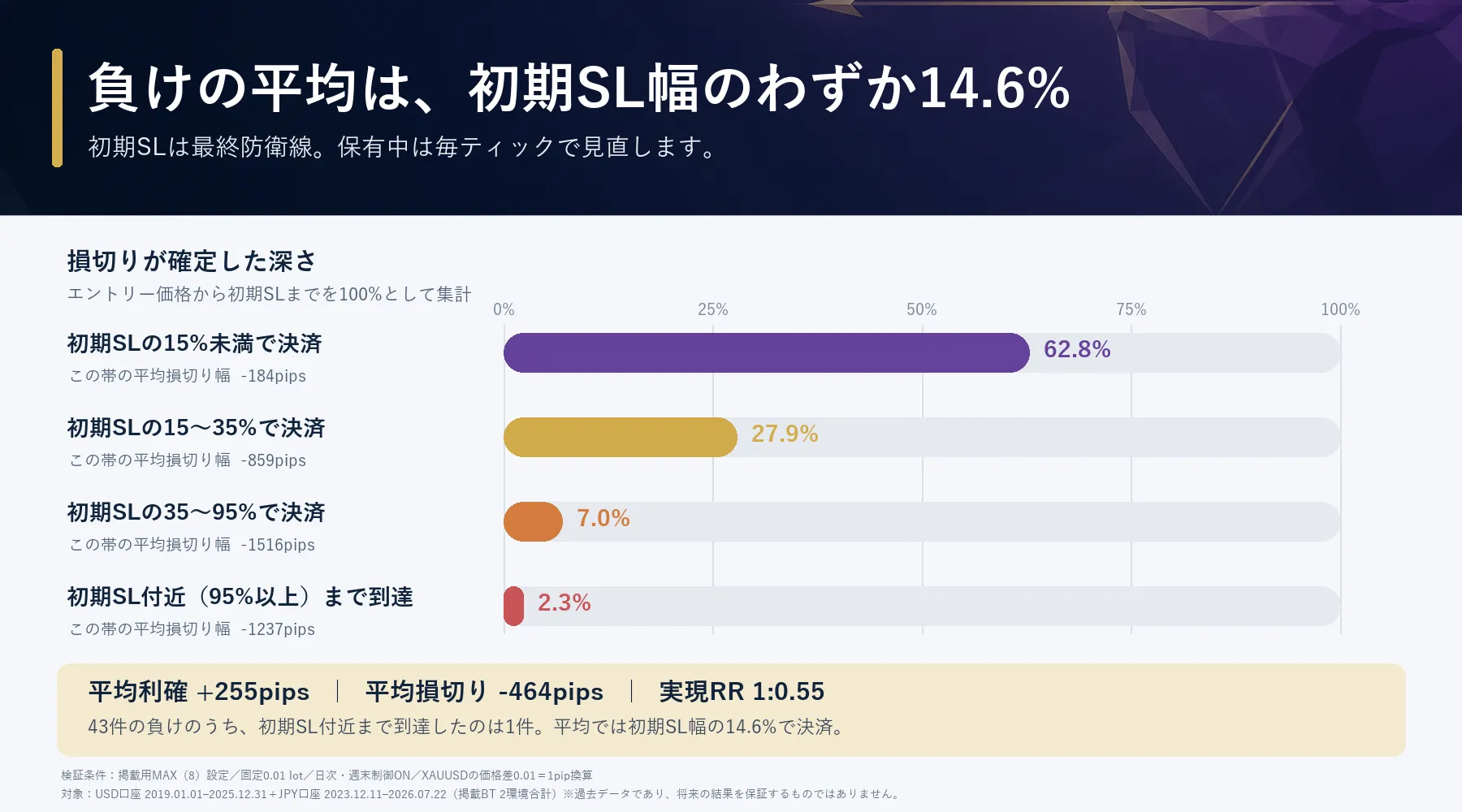
初期SLは最終防衛線。保有中は毎ティックで見直し
Flankerは、急変時にもサーバー側で保護できるよう、エントリー時に戦略ごとの初期SLを設定します。ただし、その位置まで損失を放置する設計ではありません。保有中は毎ティック、値動きの進展、含み益、反転、経過時間を確認し、条件に応じてSLを有利な位置へ更新、または見込みが薄れた取引を早めに決済します。
掲載BTでも、初期SLまで待たずに保護や早期決済で終了する取引が多く確認されています。初期SLは急変時の最終防衛線であり、通常の決済位置を示すものではありません。
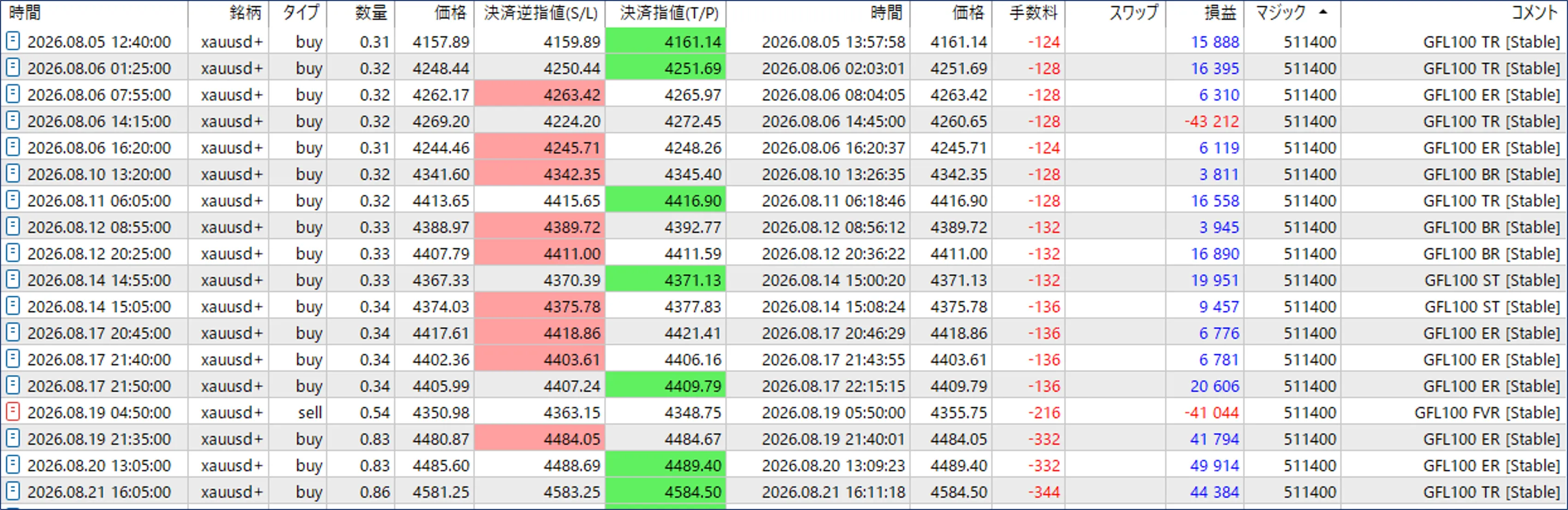
リアル口座取引実績
バックテスト結果
初期値MAX(8)と同梱の1ポジションSETを、v1.01とv1.02で直接比較しました。固定0.01 lot、日次・週末制御ON、MT5の「リアルティックに基づく全ティック」で実行しています。チャートの表示時間足は任意で、M1に固定する必要はありません。
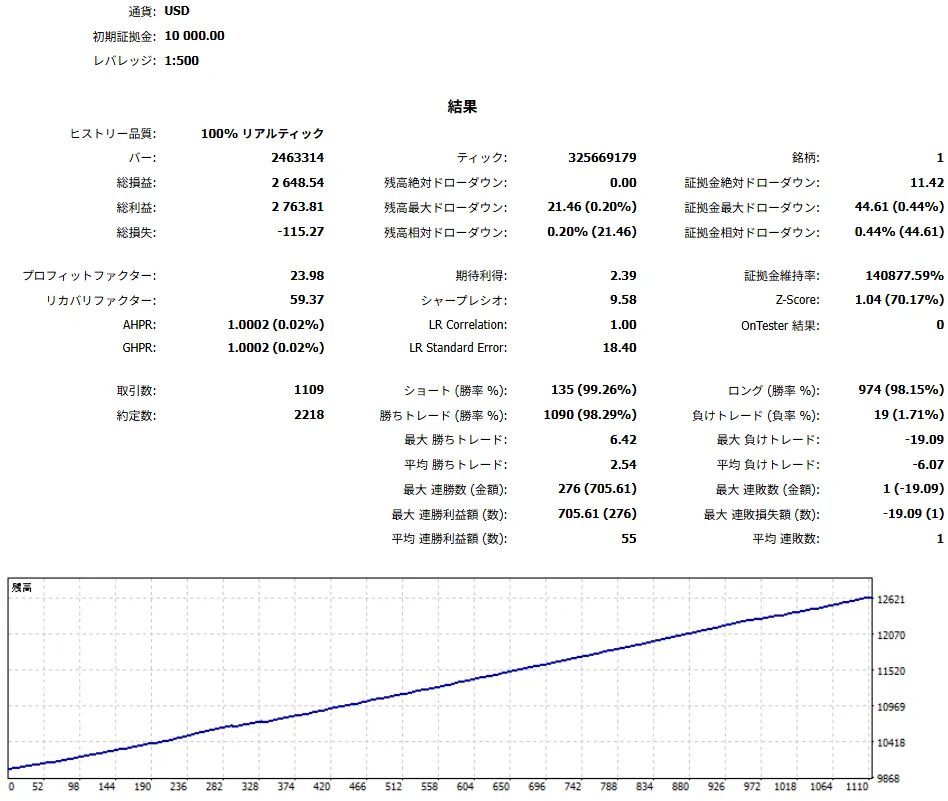
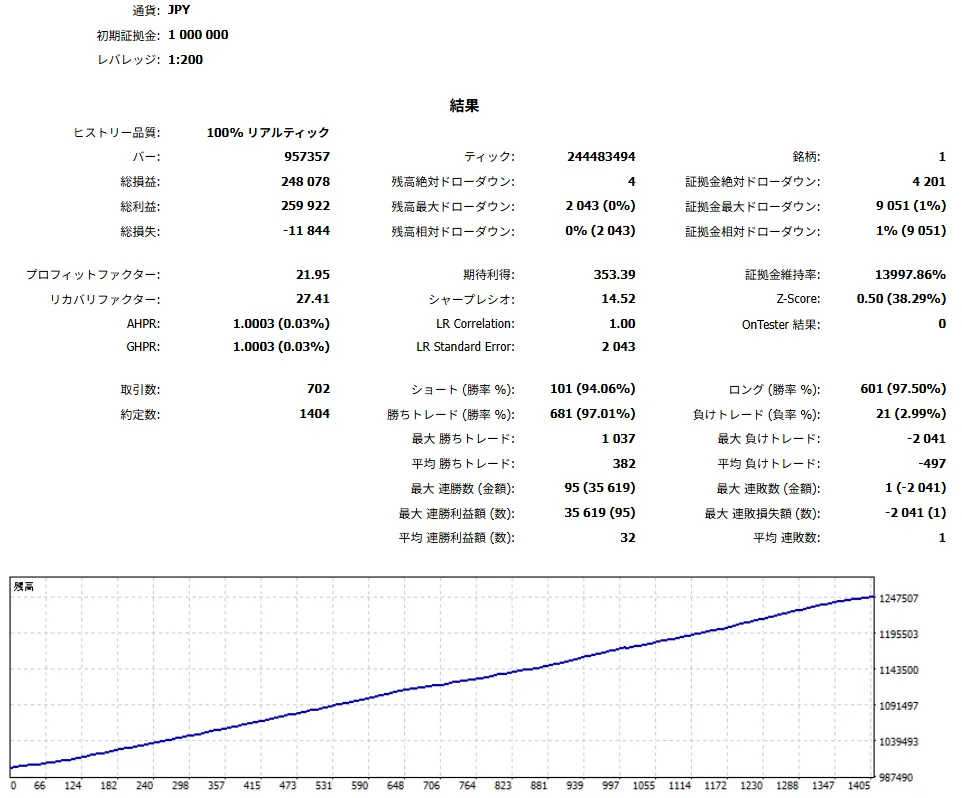
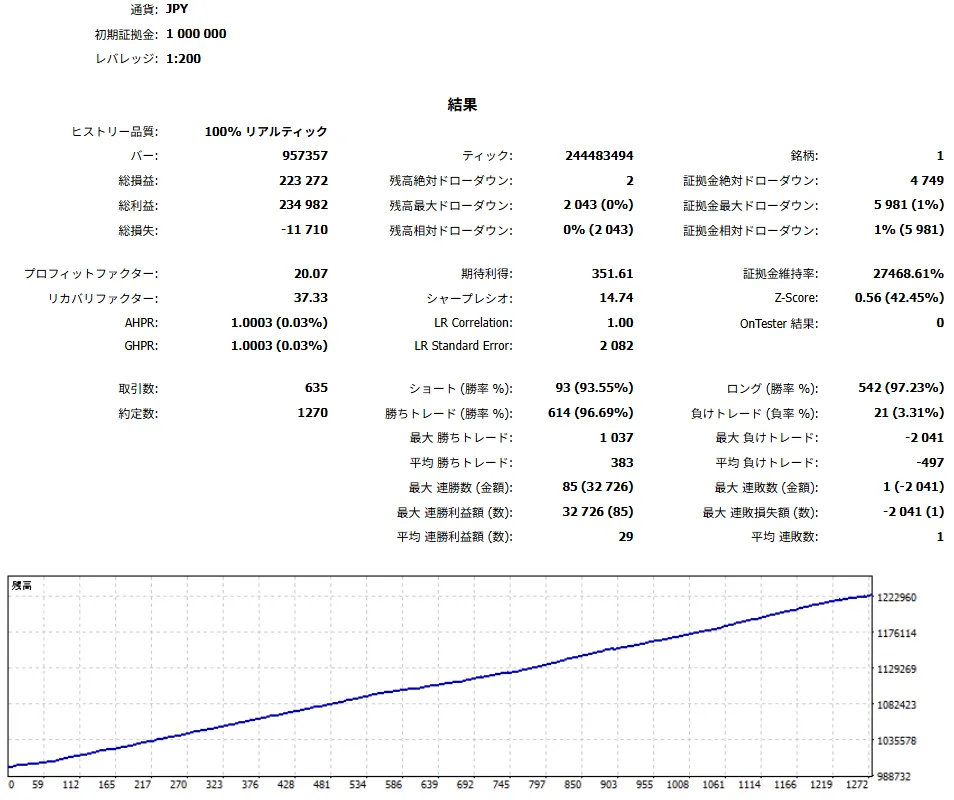
表は同じ検証環境・同じ期間・同じ設定での「v1.01 → v1.02」です。USD口座は2019年1月1日から2025年12月31日まで、JPY口座は2023年12月11日から2026年8月25日までです。JPY口座は8月25日の実ティックを含みます。掲載中の4枚の画像はv1.01時点の参考レポートで、最新の直接比較は下表に掲載しています。
■USD口座 - EA初期値 MAX(8)(v1.01参考画像)
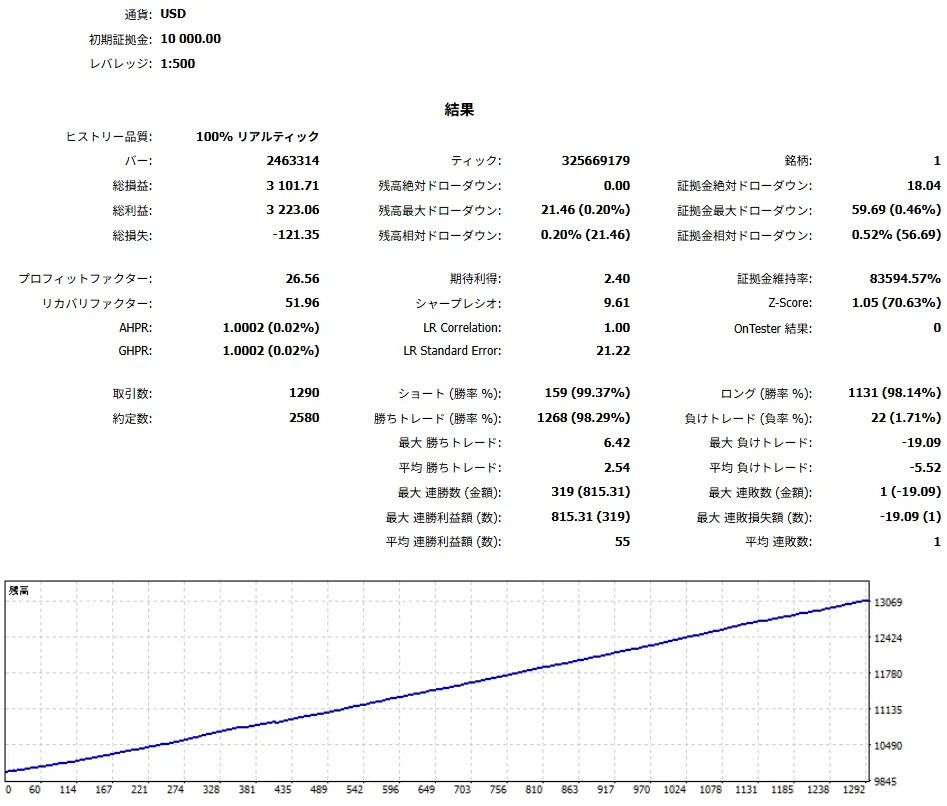
■USD口座 - 1ポジションSET(v1.01参考画像)
■JPY口座 - EA初期値 MAX(8)(v1.01参考画像)
■JPY口座 - 1ポジションSET(v1.01参考画像)
v1.01との直接比較
v1.02ではエントリー条件を変更していません。4パターンすべてで取引数・勝率・総利益を維持したまま、既存の損失取引だけを縮小しました。表中の最大DDは、保有中の含み損益を含む最大ドローダウンです。
| 検証環境 | 設定 | 期間 | 取引数 | 勝率 | PF | RF | シャープ | 総損益 | 最大DD | 最大損失 |
|---|---|---|---|---|---|---|---|---|---|---|
| USD口座 | EA初期値 MAX(8) | 2019.01.01~2025.12.31 | 1,290 → 1,290 | 98.29% → 98.29% | 24.35 → 26.56 | 51.78 → 51.96 | 9.55 → 9.61 | +3,090.69 → +3,101.71 USD | 59.69 → 59.69 USD | -19.09 → -19.09 USD |
| USD口座 | 1ポジションSET | 2019.01.01~2025.12.31 | 1,109 → 1,109 | 98.29% → 98.29% | 21.88 → 23.98 | 59.12 → 59.37 | 9.50 → 9.58 | +2,637.52 → +2,648.54 USD | 44.61 → 44.61 USD | -19.09 → -19.09 USD |
| JPY口座 | EA初期値 MAX(8) | 2023.12.11~2026.08.25 | 702 → 702 | 97.01% → 97.01% | 14.38 → 21.95 | 26.72 → 27.41 | 13.98 → 14.52 | +241,844 → +248,078円 | 9,051 → 9,051円 | -3,999 → -2,041円 |
| JPY口座 | 1ポジションSET | 2023.12.11~2026.08.25 | 635 → 635 | 96.69% → 96.69% | 13.10 → 20.07 | 36.29 → 37.33 | 14.13 → 14.74 | +217,038 → +223,272円 | 5,981 → 5,981円 | -3,999 → -2,041円 |
※JPY口座は、同一の履歴を使ってv1.01とv1.02を比較しています。長期履歴にはMT5による補完警告が含まれますが、8月25日の対象データには警告がなく、両バージョンの全エントリーを同一条件で照合しています。絶対成績の保証ではなく、バージョン差の確認用としてご覧ください。
2026年8月の損失3件はv1.02でどう変わったか
8月6日、19日、25日の損失は、それぞれ別の売買ロジックで発生しています。v1.02は3件を日付で指定したのではなく、各ロジックで期待した値動きが続かず、回復にも失敗した状態を共通の考え方で捉えています。
| 日付 | ロジック | 初期SL幅 | 保有時間 v1.01 → v1.02 | 損益 v1.01 → v1.02 |
|---|---|---|---|---|
| 8月6日 | TR | 45.00ドル | 30分 → 5分00秒 | -1,354円 → -533円 |
| 8月19日 | FVR | 12.17ドル | 60分 → 5分34秒 | -737円 → -601円 |
| 8月25日 | ER | 49.00ドル | 15分 → 10分16秒 | -4,001円 → -2,043円 |
USD口座は初期証拠金10,000 USD・レバレッジ1:500、JPY口座は初期証拠金1,000,000円・レバレッジ1:200です。両環境とも買い・売りの取引を含みます。
バックテストは過去データによる検証であり、将来の利益を保証するものではありません。銘柄仕様、スプレッド、約定、サーバー時刻はブローカーごとに異なります。
日本語操作マニュアル
1. 導入
| 手順 | 内容 |
|---|---|
| 1 | MT5の「ファイル」→「データフォルダを開く」からMQL5\Expertsを開きます。 |
| 2 | GonzoFlanker_v1_02_release.ex5を保存し、ナビゲータのエキスパートアドバイザを更新します。 |
| 3 | ブローカーのXAUUSD / GOLDチャートを開き、任意の表示時間足で半裁量EAを適用します。M1に固定する必要はありません。 |
| 4 | 掲載BTと同じMAX(8)は初期値です。最大同時保有数を1にしたい場合だけ、同梱SETを読み込みます。 |
| 5 | ロット、取引方向、最大同時保有数、サーバー時刻を確認します。 |
| 6 | MT5上部のアルゴリズム取引をONにします。 |
| 7 | 最初は0.01 lotで、注文と決済が正常に行われることを確認してください。 |
2. 重要な設定
| 設定 | 内容 |
|---|---|
| マジックナンバー | 初期値511400。ほかの自動売買ツールと重なる場合だけ変更します。 |
| 取引方向 | 買いのみ/売りのみ/両方/停止を選びます。 |
| ロット計算モード | 固定ロット/戦略別リスク%/全戦略の最小ロットで統一から選びます。 |
| 最大エントリースプレッド | 初期値0.19。ASKとBIDの価格差が上限を超える場合、新規の自動エントリーを見送ります。0以下で無効になります。 |
| ほかのGonzo製品との同時運用 | 初期値OFF。ONにすると、登録した製品が同じ口座でポジションを保有している間、新規の自動エントリーを見送ります。 |
| 最大同時保有数 | 1~7、MAX(8)から選びます。上限であり、常にその数を保有する設定ではありません。 |
| Gonzo自動エントリー | OFFにすると新規の自動エントリーを止めます。 |
| Gonzo自動決済・追跡 | 保有中ポジションの自動管理です。通常はONのまま使用します。 |
| ロールオーバー制御 | サーバー時刻23:00に新規停止、01:00に再開します。 |
| 週末リスク制御 | 金曜18:00に新規停止、月曜01:00に再開します。 |
| パネル表示 | パネルの表示/非表示を切り替えます。 |
3. パネル
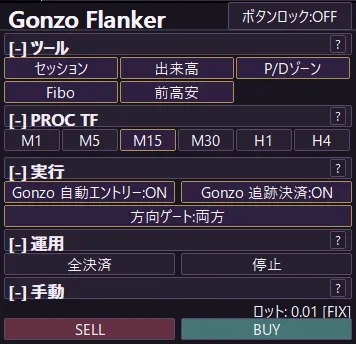
| 項目 | 動作 |
|---|---|
| 自動売買 | Flanker全体の自動売買をON/OFFします。 |
| 自動エントリー | 新規の自動エントリーだけをON/OFFします。 |
| 自動決済・追跡 | 保有中ポジションの自動管理をON/OFFします。 |
| 方向ゲート | 買いのみ/売りのみ/両方/停止を切り替えます。 |
| BUY/SELL | 固定ロット欄の数量で手動注文します。 |
| 全決済 | Flankerが管理するポジションを全決済します。 |
| 停止 | 新規売買を停止します。 |
| セッション/出来高/P/D/Fibo/前高安 | チャート補助表示を切り替えます。これらの表示切替だけでは売買条件は変わりません。 |
4. ロットとリスク
| モード | 計算方法 |
|---|---|
| 固定ロット | すべての戦略を指定ロットで取引します。 |
| 戦略別リスク% | 各戦略の想定損失幅に合わせて、1取引ごとのロットを計算します。 |
| 全戦略の最小ロットで統一 | 戦略別計算で求めたロットのうち最小値を、すべての戦略に使います。ロット差を抑えたい場合に選びます。 |
| 計算に使う資金 | 残高または有効証拠金を選べます。 |
5. 同梱SET
| 設定 | 最大同時保有数 | ロット | 日次・週末制御 |
|---|---|---|---|
| 初期値 | MAX(8) | 固定0.01 lot | ON |
| Distribution_1Position.set | 1 | 固定0.01 lot | ON |
最大同時保有数MAX(8)は初期値のため、同梱SETは1ポジション用だけです。描画設定はSETで上書きせず、Flankerの初期値を使用します。
6. 日次・週末制御
| 制御 | 初期設定 | 動作 |
|---|---|---|
| 日次ロールオーバー | 23:00停止/01:00再開 | 新規エントリーを止め、既存ポジションの管理は継続します。停止前からのポジションは、制御時間中に利益になれば決済します。 |
| 週末 | 金曜18:00停止/月曜01:00再開 | 新規エントリーを止め、既存ポジションの管理は継続します。停止前からのポジションは、制御時間中に利益になれば決済します。 |
時刻はすべてブローカーのサーバー時刻です。
7. FAQ
| 質問 | 回答 |
|---|---|
| Specialを持っていなくても使えますか? | はい。Flanker単体で運用できます。Specialの稼働や購入は必要ありません。 |
| Specialと同じ口座で使えますか? | はい。掲載BTと同じUSD環境での同方向エントリー重複率は0.91%です。Specialが取引していない局面を別ロジックで狙うため、同一口座で併用し、証拠金を有効活用できます。 |
| 最大同時保有数を2以上にするとナンピンになりますか? | いいえ。別々のロジックが同時に条件を満たした場合の複数保有です。ピラミッディングも搭載していません。 |
| MAX(8)を選ぶと常に8ポジション持ちますか? | いいえ。MAX(8)は上限です。条件が重ならなければ1ポジションだけです。 |
| MAX(8)のBTはどの設定ですか? | 初期値です。SETを読み込まず、そのまま使用してください。 |
| リスク%はどのように計算されますか? | 1取引ごとに計算します。保有数を1に固定したい場合は、同梱の1ポジションSETを使用してください。 |
| どの時間足に設定しますか? | チャートの表示時間足は任意です。M1に固定する必要はありません。分析基準時間足は初期値M15で、パネルから変更できます。売買ロジックは必要な時間足を内部で参照します。 |
| 銘柄名に記号やサフィックスが付いていても使えますか? | はい。ブローカーが提供するXAUUSD / GOLDの銘柄を選び、最初に0.01 lotで動作を確認してください。 |
| 時間制御中はすべてのポジションを強制決済しますか? | いいえ。新規エントリーを止め、既存ポジションの管理を続けます。停止前からのポジションは利益になれば決済します。 |
| 補助描画を切り替えると売買成績が変わりますか? | いいえ。セッション、出来高、P/D、Fibo、前高安の表示切替だけでは売買条件は変わりません。 |
| 自動エントリーだけを止められますか? | はい。「Gonzo自動エントリー」をOFFにしてください。保有中は「Gonzo自動決済・追跡」をONのままにしてください。 |
| v1.02でエントリー条件やSETは変わりましたか? | いいえ。変更したのは保有後の損失管理です。エントリー条件と同梱SETの設定値はv1.01と同じです。 |
| VPSは必要ですか? | 常時稼働する場合は推奨します。MT5が終了・切断している間はFlankerが動作しません。 |
8. 困ったとき
| 症状 | 確認すること |
|---|---|
| エントリーしない | MT5のアルゴリズム取引、Flankerの自動売買、自動エントリー、取引方向、サーバー時刻を確認してください。条件が成立しない日は取引しません。 |
| 注文できない | 銘柄の最小ロット、ロット刻み、必要証拠金、取引時間を確認し、エキスパートログのエラーを確認してください。 |
| パネルが表示されない | 設定の「パネル表示」をONにして半裁量EAを再適用してください。 |
| SETを読み込めない | 本体のバージョンがv1.02であることを確認し、同梱SETを読み直してください。 |
English product page
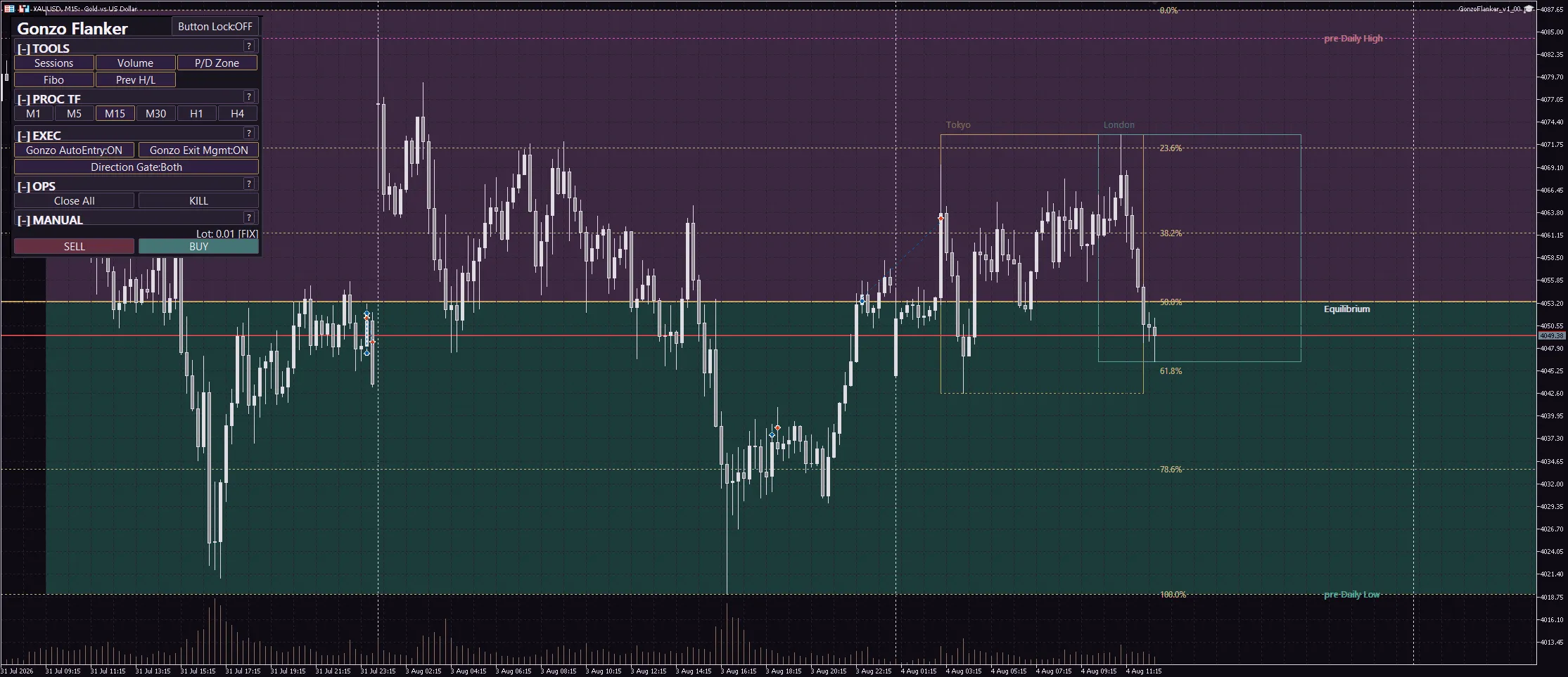
Gonzo Flanker is a semi-automatic (semi-discretionary) XAUUSD / GOLD EA powered by the same engine as Gonzo Special. Its entries are separate: four long strategies and three short strategies monitor different market conditions. Orders, TP, SL, protection, and exits are processed on every tick. It can also be used in fully automatic mode without using the manual panel controls.
Changes from v1.01 to v1.02
Post-entry loss management improved without changing entries
The seven entry rules, initial SL design, lot settings, and included SET are unchanged from v1.01. After entry, v1.02 checks whether price is progressing as expected, whether a recovery from adverse movement is continuing, and whether that recovery has failed and deterioration has resumed. It exits earlier only when the original trade premise has weakened.
No uniform exit based only on time or floating loss
This is not a simple reduction of holding time and does not close every trade after a fixed adverse move. It combines favorable and adverse progress with the state of the recovery, leaving room for trades that are already rebounding. After the initial phase, the existing strategy-specific protection, exit, and SL management continues on every tick.
No month-specific or trade-specific rescue rule
The update does not use the month, date, trade number, broker name, or the EA's recent profit and loss. The same post-entry failure pattern is handled consistently whenever it occurs in past or future data.
Long-term tests preserved entries and profitable trades
Across all four published environment and setup combinations, v1.01 and v1.02 produced matching entries and no profitable trade was converted into a loss. Every changed exit was an existing losing trade, and each of those losses was reduced.
Changes from v1.00 to v1.01
Consistent handling across different quote digits
The entry-spread limit now uses the actual ASK-BID price difference, so two- and three-decimal XAUUSD / GOLD quotes are judged on the same basis. The default is 0.19; a value of zero or less disables the limit.
Optional cross-Gonzo entry control
Flanker can skip new automatic entries while a listed Gonzo product already has an open position in the same account. It is OFF by default. Management and exits for existing Flanker positions continue while the block is active.
Broker-minimum handling in Risk % modes
If the calculated volume is positive but below the broker minimum, Flanker sends the broker minimum volume. This can exceed the selected Risk %, so small accounts should first check the expected loss at fixed 0.01 lot.
Main specifications
| Item | Details |
|---|---|
| Symbol | XAUUSD / GOLD |
| Platform | MetaTrader 5 |
| Product type | Semi-automatic EA: automated trading plus manual panel controls |
| Chart | Any display timeframe; M1 is not required |
| Analysis timeframe | Default M15 and selectable from the panel. This is separate from the chart display timeframe. |
| Direction | Long only / Short only / Both / Stop |
| Entries | Four long strategies and three short strategies |
| Maximum positions | 1 through 7, or Maximum (8) |
| Pyramiding | Not included. Multiple positions can occur only when different strategies trigger at the same time. |
| Lot sizing | Fixed lot / Per-strategy risk % / Uniform minimum lot across strategies |
| Time controls | Daily rollover and weekend risk controls |
| Controls | Auto trading, manual BUY/SELL, close all, stop, and chart aids |
| Language | Japanese / English |
Included files
| File | Purpose |
|---|---|
| GonzoFlanker_v1_02_release.ex5 | EA file. Place it in MQL5\Experts. |
| GonzoFlanker_v1_02_Distribution_1Position.set | Setup limited to one position. |
Maximum (8) is already the EA default and does not require a separate SET file.
Initial SL is the final safety line
Flanker places a strategy-specific server-side initial SL at entry so the trade remains protected during a sudden move. It does not simply wait for that level. On every tick it reassesses price progress, favorable excursion, reversal, and elapsed time, then tightens protection or exits early when conditions warrant.
The published backtests show that many losing trades were protected or closed before reaching the initial SL. The initial SL is a final server-side safety line, not the normal intended exit point.
Backtest results
The default Maximum (8) setup and the included one-position SET were compared directly between v1.01 and v1.02. All tests used fixed 0.01 lot, daily and weekend controls ON, and MT5's Every tick based on real ticks mode. The chart display timeframe is optional; M1 is not required.
Each table cell shows v1.01 → v1.02 under the same environment, period, and setup. The USD account covers 1 January 2019 through 31 December 2025. The JPY account covers 11 December 2023 through 25 August 2026 and includes the real ticks from 25 August.
Direct comparison with v1.01
v1.02 does not change the entry rules. All four combinations preserve trade count, win rate, and gross profit while reducing only existing losing trades. Max DD in the table includes floating profit and loss.
| Environment | Setup | Period | Trades | Win rate | PF | RF | Sharpe | Net profit | Max DD | Largest loss |
|---|---|---|---|---|---|---|---|---|---|---|
| USD account | EA default Maximum (8) | 2019.01.01–2025.12.31 | 1,290 → 1,290 | 98.29% → 98.29% | 24.35 → 26.56 | 51.78 → 51.96 | 9.55 → 9.61 | +3,090.69 → +3,101.71 USD | 59.69 → 59.69 USD | -19.09 → -19.09 USD |
| USD account | One-position SET | 2019.01.01–2025.12.31 | 1,109 → 1,109 | 98.29% → 98.29% | 21.88 → 23.98 | 59.12 → 59.37 | 9.50 → 9.58 | +2,637.52 → +2,648.54 USD | 44.61 → 44.61 USD | -19.09 → -19.09 USD |
| JPY account | EA default Maximum (8) | 2023.12.11–2026.08.25 | 702 → 702 | 97.01% → 97.01% | 14.38 → 21.95 | 26.72 → 27.41 | 13.98 → 14.52 | +241,844 → +248,078 JPY | 9,051 → 9,051 JPY | -3,999 → -2,041 JPY |
| JPY account | One-position SET | 2023.12.11–2026.08.25 | 635 → 635 | 96.69% → 96.69% | 13.10 → 20.07 | 36.29 → 37.33 | 14.13 → 14.74 | +217,038 → +223,272 JPY | 5,981 → 5,981 JPY | -3,999 → -2,041 JPY |
The JPY comparison uses the same history for v1.01 and v1.02. The long history contains MT5 history-fill warnings, while the 25 August data itself has no warning. All entries were matched under the same conditions, so the figures are provided as a direct version comparison rather than a guarantee of absolute performance.
How the three August 2026 losses changed
The losses on 6, 19, and 25 August came from three different trading logics. v1.02 does not identify those dates. It applies the same post-entry principle when the move expected by each logic fails to develop and a recovery attempt also fails.
| Date | Logic | Initial SL width | Holding time v1.01 → v1.02 | P/L v1.01 → v1.02 |
|---|---|---|---|---|
| 6 Aug | TR | USD 45.00 | 30m → 5m 00s | JPY -1,354 → -533 |
| 19 Aug | FVR | USD 12.17 | 60m → 5m 34s | JPY -737 → -601 |
| 25 Aug | ER | USD 49.00 | 15m → 10m 16s | JPY -4,001 → -2,043 |
The USD account used a 10,000 USD initial deposit and 1:500 leverage. The JPY account used a 1,000,000 JPY initial deposit and 1:200 leverage. Both results include long and short trades.
Backtests use historical data and do not guarantee future profit. Symbol specifications, spreads, execution, and server time vary by broker.
English operation manual
1. Installation
| Step | Action |
|---|---|
| 1 | In MT5, choose File → Open Data Folder and open MQL5\Experts. |
| 2 | Place GonzoFlanker_v1_02_release.ex5 in the folder and refresh Expert Advisors in the Navigator. |
| 3 | Open the broker's XAUUSD / GOLD chart, select any display timeframe, and attach the EA. M1 is not required. |
| 4 | Maximum (8) is the EA default. Load the included SET only when you want to limit the EA to one position. |
| 5 | Check lot size, direction, maximum positions, and broker server time. |
| 6 | Turn on Algorithmic Trading in MT5. |
| 7 | Start with 0.01 lot and confirm that orders and exits work correctly. |
2. Important settings
| Setting | Meaning |
|---|---|
| Magic number | Default 511400. Change it only if another EA uses the same number. |
| Trade direction | Long only / Short only / Both / Stop. |
| Lot sizing mode | Fixed lot / Per-strategy risk % / Uniform minimum lot across strategies. |
| Maximum entry spread | Default 0.19. New automatic entries are skipped when the ASK-BID price difference exceeds the limit. Zero or less disables it. |
| Cross-Gonzo entry control | OFF by default. When enabled, Flanker skips new automatic entries while a listed product has an open position in the same account. |
| Maximum positions | 1 through 7, or Maximum (8). This is a cap, not a target position count. |
| Gonzo auto entry | OFF stops new automatic entries. |
| Gonzo auto close and tracking | Controls open positions. Keep it ON during normal operation. |
| Daily rollover | Stops new entries at server 23:00 and resumes at 01:00. |
| Weekend control | Stops new entries Friday at 18:00 and resumes Monday at 01:00. |
| Panel display | Shows or hides the control panel. |
3. Panel
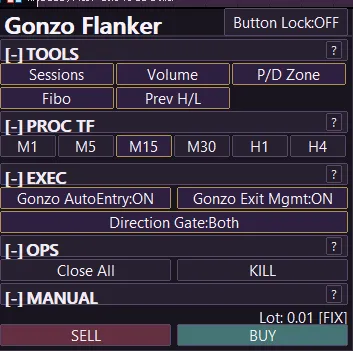
| Control | Action |
|---|---|
| Auto trading | Turns EA auto trading ON or OFF. |
| Auto entry | Turns only new automatic entries ON or OFF. |
| Auto close and tracking | Turns management of open positions ON or OFF. |
| Direction gate | Selects Long only / Short only / Both / Stop. |
| BUY / SELL | Places a manual order using the fixed-lot field. |
| Close all | Closes positions managed by Flanker. |
| Stop | Stops new trading. |
| Sessions / Volume / P/D / Fibo / Previous H/L | Toggles chart aids. These display toggles alone do not change entry conditions. |
4. Lot size and risk
| Mode | Calculation |
|---|---|
| Fixed lot | All strategies use the specified lot size. |
| Per-strategy risk % | Lot size is calculated for each trade from that strategy's estimated loss distance. |
| Uniform minimum lot | The smallest per-strategy calculated lot is applied to every strategy to reduce lot-size differences. |
| Capital basis | Choose account balance or equity. |
5. Included SET files
| Setup | Maximum positions | Lot | Daily/weekend controls |
|---|---|---|---|
| EA default | Maximum (8) | Fixed 0.01 lot | ON |
| Distribution_1Position.set | 1 | Fixed 0.01 lot | ON |
Because Maximum (8) is already the EA default, only the one-position SET is included. Display settings are not overridden by that SET; the EA defaults are used.
6. Daily and weekend controls
| Control | Default schedule | Action |
|---|---|---|
| Daily rollover | Stop 23:00 / Resume 01:00 | Stops new entries and continues managing open positions. Positions opened before the window are closed if they become profitable during the window. |
| Weekend | Friday 18:00 / Monday 01:00 | Stops new entries and continues managing open positions. Positions opened before the window are closed if they become profitable during the window. |
All times use the broker's server time.
7. FAQ
| Question | Answer |
|---|---|
| Do I need Gonzo Special? | No. Flanker can run by itself. Owning or running Special is not required. |
| Can I run it on the same account as Special? | Yes. Same-direction entry overlap was 0.91% in the published USD environment. Flanker targets market opportunities that Special does not take, so both EAs can share one account and make efficient use of available margin. |
| Is multiple-position mode nanpin? | No. Multiple positions can occur when separate strategies trigger together. Pyramiding is not included. |
| Does Maximum (8) mean it always opens eight positions? | No. It is only the upper limit. If signals do not overlap, only one position is opened. |
| Which settings were used for the Maximum (8) backtest? | The EA defaults. Attach the EA without loading a SET. |
| How is risk % calculated? | It is calculated per trade. Use the included one-position SET when you want to limit the EA to one open position. |
| Which chart timeframe should I use? | Any chart display timeframe may be used; M1 is not required. The analysis timeframe starts at M15 and can be changed from the panel. Trading logic reads the timeframes it needs internally. |
| Can I use a symbol with a suffix? | Yes. Select the broker's XAUUSD / GOLD symbol and first confirm operation at 0.01 lot. |
| Do time controls force-close every position? | No. They stop new entries and continue management. Positions opened before the window are closed if they become profitable. |
| Do chart-aid buttons change trading results? | No. Sessions, Volume, P/D, Fibo, and Previous H/L display toggles alone do not change entry conditions. |
| Can I stop only new automatic entries? | Yes. Turn Gonzo auto entry OFF and keep Gonzo auto close and tracking ON for open positions. |
| Did v1.02 change the entry rules or SET values? | No. The update changes only post-entry loss management. Entry rules and the included SET values are unchanged from v1.01. |
| Do I need a VPS? | It is recommended for continuous operation. The EA cannot run while MT5 is closed or disconnected. |
8. Troubleshooting
| Issue | Check |
|---|---|
| No entries | Check MT5 Algorithmic Trading, EA auto trading, auto entry, trade direction, and server time. The EA does not trade when no entry condition is met. |
| Order rejected | Check minimum lot, lot step, free margin, trading hours, and the Experts log. |
| Panel not shown | Turn Panel display ON and reattach the EA. |
| SET does not load | Confirm that the EA is v1.02 and load the SET supplied with this version. |
GogoJungleを初めてご利用する方へ 商品のご利用まではかんたん3ステップ!
GogoJungleでは、会員様向けに、あなたの投資生活を豊かにするサービスをご用意しております。また、商品をご購入いただけるのは、会員様のみとなっております。今すぐ会員登録をして、GogoJungleを活用してみませんか!
