

The coupon expires today.
●Payment






Gonzo Flanker v2.00
Gonzo Specialと同じエンジンで、Specialが取引しない値動きを狙う買い4種・売り3種の7つの独立ロジックが相場を監視し、保有中は毎ティック管理します。ロジックごとに損切りの深さと保有時間を決められ、経済指標の前後は新規を見送れます。
XAUUSD / GOLDMetaTrader 5半裁量EAv2.00日本語 / Englishこの商品について
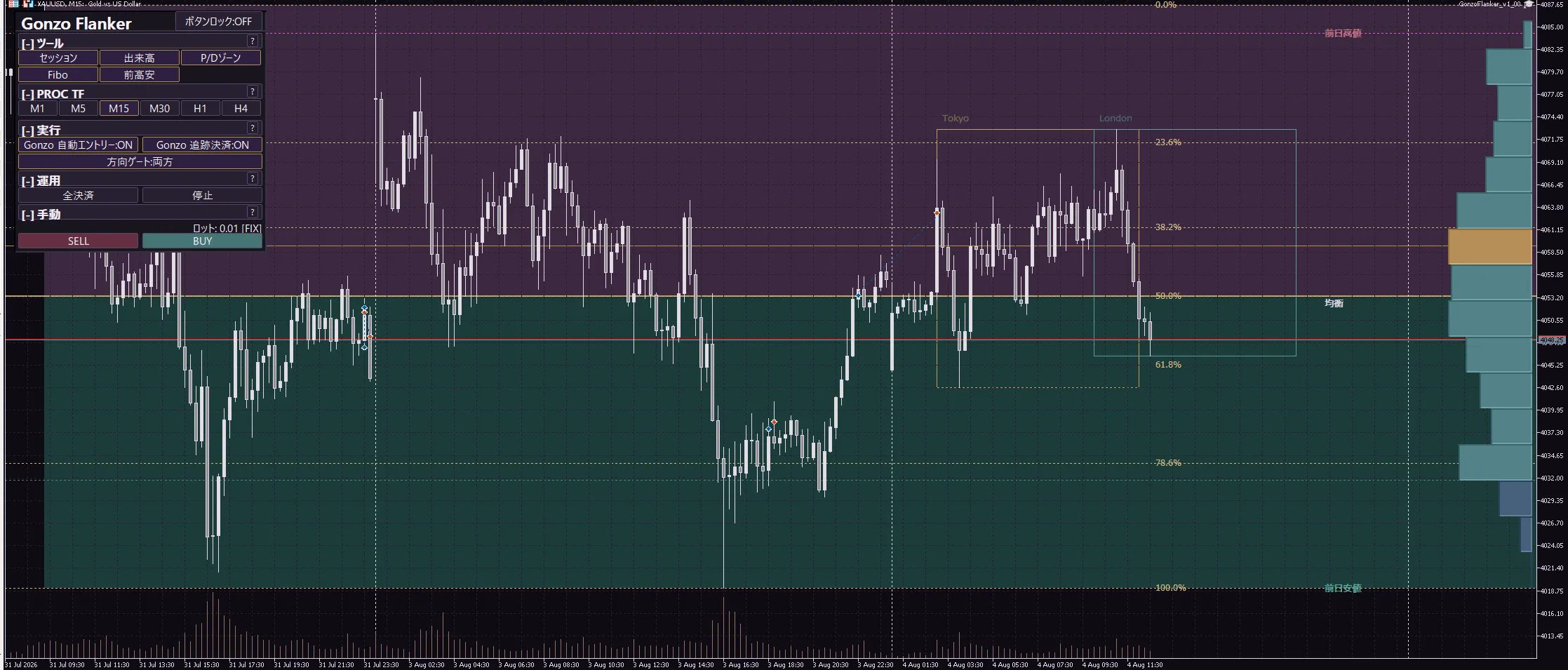
Gonzo Flankerは、Gonzo Specialと同じエンジンで動くXAUUSD向けの半裁量EAです。エントリーはSpecialとは別に設計し、ロング4種・ショート3種、計7つの独立ロジックが相場を監視します。注文、TP、SL、保護、撤退は毎ティックで処理します。
掲載BTと同じ環境で、Specialとの同方向エントリー重複率は0.91%でした(同方向のエントリーを前後15分の範囲で照合した結果です)。同一口座で併用し、証拠金を有効に使えます。ピラミッディングはありません。最大同時保有数を2以上にした場合は、別々のロジックが同時に条件を満たしたときだけ複数ポジションになります。
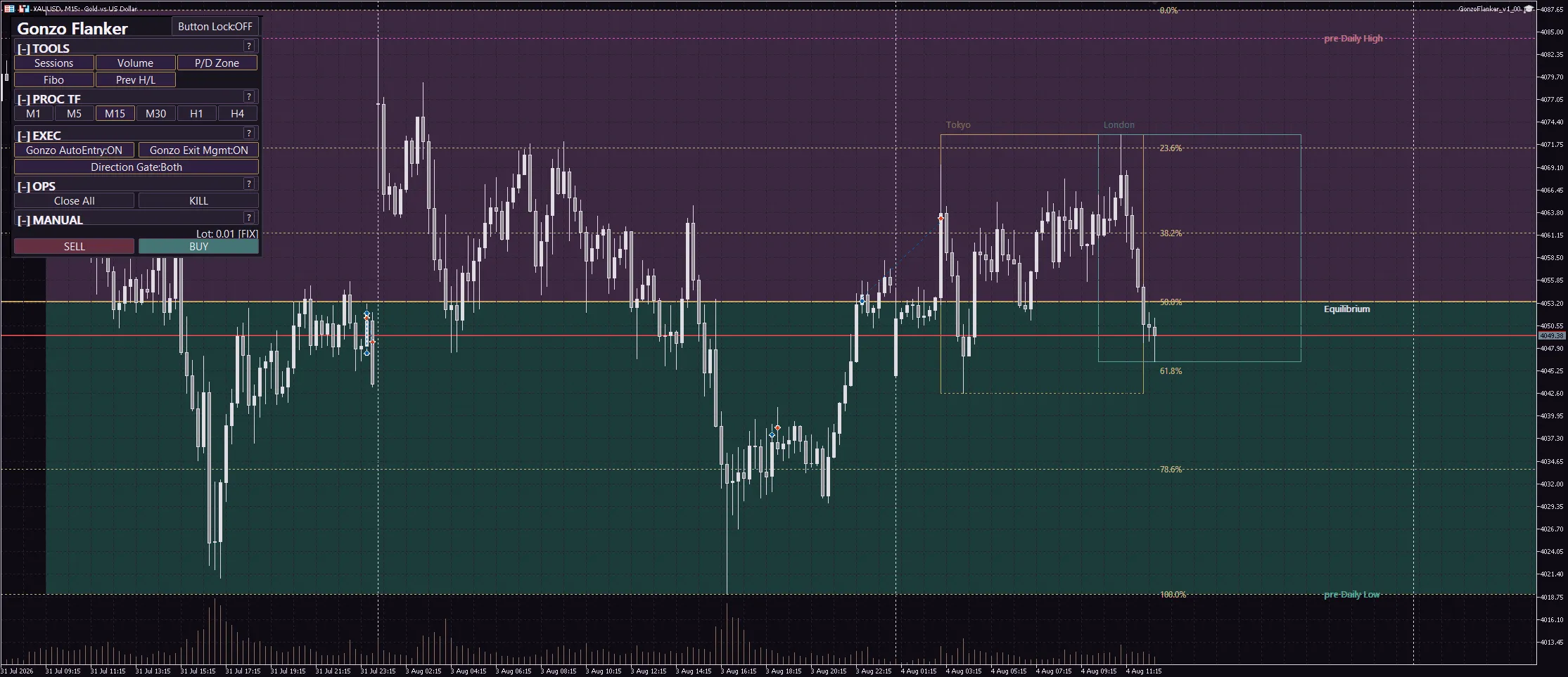
自動売買のみでも利用でき、パネルから手動BUY/SELL、全決済、売買停止を操作できます。
ロジックと取引履歴の名前
| 設定グループ(取引履歴のコメント名) | 内容 |
|---|---|
| 「GFL100 ER」買い1(勢い尽きの反転) | 買い。勢いが尽きた後の反転を狙う。 |
| 「GFL100 BR」買い2(レンジ内の回転) | 買い。レンジ内の回転を狙う。 |
| 「GFL100 ST」買い3(セッション転換) | 買い。セッションの切り替わりを狙う。 |
| 「GFL100 TR」買い4(階段状の再開) | 買い。階段状の上昇の再開を狙う。 |
| 「GFL100 SD」売り1(セッション下抜け) | 売り。セッション安値の下抜けを狙う。 |
| 「GFL100 HB」売り2(高効率ブレイク) | 売り。効率のよい下落の継続を狙う。 |
| 「GFL100 FVR」売り3(失敗ラリーの反転) | 売り。失敗した急騰の反転を狙う。 |
負けの多いロジックだけ、止める・弱めるができます
Gonzoの主要3EA(Gonzo Special、Gonzo Nexus、Gonzo Flanker)はどれも複数のロジックで動いています。どれも勝率は高いのですが、負けるときはロジックに偏る傾向があります。前のバージョンまでは、EAごと止めるか、そのまま使うかの二択でした。このバージョンでは、負けの出どころになっているロジックだけを、ほかのロジックに触れずに止めたり弱めたりできます。
- ロジックそのものを止める:そのロジックの新規建玉だけを停止します。ほかのロジックは通常どおり動きます。
- 損切りを早める:初期SL幅を浅くする、SL幅の一定割合で決済する、構造が崩れたら決済する。
- 利確のしかたを変える:初期TP幅を変える。建値ロックとトレーリングで、一度抱えた含み益を守る。
- ロットだけ落とす:そのロジックのロット係数を下げる。弱いトレンドのときだけ下げることもできます。
- 保有時間に上限を付ける:含み損のまま持てる分数と、保有そのものの上限を分で指定します。
初期値はすべて従来どおりです。読み込んで何も変えなければ、前のバージョンと同じ売買になります。まず負けの出どころを確かめて、そのロジックだけ手を入れる。それが今回の使い方です。
一番良い設定は口座ごとに変わります。スプレッド、スワップ、約定のクセ、サーバー時刻がブローカーごとに違うためです。購入者専用のコミュニティがありますので、ご自身の口座で見つけた設定を共有していただけますし、ほかの方の結果を試すこともできます。
利用者任せにするのは開発者として無責任だと思っています。私の方でも検証を続け、良い設定が見つかり次第コミュニティで配布します。今の版で調整できる範囲は限られているので、足りないと判断した項目は、設定として開放することも検討します。
ロジックの使い分け
7つのロジックはそれぞれ独立していて、注文コメント(GFL100 ER など)で見分けられます。負けの多いロジックは口座によって変わるので、自分のバックテストで確かめ、そのロジックだけを止める、ロットを落とす、早期損切りや保有時間の上限を入れる、という使い分けができます。
主な機能
売買は自動です。エントリーはロジックごとの条件で行い、保有中は毎ティック値動きを確認して、SLの調整や決済を行います。次の機能を組み合わせて使えます。
- 保有中の管理:エントリー時に初期SLとTPを置き、保有中は保護と撤退の判断を続けます。ロジックごとに「初期SL幅」「早期損切り」「含み損で持てる時間」「保有時間の上限」「建値ロック」「トレーリング」を設定できます。
- 経済指標の前後の見送り:方式A(予定表)と方式B(MT5内蔵カレンダー)のどちらか、または両方で、発表の前後に新規エントリーを止めます。
- 時間帯制御:週末と日次ロールオーバーの前後に新規を止め、持っているポジションの扱い(維持/利益時に決済/指定時刻に決済)を選べます。
- ロット:固定ロットか、1取引あたりのリスク%から計算します。さらに、弱いトレンドや大きな値動きのときにロットを減らす、負けた直後に一時停止する、といったロット調整があります。
- 設定ファイル:掲載バックテスト再現用、週末・日次保護、安全側のサンプルを同梱しています。読み込むだけで使えます。
ロジックごとに損切りを「早く」できます。時間で切る(含み損で持てる上限、保有時間の上限)と、幅で切る(初期SL幅を浅くする、早期損切り=SL幅の一定割合や構造崩れで決済)の両方があります。
含み益を一度抱えた後の逆行で負けに変わるのを防ぐため、建値ロックとトレーリングもロジックごとに設定できます。
バックテスト結果
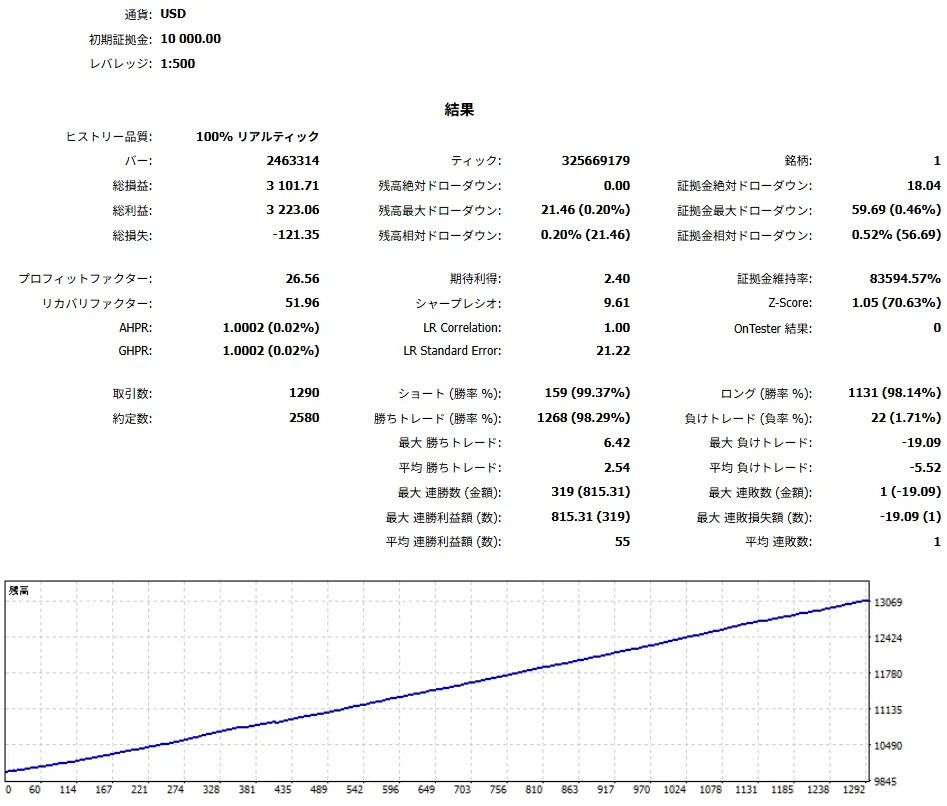
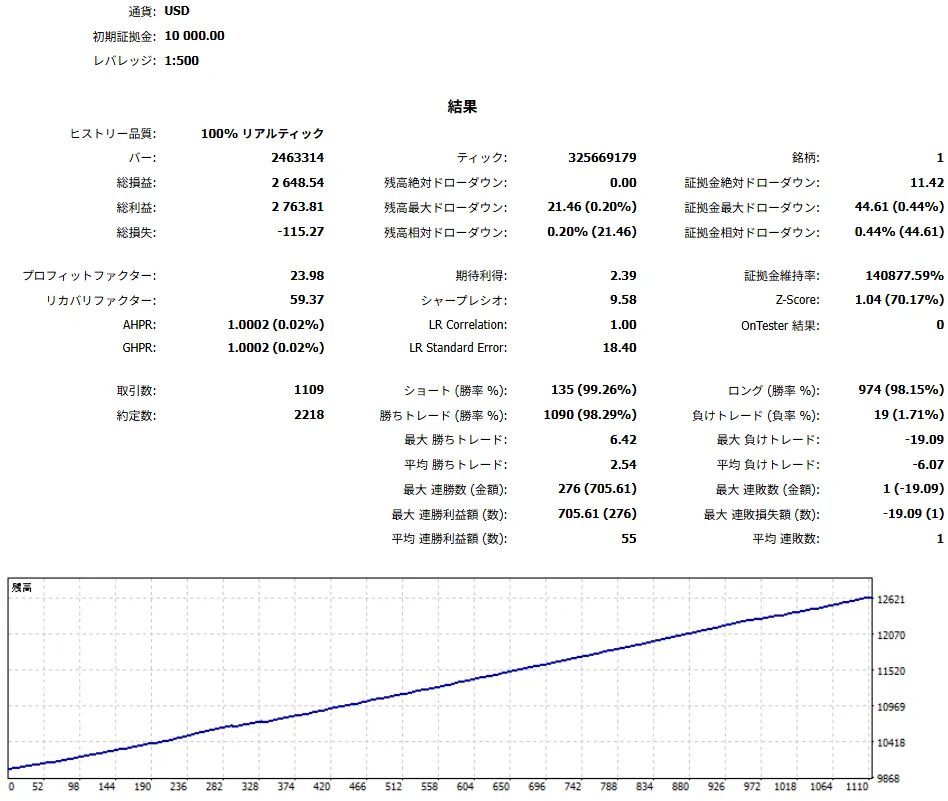
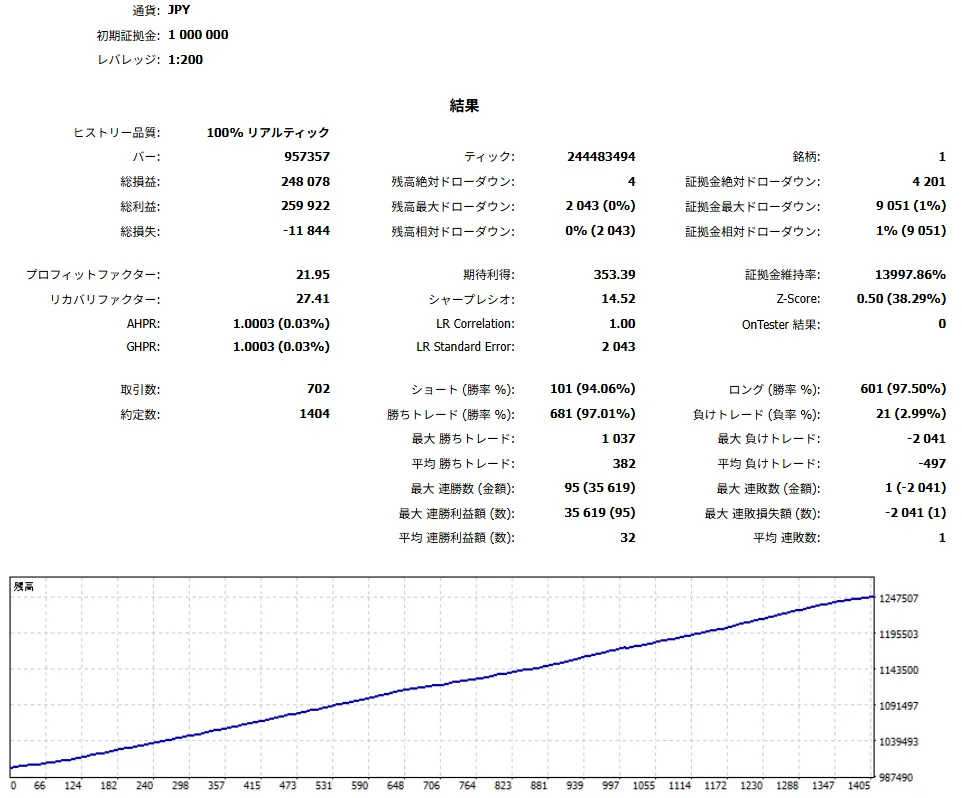
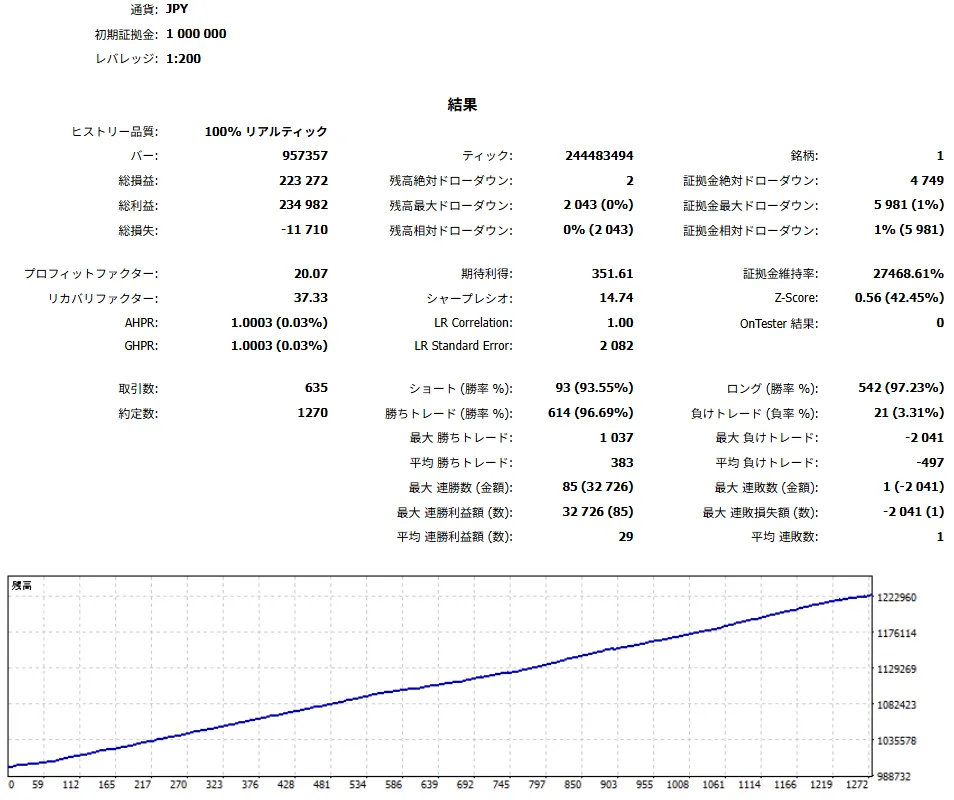
USD口座(初期証拠金10,000 USD、1:500)とJPY口座(1,000,000円、1:200)で、EA初期値MAX(8)と同梱の1ポジション用設定ファイルを検証した結果です。固定0.01ロット、日次・週末制御ON、リアルティックに基づく全ティック。v2.00は同じ設定で前の版(v1.02)と同一の約定になることを確認しているため、数値はv1.02の掲載値と同じです。
どちらの結果にも買いと売りの両方の取引を含みます。
| 検証環境 | 設定 | 期間 | 取引数 | 勝率 | PF | RF | シャープ | 総損益 | 最大DD | 最大損失 |
|---|---|---|---|---|---|---|---|---|---|---|
| USD口座 | EA初期値 MAX(8) | 2019.01.01-2025.12.31 | 1,290 | 98.29% | 26.56 | 51.96 | 9.61 | +3,101.71 USD | 59.69 USD | -19.09 USD |
| USD口座 | 1ポジション用 | 2019.01.01-2025.12.31 | 1,109 | 98.29% | 23.98 | 59.37 | 9.58 | +2,648.54 USD | 44.61 USD | -19.09 USD |
| JPY口座 | EA初期値 MAX(8) | 2023.12.11-2026.08.25 | 702 | 97.01% | 21.95 | 27.41 | 14.52 | +248,078円 | 9,051円 | -2,041円 |
| JPY口座 | 1ポジション用 | 2023.12.11-2026.08.25 | 635 | 96.69% | 20.07 | 37.33 | 14.74 | +223,272円 | 5,981円 | -2,041円 |
最大DDは保有中の含み損益を含む最大ドローダウンです。JPY口座の長期履歴にはMT5による補完警告が含まれるため、バージョン差の確認用としてご覧ください。
USD口座 - EA初期値 MAX(8)
USD口座 - 1ポジション用
JPY口座 - EA初期値 MAX(8)
JPY口座 - 1ポジション用
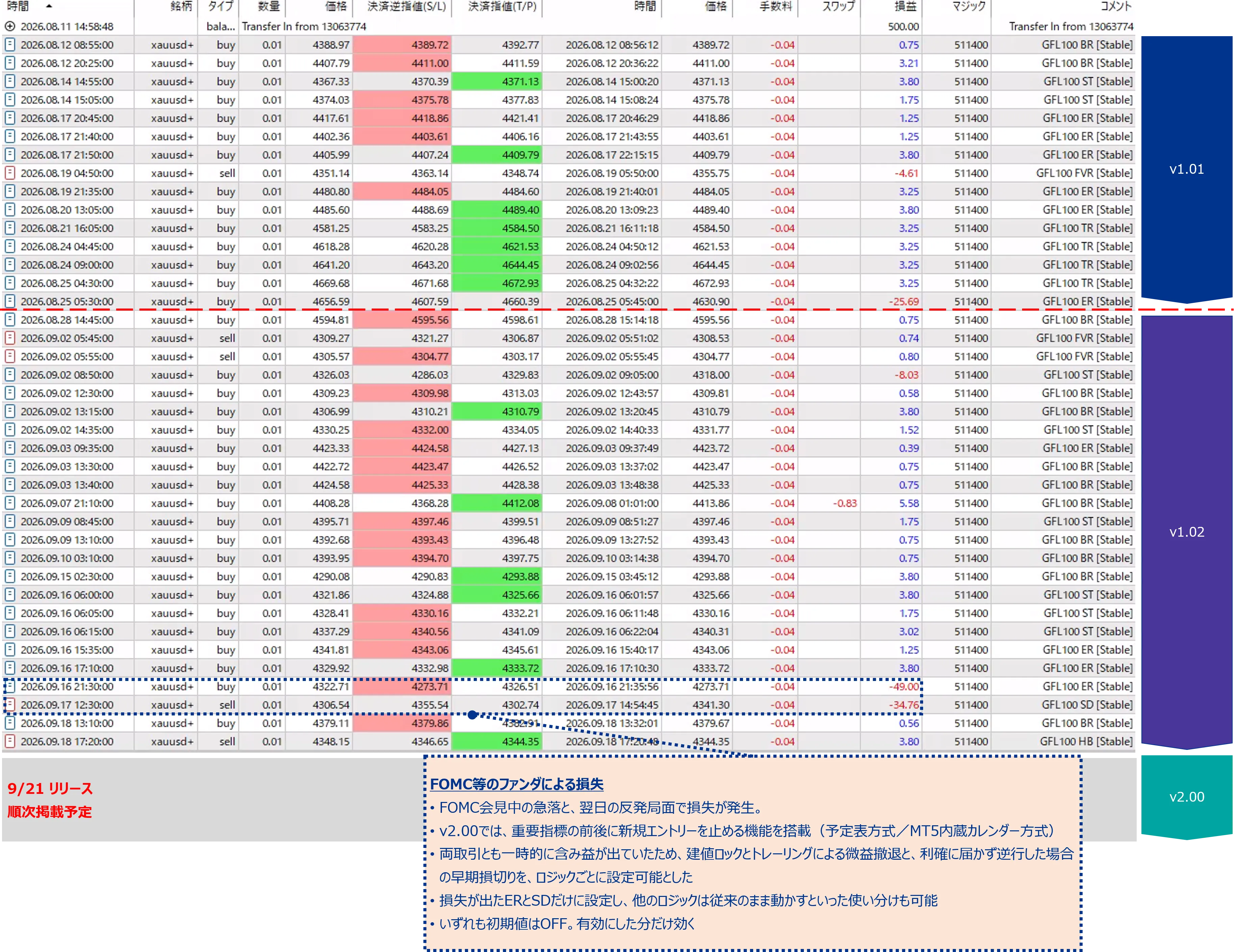
リアル口座での取引実績
リアル口座の取引実績です。
損失を浅く・短くする設定
ここからは、その成績を自分の許容範囲に合わせて動かす話です。損失を小さくするには「浅くする」と「短くする」の2方向があります。どちらもロジックごとに設定でき、初期値はすべて従来どおり(使わない)です。
エントリー時に置くSLまでの価格差を指定します。0のときはEA本来の幅です。例えば従来50ドルの幅を25ドルにすると、そのSLに掛かったときの損失は半分になります。
効き方:1取引の最大損失が確実に小さくなります。副作用:通常の値動きの揺れでSLに掛かる回数が増え、反発して勝ちになったはずの取引が負けで終わることがあります。
含み損が「初期SL幅×割合」に達したら決済します。割合0.5なら、SLの半分まで逆行した時点で切ります。「構造崩れでも決済」を選ぶと、判定時間足で高値・安値の更新が逆方向に崩れた場合にも決済します。
効き方:初期SLを変えずに損失を浅くできます。急な値飛びには初期SLが残ります。副作用:初期SL幅を浅くした場合と同じで、反発前に切る取引が増えます。
含み損のまま指定した分数を超えたら決済します。含み益に転じている取引は対象外です。上級設定で、数え始めを「建玉時」か「逆行を確認した時」かに変えられます。
効き方:含み損を長く抱えることがなくなります。副作用:時間だけで切るため、待てば戻った取引も切ります。
損益に関係なく、指定した分数を超えたら決済します。週末をまたぐ長期保有を避けたいときに使います。
効き方:保有時間の上限を保証できます。副作用:利益方向へ伸びている取引も時間で決済します。
ロジックごとのEA本来の初期SL幅
「初期SL幅」を0のままにすると、EA本来の幅を使います。ロジックごとに幅が違うので、浅くしたい場合は下の値より小さい数字を入れてください。下の値より大きい数字を入れると、そのロジックの損切りは深くなります。
| ロジック | 方向 | EA本来の初期SL幅 | EA本来の初期TP幅 | EA本来の保有上限 |
|---|---|---|---|---|
| 「GFL100 ER」買い1 | 買い | 49.0 | 3.8 | 14日 |
| 「GFL100 BR」買い2 | 買い | 40.0 | 3.8 | 14日 |
| 「GFL100 ST」買い3 | 買い | 40.0 | 3.8 | 14日 |
| 「GFL100 TR」買い4 | 買い | 45.0 | 3.25 | 14日 |
| 「GFL100 SD」売り1 | 売り | 49.0 | 3.8 | 14日 |
| 「GFL100 HB」売り2 | 売り | 28.0 | 3.8 | 24時間 |
| 「GFL100 FVR」売り3 | 売り | 12.0 | 2.4 | 60分 |
建値ロックとトレーリング(含み益を守る)
建値ロックとトレーリングは、含み益を一度抱えた後の逆行で負けに変わるのを防ぐための設定です。含み益が指定の幅に達したらSLを建値付近へ移し(建値ロック)、さらに値が伸びればSLを追従させます(トレーリング)。
例:建値ロック開始=3.0、位置=0.5、トレーリング開始=6.0、幅=4.0、最低確保=1.0。含み益が3.0ドルに達したらSLを建値+0.5へ、6.0ドルに達したら現在値から4.0ドル下(売りなら上)にSLを置き、以後は値が伸びるたびに追従します。SLは建値+1.0より下には戻しません。
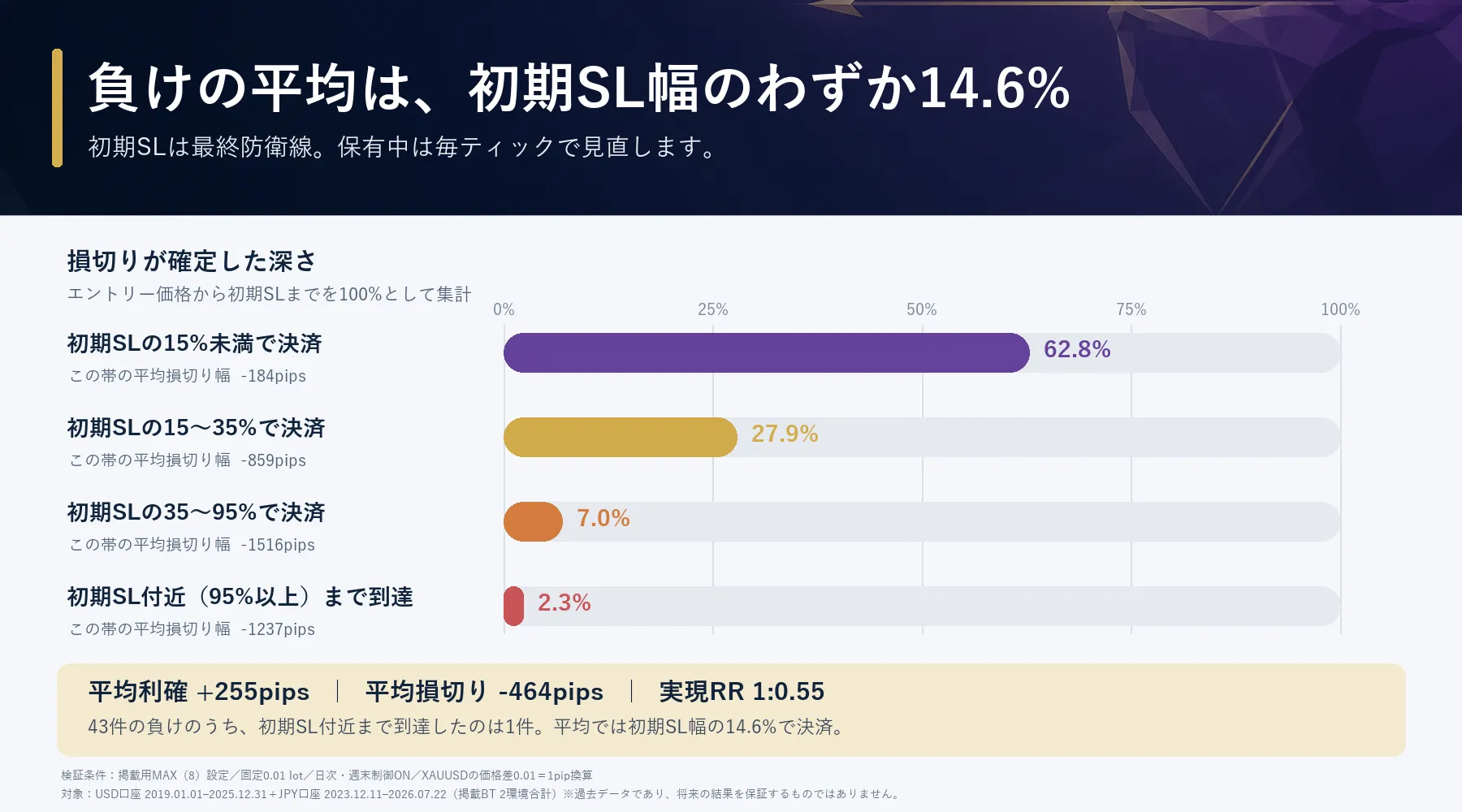
初期SLは急変時の最終防衛線です。掲載BTでも、初期SLまで待たずに保護や早期決済で終了する取引が多く確認されています。
負けはロジックに偏る
負けはロジックによって偏ります。検証では、負け額のほとんどが一つのロジックから出ていました。まずそのロジックにだけ「早期損切り」と「含み損で持てる上限」の2つを入れ、勝率の高いロジックは触らない。これが出発点です。全ロジックに一律で入れると、勝っている取引まで時間で切ってしまい、純益とPFが大きく下がります。
負けの多いロジックは環境で変わります。V社(JPY)では負け額の50%が「GFL100 ER」、25%が「GFL100 SD」で、I社(USD)では「GFL100 ST」と「GFL100 TR」に負けが多く出ました。自分の口座のバックテストで負けの多いロジックを確かめてから、そのグループに設定するのが出発点です。
設定例(出発点):負けの多いグループの早期損切りを「含み損がSL幅の一定割合で決済」・割合0.5、含み損で持てる上限を120分。
経済指標の前後は新規を止める
経済指標の前後は値が飛びやすく、スプレッドも広がります。この機能は指定した時間帯に新規エントリーだけを見送ります。保有中のポジションには何もしません(決済・SL・TPの管理は通常どおり続きます)。
設定画面のスロット1〜6に「いつ止めるか」を書いておく方式です。スロットの種類は3つ:毎月(第X週のX曜日、例:第1金曜のNFP)、指定日リスト(YYYY.MM.DD を「;」区切りで並べる。CPIなど日付が決まっている発表向け)、FOMC声明日(2019〜2026年の日付をEAが内蔵)。止める時間帯はスロットごとにサーバー時刻で指定します。初期値ではスロット1にNFP(第1金曜 15:00〜17:30)、スロット2にFOMC(内蔵日付 20:30〜23:30)が入っています。
良い点:バックテストで効果を確かめられます。ネット接続やブローカーのカレンダー配信に依存しません。止める時間帯を自分で決められます。
注意点:日付が動く発表(NFPが祝日で木曜になる月など)や、新しい年のFOMC日程は自分で追加する必要があります。サーバー時刻はブローカーごとに違うので、時間帯は自分の口座に合わせてください。
MT5が配信する経済カレンダーから、対象通貨(初期値USD)と重要度(初期値「高」のみ)で発表を拾い、発表の何分前から何分後まで止めるかを指定します。カレンダーは1時間ごとに読み直します。
良い点:日付の追加が要りません。日程変更もカレンダーに反映されていれば追従します。
注意点:使う前に、MT5のツールボックスで「指標カレンダー」タブを一度開いてください。タブを開くまでカレンダーが読み込まれず、方式Bが何も拾えない口座があります(検証した口座の一方がこれでした)。タブに予定が並べば方式Bは働きます。何も表示されない口座では方式Bは使えないので、方式Aを選んでください。EAがカレンダーを読めなかったときはログに書き出し、1分ごとに読み直します。読めない間、方式Bは新規を止めません。なお、ストラテジーテスターにはカレンダーが無いため、バックテストでは方式Aへ自動で切り替わります(ログに1回表示)。
方式Bだけで、FOMC(FRBの政策金利発表)・NFP・CPIなど、対象通貨の重要度「高」の発表を自動で広くカバーします。方式Aと組み合わせる必要はありません。方式Aは、バックテストで効果を確かめたい人や、カレンダー配信に頼りたくない人向けです。「両方」を選ぶと、どちらかの条件に当たれば止めます。
内蔵しているFOMC声明日
| 年 | 声明日(月/日) |
|---|---|
| 2019 | 1/30, 3/20, 5/1, 6/19, 7/31, 9/18, 10/30, 12/11 |
| 2020 | 1/29, 3/3, 4/29, 6/10, 7/29, 9/16, 11/5, 12/16 |
| 2021 | 1/27, 3/17, 4/28, 6/16, 7/28, 9/22, 11/3, 12/15 |
| 2022 | 1/26, 3/16, 5/4, 6/15, 7/27, 9/21, 11/2, 12/14 |
| 2023 | 2/1, 3/22, 5/3, 6/14, 7/26, 9/20, 11/1, 12/13 |
| 2024 | 1/31, 3/20, 5/1, 6/12, 7/31, 9/18, 11/7, 12/18 |
| 2025 | 1/29, 3/19, 5/7, 6/18, 7/30, 9/17, 10/29, 12/10 |
| 2026 | 1/28, 3/18, 4/29, 6/17, 7/29, 9/16, 10/28, 12/9 |
内蔵しているFOMC声明日(月/日)です。過去の日付まで内蔵しているのは、バックテストで指標回避の効果を再現できるようにするためです(方式BのMT5カレンダーはテスターで使えません)。声明は米国時間の午後に出るため、サーバー時刻がUTC+2/+3の口座では20:30〜23:30の窓を初期値にしています。口座のサーバー時刻が違う場合は時刻を合わせてください。2027年以降のFOMCを追加するには、空いているスロットに「種類=指定日リスト、名前=FOMC 2027、日付リスト=2027.01.28;2027.03.17;…(FRBの公表日程)、開始20:30、終了23:30」のように登録します。
ロット調整
ロット調整はEA全体に効く設定です。どれも「新規エントリーのロットを減らす、または見送る」働きで、勝ち負けの判断そのものは変えません。損失の金額を小さくしたい人向けです。
- 弱トレンド時のロット係数(ロジックごと):H1のADXが閾値(初期値30)を下回っているときだけ、そのロジックのロットに係数を掛けます。
- 値動き連動:H1のATRが基準値を超えるほどロットを減らします(下限係数あり)。
- 負けた後の一時停止:負けの決済から指定分数は新規を止める、またはロットを減らします。
- 最小ロット未満のとき:減らした結果がブローカーの最小ロットを下回る場合、「建てない」か「最小ロットで建てる」かを選べます。0.01ロットで運用している場合、係数は効かないか見送りになる点に注意してください。
こうしたい場合はこう設定する(ロットの変わり方)
「こうしたい」ごとの設定と、ロットがどう変わるかの例です(固定ロット0.10のとき)。
- 弱いトレンドのときだけ、負けの多いロジックのロットを6割にしたい → そのロジックの弱トレンド時のロット係数=0.6、ロット調整の「弱トレンドとみなすADX」=30。H1のADXが30未満のときだけ0.10×0.6=0.06ロットで建て、30以上なら0.10のまま。
- あるロジックのロットを常に半分にしたい → そのロジックの「ロット係数」=0.5。常に0.10×0.5=0.05ロット。0にするとそのロジックは建てません。
- 値動きが荒いときにロットを減らしたい → 「値動き連動の基準ATR」=10、「下限係数」=0.2。H1のATRが10ならそのまま、20なら10÷20=0.5倍で0.05ロット、50なら0.2倍(下限)で0.02ロット。
- 負けた直後は24時間新規を止めたい → 「負けた後に新規を止める時間」=1440、「停止中のロット係数」=0。半分のロットで続けたいなら係数=0.5。
- 複数の係数は掛け算です。弱トレンド0.6と値動き連動0.5が同時なら0.10×0.6×0.5=0.03ロット。減らした結果がブローカーの最小ロット(多くは0.01)を下回るときは「計算後が最小ロット未満のとき」の設定どおり、建てないか最小ロットで建てます。
- 固定ロット0.01で運用している場合、係数を掛けても0.01未満にしかならないため、ロット調整は「建てない(見送り)」の働きだけになります。損失を小さくしたい場合は初期SL幅や早期損切りを使ってください。
同梱の設定ファイル
上の設定を組み合わせた設定ファイルを同梱しています。それぞれの特徴は次の表、適用したときの成績はその下の表です。読み込んだ後、マジックナンバー、スプレッド上限、時刻設定を自分の口座に合わせて確認してください。NexusとFlankerの設定ファイルは表示・通知・表示言語の項目も含むため、読み込むとそれらは設定ファイルの値になります。表示の設定は売買結果には影響しません。
| ファイル | 用途 | 内容 |
|---|---|---|
| GonzoFlanker_ | 1ポジション用 | 最大同時保有数だけを1に変えたものです。売買条件と時間制御はEAの初期値(日次23:00〜01:00と週末 金曜18:00〜月曜01:00の新規停止)のままです。EAの初期値(最大同時保有数MAX)は設定ファイルを読み込まずに使います。 |
| GonzoFlanker_ | 指標回避を足す | 1ポジション用の設定に、方式A(予定表)の指標回避を加えたものです。NFPとFOMC声明日の前後は新規を見送ります。 |
| GonzoFlanker_ | 保有時間の上限24時間を足す | 1ポジション用の設定に、全ロジックの保有時間の上限24時間(1440分)を加えたものです。上の成績表のこの行を再現します。 |
| GonzoFlanker_ | 早期損切り0.5と保有上限8時間を足す | 1ポジション用の設定に、全ロジックの早期損切り(SL幅の半分)と保有時間の上限8時間(480分)を加えたものです。上の成績表のこの行を再現します。純益とPFが大きく下がる例として載せています。 |
| GonzoFlanker_ | 負けの多いロジックだけ早く切る | 1ポジション用の設定に、V社で負け額の多かった「GFL100 ER」と「GFL100 SD」だけ、早期損切り(SL幅の半分)と含み損120分上限を加えたものです。他の5ロジックは従来のままです。 |
同梱の設定ファイルを適用したときの成績(V社/JPY口座、固定0.01ロット、2023.12.11〜2026.09.18)
同梱の設定ファイルを読み込むとGonzo Flankerの成績がどう変わるかです。1行目が基本の運用設定で、以下はそれに設定を足したものです。すべて同じ口座・同じ期間・固定0.01ロットで測っています。
| 設定 | 何を変えたか | 設定ファイル | 純益(円) | 勝率 | PF | RF | 最大有効証拠金DD(円) | 1取引の最大損失(円) |
|---|---|---|---|---|---|---|---|---|
| 1ポジション用(基本の運用設定) | 最大同時保有数を1に。売買条件と時間制御はEAの初期値 | GonzoFlanker_ | 214,160 | 96.31% | 9.67 | 16.5 | 13,004 | -7,643 |
| 指標回避を足す | 方式A(NFP・FOMC)で新規を見送り | GonzoFlanker_ | 219,282 | 96.43% | 13.86 | 36.7 | 5,976 | -5,361 |
| 保有時間の上限24時間を足す | 全ロジックの保有時間の上限を24時間(1440分)に | GonzoFlanker_ | 182,531 | 94.38% | 4.30 | 14.0 | 13,004 | -7,643 |
| 早期損切り0.5と保有上限8時間を足す | 全ロジックに早期損切り0.5と保有上限8時間(480分) | GonzoFlanker_ | 103,609 | 88.71% | 1.83 | 9.6 | 10,792 | -3,986 |
| 負けの多いロジックだけ早く切る | GFL100 ERとSDに早期損切り0.5と含み損120分上限 | GonzoFlanker_ | 182,264 | 91.74% | 4.65 | 23.8 | 7,674 | -3,954 |
過去データによる結果です。指標回避は方式A(予定表)で測っています。指標回避の行が1行目とほとんど変わらない製品は、この期間の指標時間帯に大きな負けが無かったためで、効果はその時間帯に急変が起きたときだけ出ます(同シリーズのFlankerでは、2026年9月16日のFOMC時の負け −7,639円が消えました)。最後の行は、負け額の大半を占めるロジックにだけ早期損切りと含み損の時間上限を入れたものです。そのロジックを止めるという意味ではありません。
商品概要
| 項目 | 内容 |
|---|---|
| 対象 | XAUUSD / GOLD |
| プラットフォーム | MetaTrader 5 |
| バージョン | 2.00 |
| エントリー | ロング4種・ショート3種、計7ロジック |
| 最大同時保有数 | 1〜7、MAX(8)から選択 |
| ピラミッディング | 非搭載。別ロジックの条件が重なった場合のみ複数保有 |
| ロット計算 | 固定ロット/戦略別リスク%/全戦略の最小ロットで統一 |
| 保有中の管理 | ロジックごとに初期SL幅、早期損切り、含み損で持てる上限、保有時間の上限、建値ロック、トレーリング |
| スプレッド上限 | 価格差0.19(初期値)。0以下で無効。 |
| 時間制御 | 日次ロールオーバー制御/週末リスク制御(初期値ON) |
| 指標回避 | 方式A(予定表)/方式B(MT5カレンダー)/両方。初期値OFF。 |
| 表示言語 | 日本語/英語 |
Gonzo 3商品の位置づけ
| 商品 | 位置づけ | 向く運用 | 主な違い |
|---|---|---|---|
| Gonzo Special | 多機能モデル | 自動売買に加えて表示・通知・手動操作も使いたい方 | 2ロジック(どちらも買い・売り)、通知、SMC分析、パネル操作、任意のピラミッディング |
| Gonzo Nexus | 別ロジックモデル | Specialとは異なる売買タイミングも組み合わせたい方 | 3ロジック(本体2+Nexus+1)、Specialとは別系統の売買ロジック |
| Gonzo Flanker | Special派生モデル | Specialが取引しない値動きを狙いたい方 | 7ロジック(買い4・売り3)、Specialと同じ売買管理で別のエントリー条件 |
購入前の確認
- バックテストは過去データによる検証です。今後の利益、勝率、損失回避を保証するものではありません。XAUUSDは急変動、スプレッド拡大、滑り、週末ギャップが起こります。
- できるだけスプレッドの狭い口座で運用してください。スプレッドが広い時間帯はエントリー、決済、SL/TPの到達に影響します。
- 複数のGonzo製品を同じ口座で動かす場合は、商品ごとにマジックナンバーを分け、口座全体の最大ロットと許容DDを先に決めてください。
- 時刻の設定はすべてブローカーのサーバー時刻です。日本時間ではありません。
- 通信断や窓開けのときは、指定した価格・時間どおりの決済は保証されません。初期SLは最後の守りとして残してください。
- 短期売買を行うため、スプレッドが狭いブローカー・口座タイプをご使用ください。
- 掲載バックテストとこのページの自動売買実績は、Flankerが自動でエントリーした取引を集計したものです。パネルから手動で行う取引は、利用者の判断と操作のタイミングによって結果が異なり、掲載バックテストには含まれません。手動操作を使う場合は、発注前にロットとリスクをご確認ください。
- Risk%方式で計算したロットがブローカーの最小ロットを下回る場合は、その最小ロットで発注します。指定したRisk%を上回る損失になることがあるため、少額口座では固定0.01ロットで想定される損失額を先に確認してください。
前の版からの変更点
前の版から使っている方へ。売買ロジックは変えていません。変わったのは次の点です。
- ロジックごとに「初期SL幅」「早期損切り」「含み損で持てる上限」「保有時間の上限」「建値ロック」「トレーリング」「決済後の再入場待ち」「ロット係数」を設定できるようになりました。
- 経済指標の前後に新規を止める機能(方式A 予定表、方式B MT5カレンダー)を追加しました。
- ロット調整(弱トレンド時・値動き連動・負けた後の一時停止)を追加しました。
- 設定ファイルはファイル名の版だけ更新し、値は変えていません。安全側のサンプルを追加しました。
- 操作マニュアルはPDF(日本語・英語)として同梱しました。
操作方法と設定項目の一つひとつの意味は、同梱のPDFマニュアル(日本語・英語)に書いています。
Gonzo Flanker v2.00
The Gonzo Special engine, aimed at moves that Special does not tradeSeven independent logics (four long, three short) watch the market and every open position is managed on each tick. Stop depth and holding time can be set per logic, and new entries can be skipped around economic releases.
XAUUSD / GOLDMetaTrader 5Semi-discretionary EAv2.00Japanese / EnglishAbout this product
Gonzo Flanker is a semi-discretionary XAUUSD EA running on the same engine as Gonzo Special. Its entries are designed separately: four long and three short independent logics watch the market. Orders, TP, SL, protection and exits are handled on every tick.
In the published test environment the same-direction entry overlap with Special was 0.91% (same-direction entries matched within a plus/minus 15-minute window), so both can share one account. There is no pyramiding; with a maximum above one, several positions occur only when different logics trigger together.
It can run fully automatic, and the panel offers manual BUY / SELL, close all and a trading stop.
Logics and their names in the trade history
| Settings group (order comment in the history) | What it is |
|---|---|
| GFL100 ER long 1 (exhaustion rotation) | Long. Reversal after the move exhausts. |
| GFL100 BR long 2 (balanced range) | Long. Rotation inside a balanced range. |
| GFL100 ST long 3 (session transition) | Long. Session regime transition. |
| GFL100 TR long 4 (stair-step resume) | Long. Resumption of a stair-step advance. |
| GFL100 SD short 1 (session downside) | Short. Downside release below the session low. |
| GFL100 HB short 2 (efficient breakdown) | Short. Continuation of an efficient breakdown. |
| GFL100 FVR short 3 (failed rally) | Short. Reversal of a failed volatility rally. |
Switch off or turn down only the logic that loses
The three main Gonzo EAs (Gonzo Special, Gonzo Nexus and Gonzo Flanker) each run several logics. All of them have a high win rate, but when they lose, the losses tend to concentrate in one logic. Until this version the choice was to stop the whole EA or leave it as it was. Now you can turn down just the logic the losses come from, without touching the others.
- Switch the logic off: it stops opening new positions while every other logic keeps running.
- Cut losses earlier: a shallower initial stop, an exit at a fraction of the stop distance, or an exit on a structure break.
- Change how profit is taken: a different initial target, plus break-even lock and trailing to protect a profit once it exists.
- Reduce only its lot size: a lot factor for that logic, optionally applied only while the trend is weak.
- Cap the holding time: a limit in minutes for time spent in loss, and a limit on the holding time itself.
Every default is the previous behaviour, so loading the EA and changing nothing reproduces the trades of the previous version. Find where the losses come from first, then tighten only that. That is how this version is meant to be used.
The best settings differ from account to account, because spreads, swaps, fill behaviour and server time differ from broker to broker. There is a community for buyers where you can share what worked on your account and try what worked on other people’s.
Leaving that to users alone would not be right on my part. I keep testing as well and will publish better settings in the community as I find them. The range you can tune in this version is limited, so where that turns out not to be enough I will consider exposing more of it as settings.
Using the logics selectively
The seven logics are independent and can be told apart by the order comment (GFL100 ER and so on). Which logic carries the losses depends on the account, so check your own backtest and switch that logic off, reduce its lot, or give it an early cut or a holding limit.
Main functions
Trading is automatic. Each logic enters on its own conditions; open positions are checked on every tick and the EA adjusts the stop or closes the trade. The following functions work together.
- Position management: an initial stop and target are placed at entry, and protection and exit decisions continue while the position is open. Per logic you can set the initial stop distance, early cut, time allowed in loss, maximum holding time, break-even lock and trailing stop.
- Skipping entries around economic releases: method A (schedule table) and/or method B (the MT5 built-in calendar) stop new entries around releases.
- Time controls: new entries stop around the weekend and the daily rollover, and you choose what happens to open positions (keep, close when profitable, close at a set time).
- Lot size: a fixed lot or a lot calculated from the risk percent per trade. Lot adjustment can also reduce the lot in a weak trend or a fast market, and pause after a loss.
- Settings files: the published-backtest SET, the weekend / daily protection SET and safer samples are included and ready to load.
Each logic can cut losses earlier: by time (maximum minutes in loss, maximum holding time) and by width (a shallower initial stop, or an early cut at a fraction of the stop distance or on a structure break).
To stop a trade that was in profit from turning into a loss on a reversal, break-even lock and trailing stop can also be set per logic.
Backtest results
Results of the EA default MAX (8) and the included one-position settings file on a USD account (deposit 10,000 USD, 1:500) and a JPY account (1,000,000 JPY, 1:200): fixed 0.01 lot, daily and weekend controls ON, every tick based on real ticks. v2.00 produces the same trades as v1.02 with these settings, so the figures equal the published v1.02 figures.
Both results include long and short trades.
| Environment | Setup | Period | Trades | Win rate | PF | RF | Sharpe | Net profit | Max DD | Largest loss |
|---|---|---|---|---|---|---|---|---|---|---|
| USD account | EA default MAX (8) | 2019.01.01-2025.12.31 | 1,290 | 98.29% | 26.56 | 51.96 | 9.61 | +3,101.71 USD | 59.69 USD | -19.09 USD |
| USD account | One position | 2019.01.01-2025.12.31 | 1,109 | 98.29% | 23.98 | 59.37 | 9.58 | +2,648.54 USD | 44.61 USD | -19.09 USD |
| JPY account | EA default MAX (8) | 2023.12.11-2026.08.25 | 702 | 97.01% | 21.95 | 27.41 | 14.52 | +248,078 JPY | 9,051 JPY | -2,041 JPY |
| JPY account | One position | 2023.12.11-2026.08.25 | 635 | 96.69% | 20.07 | 37.33 | 14.74 | +223,272 JPY | 5,981 JPY | -2,041 JPY |
Max DD includes floating profit and loss. The long JPY history contains MT5 history-fill warnings, so treat it as a version comparison rather than a guarantee.
USD account - EA default MAX (8) (v1.01 reference image)
USD account - one position (v1.01 reference image)
JPY account - EA default MAX (8) (v1.01 reference image)
JPY account - one position (v1.01 reference image)
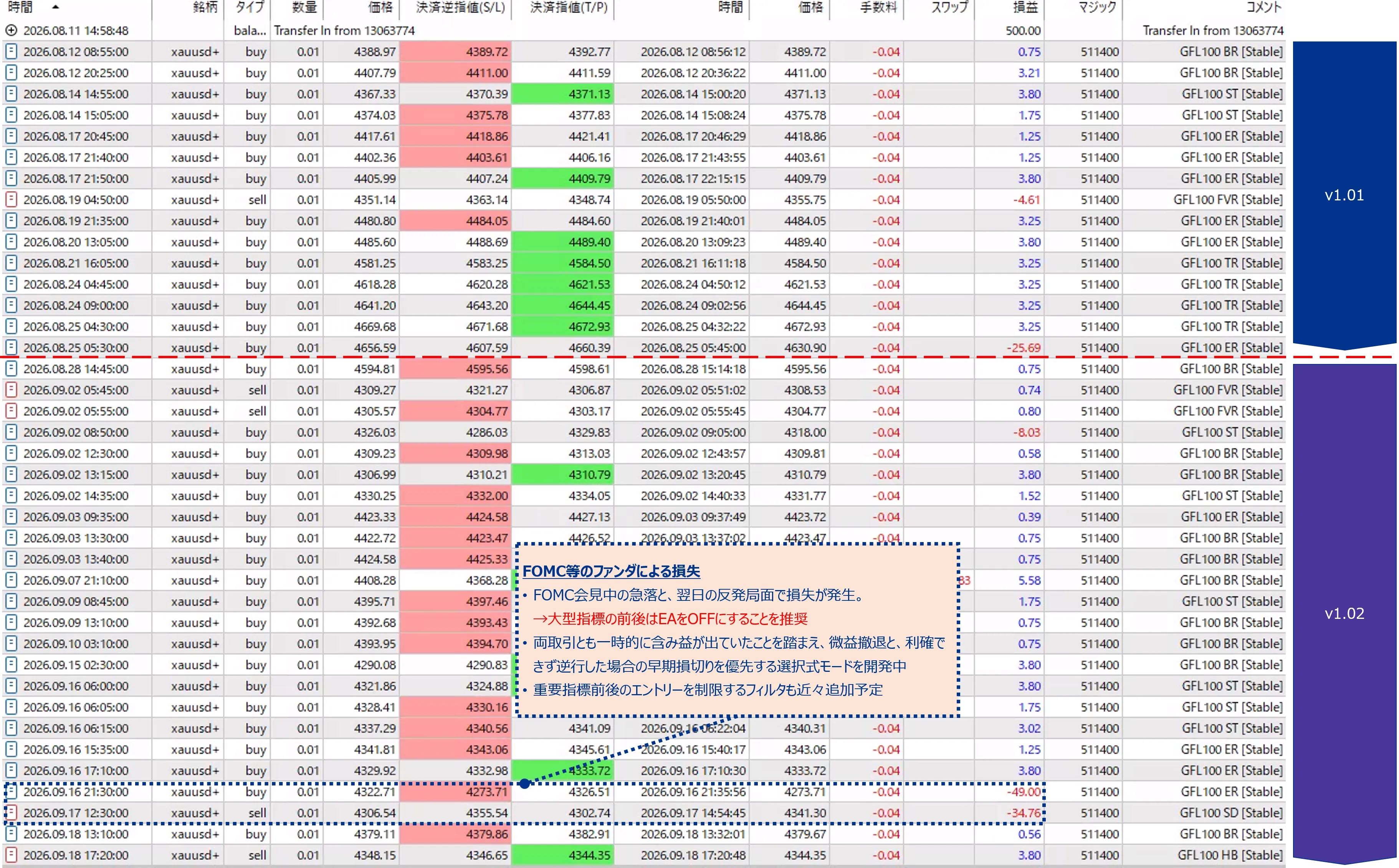
Real account trading record
Real account trading record.
Making losses shallower and shorter
From here on this is about moving those results towards what you can accept. Losses can be made shallower and shorter. Both directions are set per logic, and every default is the previous behaviour (not used).
Sets the price distance of the stop placed at entry. 0 keeps the EA default. If the previous distance was 50 dollars and you set 25, a loss at that stop is halved.
Effect: the largest loss per trade becomes smaller for certain. Side effect: normal swings hit the stop more often, and trades that would have recovered end as losses.
Closes the trade when the floating loss reaches the initial stop distance times the fraction. With 0.5 the trade is cut halfway to the stop. "Fraction or structure break" also closes when the highs and lows on the review timeframe break against the position.
Effect: losses become shallower without touching the initial stop, which still protects against sudden gaps. Side effect: as with a shallower stop, more trades are cut before they recover.
Closes the trade once it has stayed in loss longer than the set minutes. Trades in profit are not affected. In the advanced settings you can count from the entry or from the confirmed adverse move.
Effect: losing positions are no longer held for long. Side effect: the cut is by time alone, so trades that would have recovered later are closed too.
Closes the trade after the set minutes regardless of profit or loss. Useful to avoid multi-day holds across the weekend.
Effect: the holding time is capped for certain. Side effect: trades still running in profit are closed by time as well.
The EA initial stop width of each logic
With "Initial SL distance" left at 0 the EA uses its own width. The widths differ per logic, so enter a smaller number than the one below to make the stop shallower. A larger number makes that stop deeper.
| Logic | Direction | EA initial SL distance | EA initial TP distance | EA holding limit |
|---|---|---|---|---|
| GFL100 ER long 1 | Long | 49.0 | 3.8 | 14 days |
| GFL100 BR long 2 | Long | 40.0 | 3.8 | 14 days |
| GFL100 ST long 3 | Long | 40.0 | 3.8 | 14 days |
| GFL100 TR long 4 | Long | 45.0 | 3.25 | 14 days |
| GFL100 SD short 1 | Short | 49.0 | 3.8 | 14 days |
| GFL100 HB short 2 | Short | 28.0 | 3.8 | 24 hours |
| GFL100 FVR short 3 | Short | 12.0 | 2.4 | 60 minutes |
Break-even lock and trailing stop (protecting profit)
Break-even lock and trailing stop are there to stop a trade that was in profit from turning into a loss on a reversal. Once the floating profit reaches the set distance the stop moves near the entry price (break-even lock); as the price runs further the stop follows it (trailing).
Example: break-even start 3.0, lock 0.5, trailing start 6.0, distance 4.0, minimum lock 1.0. At 3.0 dollars of profit the stop moves to entry + 0.5; at 6.0 dollars the stop is placed 4.0 dollars below the price (above for a short) and follows the price from then on, never falling below entry + 1.0.
The initial stop is the final safety line for sudden moves. In the published backtests many losing trades were protected or closed before reaching it.
Losses are concentrated in one logic
Losses are concentrated in one logic. In testing, almost all of the loss amount came from a single logic. Start by setting just two things on that logic, the early cut and the maximum minutes in loss, and leave the high win-rate logic alone. Applying the same limits to every logic also closes winning trades on time, and net profit and PF fall sharply.
Which logic carries the losses depends on the environment: at Company V (JPY) 50% of the loss amount came from GFL100 ER and 25% from GFL100 SD; at Company I (USD) GFL100 ST and GFL100 TR carried most losses. Check the losing logics in a backtest on your own account first, then set that group.
Starting point: in the loss-carrying group set Early cut to "At a fraction of SL" with fraction 0.5 and Max minutes in loss to 120.
Skipping new entries around economic events
Prices jump and spreads widen around economic releases. This function skips new entries during the selected windows only. Open positions are not touched; their management continues as usual.
You write the windows into slots 1 to 6 in the settings. A slot is one of three kinds: monthly (a weekday of a given week, for example NFP on the first Friday), a date list (YYYY.MM.DD values separated by semicolons, for releases such as CPI whose dates are known), or FOMC statement days (the dates for 2019 to 2026 are built into the EA). Each slot has its own stop window in server time. By default slot 1 is NFP (first Friday 15:00-17:30) and slot 2 is FOMC (built-in dates, 20:30-23:30).
Good points: It can be verified in backtests. It does not depend on an internet feed or the broker calendar. You decide the windows.
Points to note: Releases that move (for example NFP on a Thursday because of a holiday) and FOMC dates of a new year must be added by you. Server time differs between brokers, so set the windows for your own account.
Events are taken from the economic calendar delivered by MT5, filtered by currency (default USD) and importance (default high only), and new entries stop from a set number of minutes before each release to a set number of minutes after. The calendar is re-read once an hour.
Good points: No dates to maintain. Schedule changes are followed as long as the calendar shows them.
Points to note: Before you use it, open the Calendar tab in the MT5 Toolbox once. On some accounts the calendar is not loaded until that tab has been opened, and method B finds nothing until then (one of the accounts we tested behaved this way). If the tab lists upcoming releases, method B works. If it stays empty on your account, use method A instead. When the EA cannot read the calendar it says so in the log and retries once a minute; while it cannot read it, method B stops nothing. The Strategy Tester has no calendar at all, so backtests switch to method A automatically (one line in the log).
Method B alone covers every high-importance release of the selected currencies, including the FOMC rate decision, NFP and CPI, automatically. It does not need to be combined with method A. Method A is for people who want to verify the effect in backtests or who do not want to rely on the calendar feed. With Both, new entries stop when either method matches.
Built-in FOMC statement days
| Year | Statement days (month/day) |
|---|---|
| 2019 | 1/30, 3/20, 5/1, 6/19, 7/31, 9/18, 10/30, 12/11 |
| 2020 | 1/29, 3/3, 4/29, 6/10, 7/29, 9/16, 11/5, 12/16 |
| 2021 | 1/27, 3/17, 4/28, 6/16, 7/28, 9/22, 11/3, 12/15 |
| 2022 | 1/26, 3/16, 5/4, 6/15, 7/27, 9/21, 11/2, 12/14 |
| 2023 | 2/1, 3/22, 5/3, 6/14, 7/26, 9/20, 11/1, 12/13 |
| 2024 | 1/31, 3/20, 5/1, 6/12, 7/31, 9/18, 11/7, 12/18 |
| 2025 | 1/29, 3/19, 5/7, 6/18, 7/30, 9/17, 10/29, 12/10 |
| 2026 | 1/28, 3/18, 4/29, 6/17, 7/29, 9/16, 10/28, 12/9 |
Built-in FOMC statement days (month/day). Past dates are built in so that backtests can reproduce the effect of event avoidance (method B, the MT5 calendar, is not available in the tester). Statements are released in the US afternoon, so the default window is 20:30-23:30 in server time for UTC+2/+3 accounts. Adjust the times if your server time differs. To add FOMC days from 2027 on, use a free slot: kind = Date list, label = FOMC 2027, dates = 2027.01.28;2027.03.17;... (from the Fed schedule), from 20:30 until 23:30.
Lot adjustment
Lot adjustment applies to the whole EA. Each option reduces or skips the lot of new entries; it does not change how trades are decided. It is for people who want smaller loss amounts.
- Lot factor in weak trend (per logic): when the H1 ADX is below the threshold (default 30), the lot of that logic is multiplied by the factor.
- Volatility cut: the lot shrinks as the H1 ATR rises above a reference value (with a floor).
- Pause after a loss: for a set number of minutes after a losing close, new entries stop or use a smaller lot.
- Below the minimum lot: if the reduced lot falls below the broker minimum, choose between skipping the entry and trading the minimum lot. At 0.01 lot the factors either have no effect or skip the entry.
What to set for each goal (how the lot changes)
What to set for each goal, and how the lot changes (examples with a fixed lot of 0.10).
- A 60% lot for the loss-carrying logic only in a weak trend: set its Lot factor in weak trend to 0.6 and the Weak-trend ADX threshold to 30. When the H1 ADX is below 30 the lot is 0.10 x 0.6 = 0.06; otherwise 0.10.
- Always half the lot of one logic: set its Lot factor to 0.5. The lot is always 0.10 x 0.5 = 0.05. 0 means no entries for that logic.
- A smaller lot when the market is fast: set Volatility cut: reference ATR to 10 and the floor to 0.2. With an H1 ATR of 10 the lot is unchanged, at 20 it is 10/20 = half (0.05), at 50 it is the floor 0.2 (0.02).
- No new entries for 24 hours after a loss: set Pause after a loss to 1440 and the lot factor during the pause to 0. To continue at half lot instead, set 0.5.
- Factors multiply: weak trend 0.6 and volatility 0.5 together give 0.10 x 0.6 x 0.5 = 0.03. If the result falls below the broker minimum (usually 0.01), the setting When below the minimum lot decides between skipping and trading the minimum lot.
- At a fixed lot of 0.01 any factor gives less than 0.01, so lot adjustment can only skip entries. To reduce losses at 0.01 lot, use the initial stop distance or the early cut.
Included settings files
The included settings files combine the settings above. The first table says what each one does; the table under it shows what happens when you load it. After loading one, check the magic number, spread limit and time settings for your own account. The Nexus and Flanker files also carry the display, notification and interface-language items, so loading one sets those to the values in the file. Display settings do not affect trading results.
| File | Purpose | Contents |
|---|---|---|
| GonzoFlanker_ | One position | Only the maximum-position setting is changed to one. Trading rules and time controls stay at the EA defaults (no new entries daily 23:00-01:00 and Friday 18:00 to Monday 01:00). The EA defaults (maximum positions MAX) need no settings file. |
| GonzoFlanker_ | Adds event avoidance | The one-position settings plus method A event avoidance around NFP and FOMC statement days. |
| GonzoFlanker_ | Adds a 24-hour holding limit | The one-position settings plus a 24-hour (1440-minute) holding limit on every logic. Reproduces the measured-examples row. |
| GonzoFlanker_ | Adds an early cut at 0.5 and an 8-hour holding limit | The one-position settings plus, on every logic, an early cut at half the stop distance and an 8-hour (480-minute) holding limit. Reproduces the measured-examples row; shown as an example of a large fall in net profit and PF. |
| GonzoFlanker_ | Cuts only the loss-carrying logic earlier | The one-position settings plus, on GFL100 ER and GFL100 SD only, an early cut at half the stop distance and a 120-minute loss limit. The other five logics are unchanged. |
Results of the included settings files (Company V, JPY account, fixed 0.01 lot, 2023.12.11-2026.09.18)
What each included settings file does to the results of Gonzo Flanker. The first row is the operating settings; the rows below add one thing to it. All measured on the same account, over the same period, at a fixed 0.01 lot.
| Settings | What it changes | File | Net profit (JPY) | Win rate | PF | RF | Max equity DD (JPY) | Largest loss (JPY) |
|---|---|---|---|---|---|---|---|---|
| One position at a time (the operating settings) | Maximum concurrent positions set to 1; entry rules and time controls at the EA defaults | GonzoFlanker_ | 214,160 | 96.31% | 9.67 | 16.5 | 13,004 | -7,643 |
| Add event avoidance | Method A (NFP, FOMC) skips new entries | GonzoFlanker_ | 219,282 | 96.43% | 13.86 | 36.7 | 5,976 | -5,361 |
| Add a 24-hour holding limit | Holding limit of 24 hours (1440 minutes) on every logic | GonzoFlanker_ | 182,531 | 94.38% | 4.30 | 14.0 | 13,004 | -7,643 |
| Add an early cut at 0.5 and an 8-hour holding limit | Early cut at 0.5 and an 8-hour (480-minute) holding limit on every logic | GonzoFlanker_ | 103,609 | 88.71% | 1.83 | 9.6 | 10,792 | -3,986 |
| Cut only the loss-carrying logic earlier | Early cut 0.5 and 120-minute loss limit on GFL100 ER and SD | GonzoFlanker_ | 182,264 | 91.74% | 4.65 | 23.8 | 7,674 | -3,954 |
Historical results. Event avoidance was measured with method A (schedule table). Where that row is almost identical to the first row, there was no large loss during the event windows in this period; the effect appears only when a sharp move happens in one of them (in Gonzo Flanker, another product in the series, the loss of 7,639 JPY at the FOMC of 16 September 2026 disappeared). The last row applies an early cut and a time-in-loss limit to the logic that carries most of the loss amount. It does not mean that logic is switched off.
Product overview
| Item | Details |
|---|---|
| Market | XAUUSD / GOLD |
| Platform | MetaTrader 5 |
| Version | 2.00 |
| Entries | Four long and three short logics, seven in total |
| Maximum positions | 1 to 7, or MAX (8) |
| Pyramiding | None. Several positions only when different logics trigger together |
| Lot sizing | Fixed lot / per-logic risk percent / uniform minimum lot |
| Position management | Per logic: initial stop distance, early cut, time allowed in loss, maximum holding time, break-even lock, trailing stop |
| Entry spread limit | Price difference 0.19 by default; 0 or less disables it. |
| Time controls | Daily rollover and weekend controls (ON by default) |
| Event avoidance | Method A (schedule) / method B (MT5 calendar) / both. OFF by default. |
| Interface | Japanese / English |
Position in the Gonzo lineup
| Product | Position | Suited to | Main difference |
|---|---|---|---|
| Gonzo Special | Full-feature model | Automatic trading plus display, notifications and manual control | Two logics (both long and short), notifications, SMC analysis, panel, optional pyramiding |
| Gonzo Nexus | Different-logic model | Adding entry timings different from Special | Three logics (two main plus Nexus+), a separate trading logic from Special |
| Gonzo Flanker | Special-derived model | Targeting moves that Special does not trade | Seven logics (four long, three short): the same trade management as Special with separate entry conditions |
Before you buy
- Backtests use historical data and do not guarantee future profit, win rate or loss avoidance. XAUUSD has sharp moves, spread widening, slippage and weekend gaps.
- Use an account with tight spreads. Wide spreads affect entries, exits and whether SL / TP levels are reached.
- When running several Gonzo products on one account, keep a different magic number for each and decide the total lot and the drawdown you accept beforehand.
- All time settings use the broker server time, not your local time.
- During a disconnection or a price gap, exits at the set price or time are not guaranteed. Keep the initial stop as the last line of defence.
- Because it trades short-term, use a broker and account type with tight spreads.
- The published backtests and the automatic-trading record on this page cover trades the EA entered automatically. Trades entered by hand from the panel depend on your own decision and timing and are not included in those backtests. Check the lot size and the risk before you use a manual control.
- If the risk-percent lot falls below the broker minimum, the minimum lot is sent. The loss can then exceed the selected risk percent, so on a small account check the expected loss at a fixed 0.01 lot first.
Changes from the previous version
For users of the previous version: the trading logic is unchanged. What changed is the following.
- Per logic you can now set the initial stop distance, early cut, time allowed in loss, maximum holding time, break-even lock, trailing stop, wait after a close and lot factor.
- Event avoidance was added (method A schedule table, method B MT5 calendar).
- Lot adjustment was added (weak trend, volatility, pause after a loss).
- The settings files keep their values; only the version in the file name changed. Safer samples were added.
- The operation manual is now a PDF (Japanese and English).
Operation and the meaning of every setting are described in the included PDF manual (Japanese and English).
The coupon expires today.
●Payment
For those using GogoJungle for the first time Easy 3 steps to use the product!
At GogoJungle, we provide services to enrich your investment life for our members. In addition, product purchases are limited to members. Why not register as a member now and make use of GogoJungle!
