


1クリック注文
GogoJungleでのサービス購入が、かんたん・スピーディーで便利になります。
※コンビニ・銀行支払いの場合は、注文完了しますが入金の確認がされるまでは、商品をダウンロードすることは出来ません。
※クレジットカードの場合はカード情報の入力が必要になります。
●お支払い方法





Gonzo Special v4.02
自動売買を中心に、シグナル表示、SMC分析、通知、パネル操作を組み合わせて使えるGOLD専用の半裁量EAです。v4.02では、安定モードの保有中処理を見直し、3桁価格への対応、スプレッド上限設定、ほかのGonzo製品との同時保有を避ける機能を追加しました。
XAUUSD / GOLDMetaTrader 5 半裁量EAv4.02GogoJunglev4.00からv4.02で変わったこと
- 安定モードの保有中処理を見直しました。先に持ったポジションを決済した後、追加ポジションだけが残った場合も、値動きが弱ければ早めに決済します。ピラミッディングON時に働く処理です。
- 小数点以下3桁で配信されるXAUUSDに対応しました。価格の桁数が異なる環境でも、スプレッドや注文価格を正しく扱います。
- 新規エントリー時のスプレッド上限を設定できるようにしました。初期値は価格差0.22で、0以下にすると無効です。
- ほかのGonzo製品との同時保有を避ける機能を追加しました。同一口座でNexusまたはFlankerがポジションを保有している間、Specialの新規自動エントリーを見送ります。初期値はOFFです。
- 操作パネルの表示を設定画面からON/OFFできるようにしました。初期値はONです。パネルをOFFにしても自動売買は動作します。
掲載BT再現用:GonzoSpecial_v4_02_Backtest_Stability_Pyramiding_ON.set
固定0.01 lot、安定モード、ピラミッディングON。金曜18:50から月曜01:00まで新規エントリーを止め、保有中のポジションは通常どおり管理します。日次ロールオーバー制御はOFFです。
週末・日次ロールオーバー保護:GonzoSpecial_v4_02_Stability_Daily_Weekend_Protection.set
固定0.01 lot、安定モード、ピラミッディングOFF。金曜18:00から月曜01:00までと、毎日23:00から01:00まで新規エントリーを止めます。停止前から持っているポジションは、利益になった場合に決済します。
どちらのSETにも操作パネルの表示設定は含めていません。SETを読み込んでも、パネルのON/OFFは変わりません。
v3.01からv4.02で変わったこと
今回の更新は、売買の土台を別物へ置き換えるものではありません。標準モードはv3.01の戦略動作を引き継ぎ、安定モードでは弱い値動きに対する条件付き保護を追加しています。固定ロット0.01・ピラミッディングON・ロールオーバー/週末/年末年始制御OFFの同一条件で比較した結果、安定モードは2つの検証環境の両方で純益・PF・RFを上回りました。過去データによる結果であり、将来の成績を保証するものではありません。
標準モード(初期設定):v3.01の戦略動作を引き継ぐモードです。従来の運用バランスを優先する場合はこちらを使います。
安定モード:エントリー後、段階的な時間経過に伴いポジションの状態を監視します。保有が長期化し失速したポジションは早めに手仕舞いし、さらに長引く場合は、上位足が逆行かつ値動きが弱い場合に限り、初期SLを現在値に引き寄せます。※時間経過だけで全決済を行う機能ではありません。
ロット計算:v3.01からの変更:v3.01は『リスク%ロットを使う』のON/OFF方式で、SL幅、保有中のリスク、想定ポジション数を考慮して利用できるリスク枠を配分していました。計算できない場合には固定ロットへ戻る経路もありました。v4.00は『固定ロット』または『1取引あたりのリスク%』を選択します。リスク%方式では、残高または有効証拠金を基準に、発注時のASK/BIDと初期SLから1注文ごとのロットを口座通貨で計算します。1.00は1%です。計算不能または最小ロット未満の場合は注文を出さず、固定ロットへ切り替えません。ピラミッディング時は追加注文にも1件ごとに設定率を使うため、口座全体の合計リスクは増えます。v3.01のSETやリスク数値はそのまま流用せず、v4.02用SETを使用してください。
時間帯制御:v3.01からの変更:v3.01にも週末・ロールオーバー制御はありました。v4.00では判定時刻をブローカーのサーバー時刻に統一し、新規停止の開始・基準時刻・再開時刻と、保有ポジションの対応をまとめて指定する方式へ再設計しました。ポジションは『維持』『停止開始前からのポジションを利益時に決済』『指定時刻に強制決済』『利益時決済後に残りを強制決済』から選べます。年末年始制御も追加しました。初期設定はすべてOFFです。
同梱SET:v4.02では、掲載BT再現用と週末・日次ロールオーバー保護用の2種類を同梱します。フォワード取引履歴は今後、安定モードのみを掲載していく予定です。
表示と操作:パネル、A/B/C/Gシグナル、通知、SMC分析、手動操作はv4.00でも利用できます。
初期設定と掲載バックテスト:商品本体の初期設定は標準モード、ピラミッディングOFF、時間帯制御OFFです。現在掲載しているバックテストは、同梱のv4.02掲載BT再現用SETを使った結果で、商品本体の初期設定とは条件が異なります。
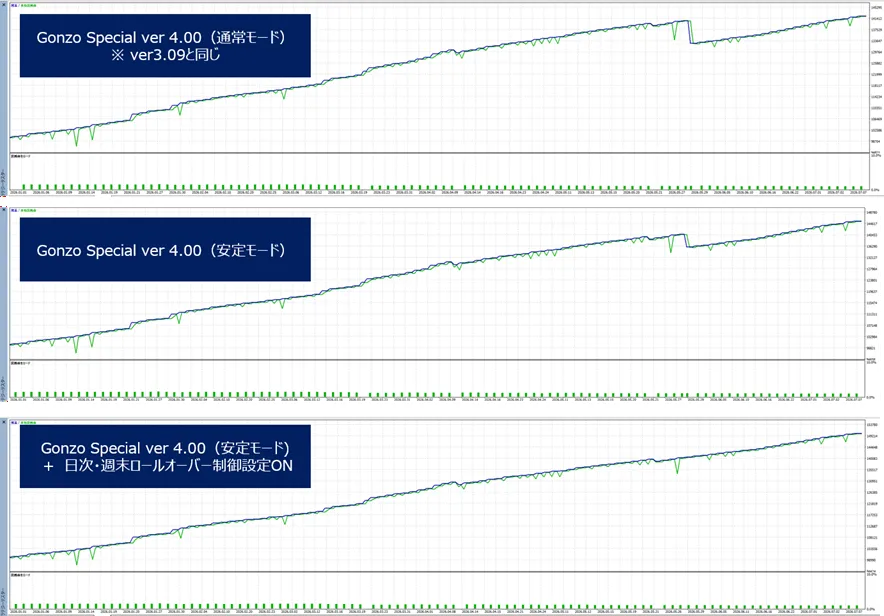
期間 [ 2026/1/1 ~ 2026/7/9 ] における各モードの損益傾向
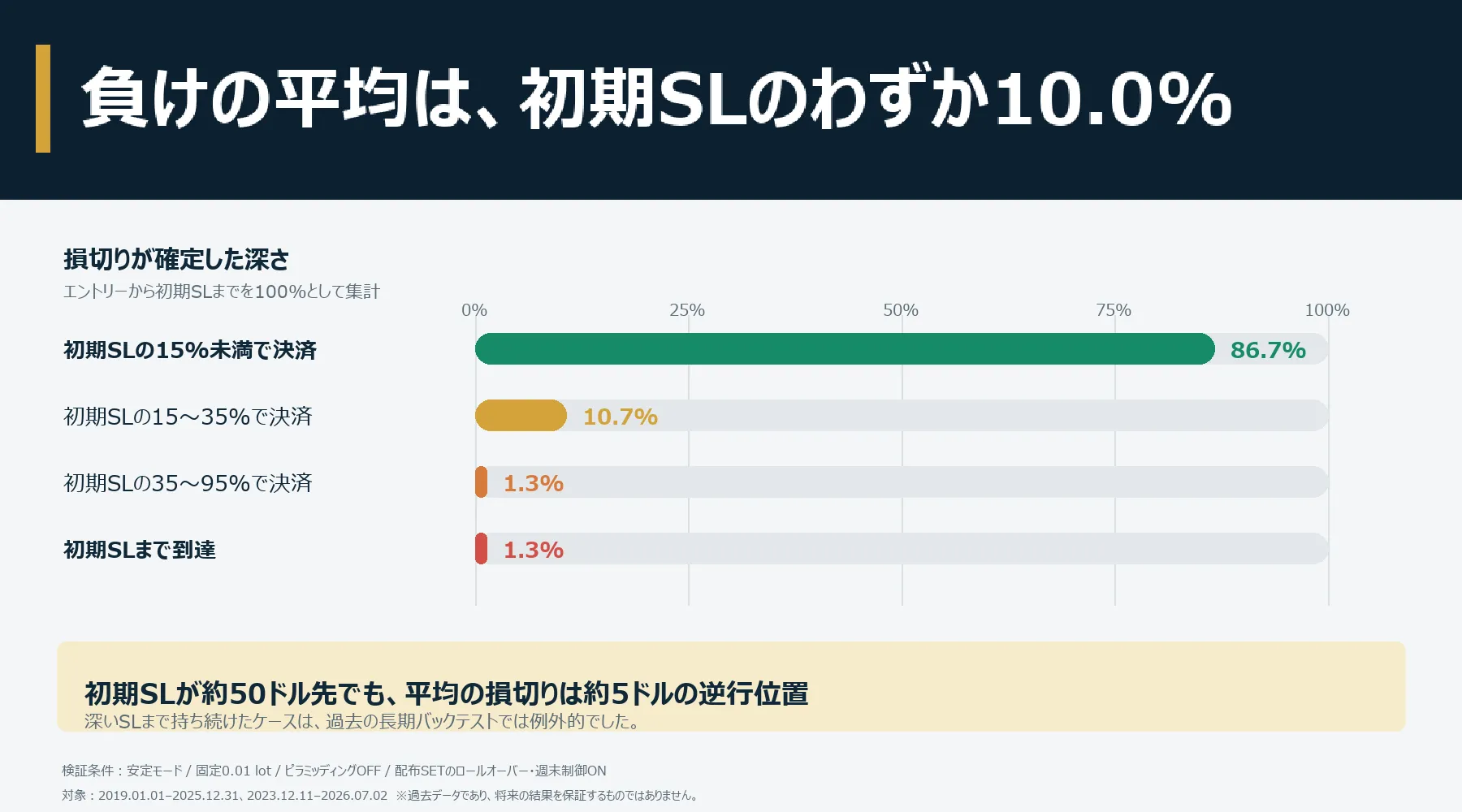
ポジション保有時に設定する初期SLは深めですが、初期SLまで到達した負けは、バックテスト期間中でわずか1件です。 また、負けの平均は、初期SLのわずか10%の位置で決済されています。
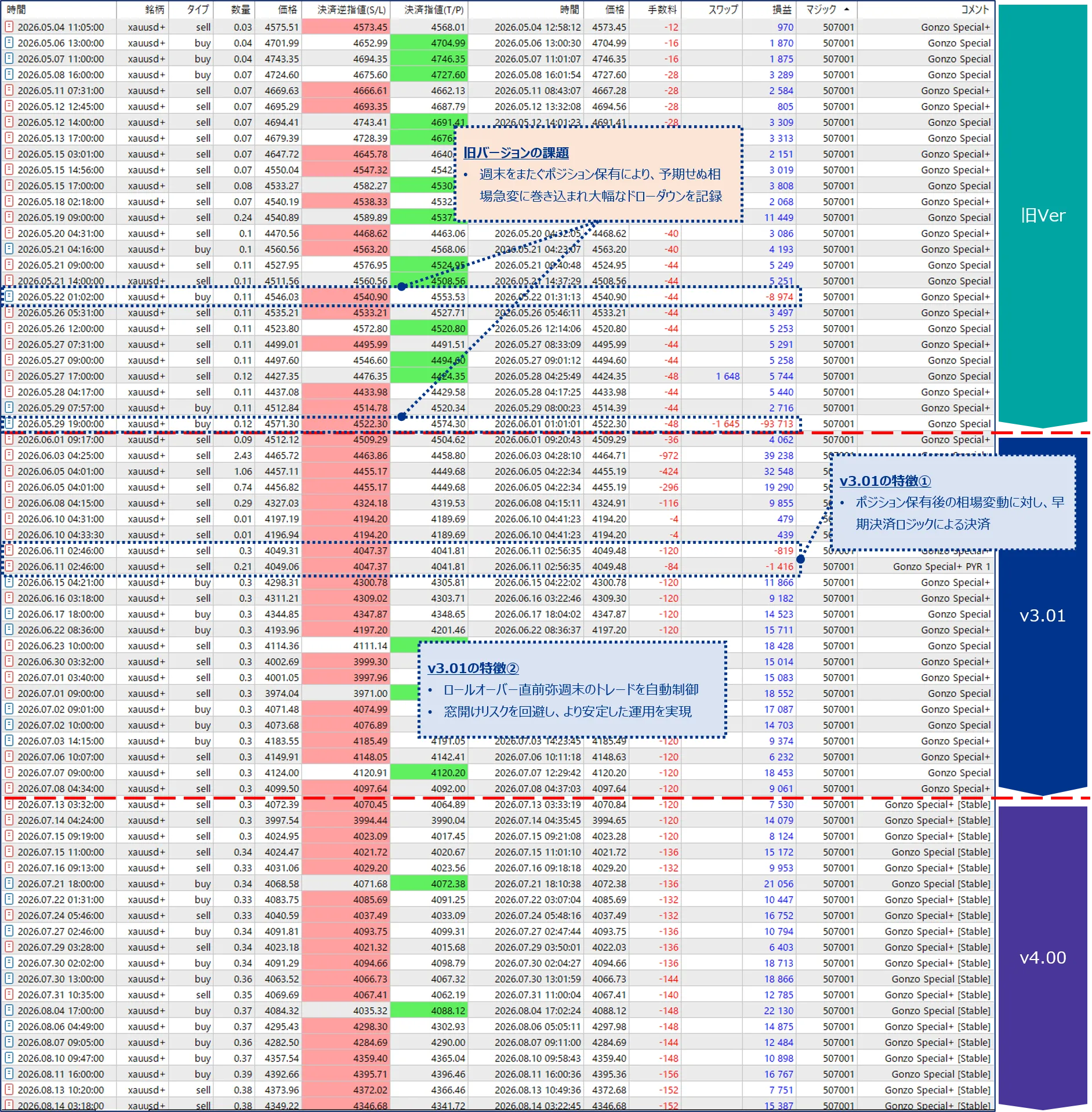
リアル口座での取引実績
v4.02以降も「週末・日次ロールオーバー保護:GonzoSpecial_v4_02_Stability_Daily_Weekend_Protection.set」ファイルを適用して計測を継続していきます。

日本語商品ページ
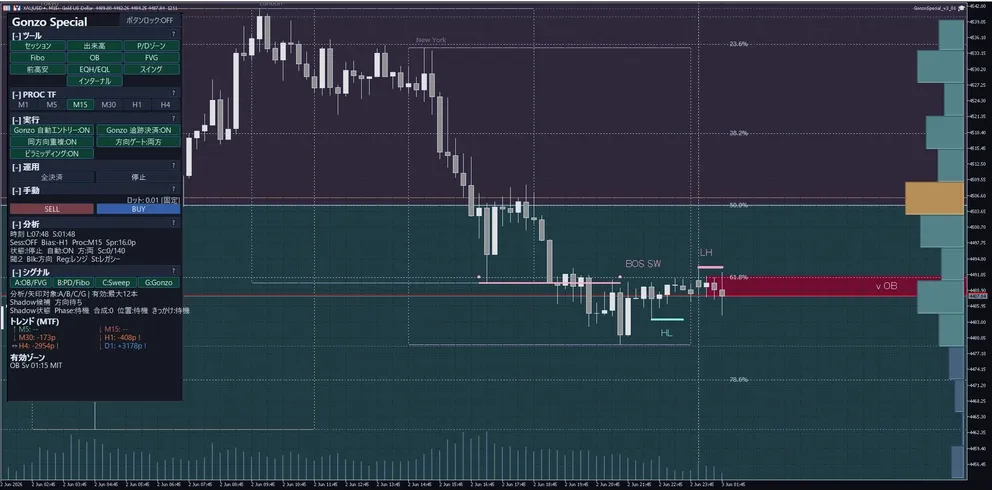
Gonzo Specialは、自動売買を中心にしながら、シグナル表示やSMC分析、通知、パネルからの手動操作も使えるXAUUSD向け半裁量EAです。基本は自動売買に任せ、必要な場面だけチャートを見ながら操作できます。
商品概要
| 項目 | 内容 |
|---|---|
| 対象 | XAUUSD / GOLD |
| プラットフォーム | MetaTrader 5 半裁量EA |
| バージョン | 4.02 |
| 保護モード | 標準モード(初期設定) / 安定モード |
| ロット | 固定ロット0.01が初期値。1取引あたりのリスク%方式も選択可能。 |
| ピラミッディング | 任意機能。初期値はOFF。 |
| 時間帯制御 | ロールオーバー、週末、年末年始を個別設定。初期値はすべてOFF。 |
| 表示・操作 | パネル、A/B/C/Gシグナル、通知、SMC分析、手動操作に対応。 |
| 公式ページ | GogoJungle Japanese product page |
Gonzo 3商品の位置づけ
| 商品 | 位置づけ | 向く運用 | 主な違い |
|---|---|---|---|
| Gonzo Special | 多機能モデル | 自動売買に加えて表示・通知・手動操作も使いたい方 | A/B/C/G、通知、SMC分析、パネル操作、任意ピラミッディング |
| Gonzo Nexus | 別ロジックモデル | Specialとは異なる売買タイミングも組み合わせたい方 | A/B/C/G NX、Specialとは別系統の売買ロジック |
| Gonzo Special Lite | 機能を絞ったモデル | 設定を少なくして自動売買を使いたい方 | Gonzo矢印中心、設定項目を削減 |
v4.02 バックテスト結果
I社とV社で、同梱の掲載BT再現用SETを使って検証しました。どちらも固定0.01 lot、安定モード、ピラミッディングONです。I社とV社はブローカー、口座通貨、検証期間が異なるため、結果を分けて掲載しています。
| 検証環境・期間 | 読み込むSETファイル | 保護モード・ピラミッディング | 週末・日次ロールオーバー制御 |
|---|---|---|---|
| I社/USD口座 2019.01.01~2026.01.01 初期証拠金5,000 USD/1:500 | GonzoSpecial_v4_02_Backtest_Stability_Pyramiding_ON.set | 安定モード/ON | 金曜18:50~月曜01:00は新規停止。保有中のポジションは通常管理。日次ロールオーバー制御はOFF |
| V社/JPY口座(参考) 2023.12.11~2026.08.15 初期証拠金1,000,000円/1:500 | GonzoSpecial_v4_02_Backtest_Stability_Pyramiding_ON.set | 安定モード/ON | 金曜18:50~月曜01:00は新規停止。保有中のポジションは通常管理。日次ロールオーバー制御はOFF |
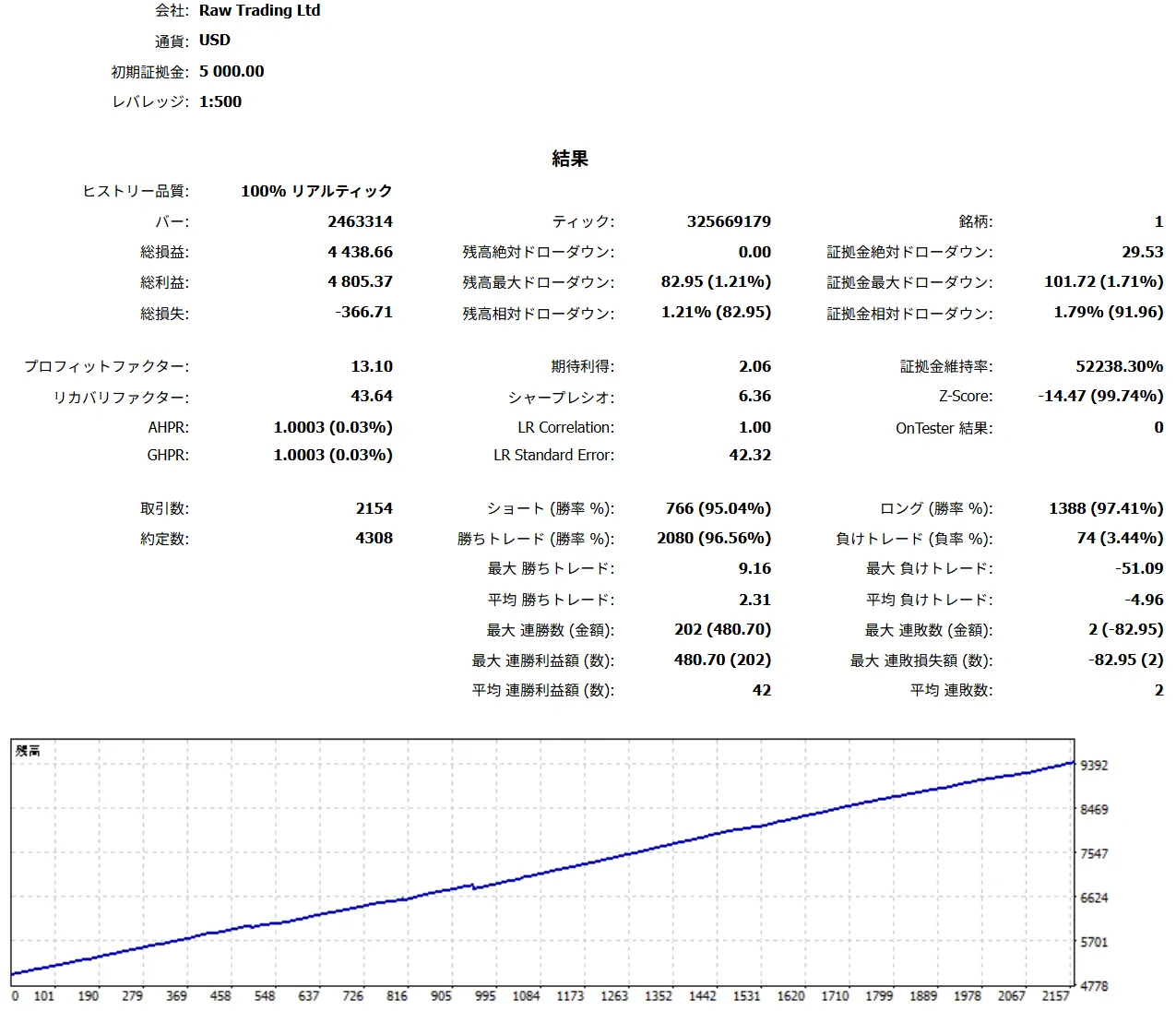
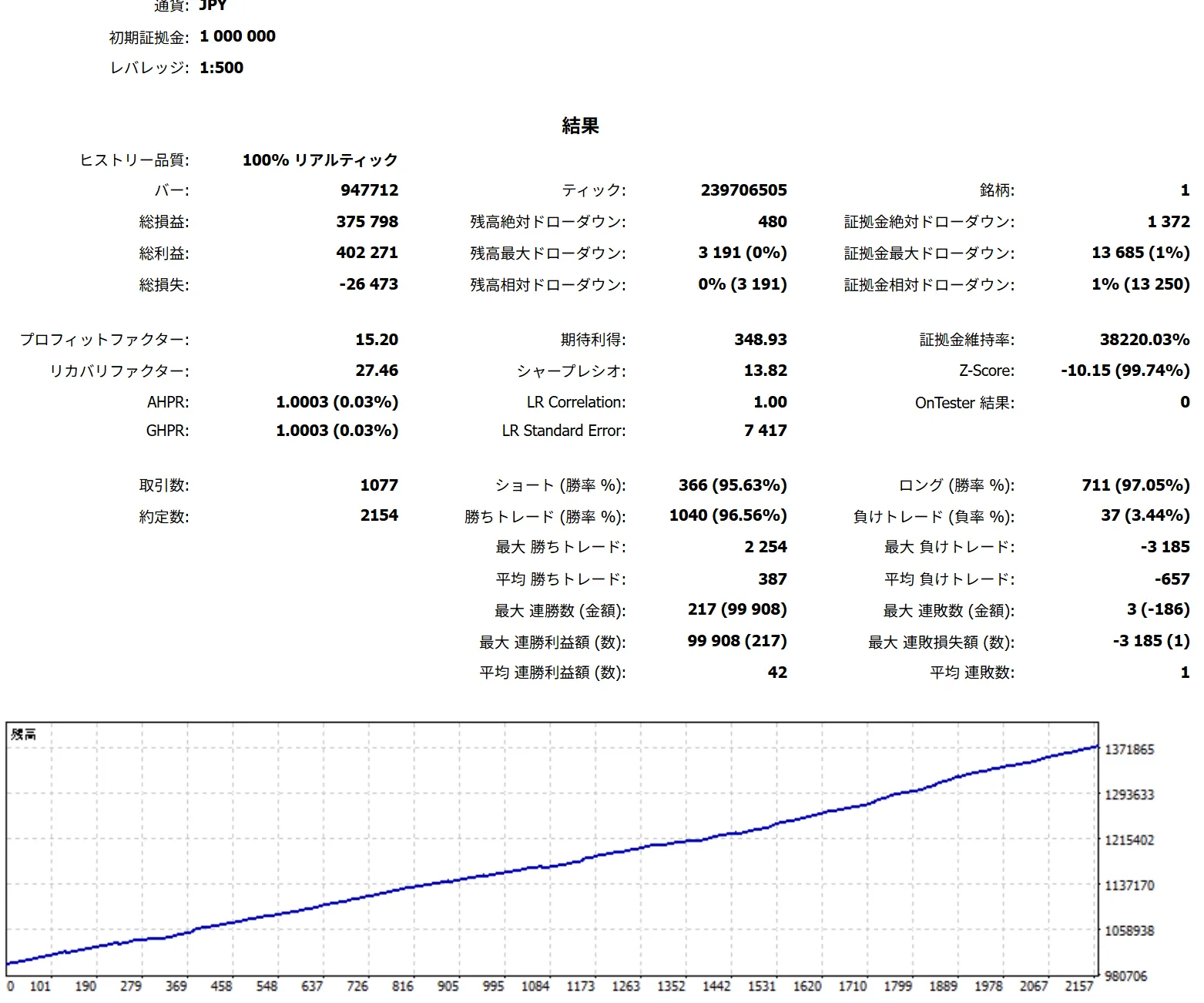
| 環境・設定 | 取引数 | 勝率 | PF | RF | 総損益 | 最大有効証拠金DD (金額) |
|---|---|---|---|---|---|---|
| I社/掲載BT再現用 | 2,154 | 96.56% | 13.10 | 43.64 | +4,438.66 USD | 101.72 USD |
| V社/掲載BT再現用(参考) | 1,077 | 96.56% | 15.20 | 27.46 | +375,798円 | 13,685円 |
最大有効証拠金DDは、保有中の含み損も含めて資産が最も大きく減った金額です。PFは総利益が総損失の何倍か、RFは総損益が最大DDの何倍かを示します。
V社の結果は、テスター画面上は履歴品質100%ですが、ログに過去レートの一部欠損・不一致と一部注文エラーが残っているため参考値です。正式な掲載BTの基準はI社です。
半裁量EAについて
本商品は、自動売買機能と裁量支援機能を備えた半裁量EAです。パネルからの手動注文・手動決済、シグナルやSMC分析を使った裁量判断は任意です。手動操作を加えた場合、フルオート運用とは結果が異なることがあります。
日本語操作マニュアル
ここでは、購入後に迷いやすい設定とパネル操作を、MT5に表示される順に説明します。初めて使う場合は、まず初期設定のままデモ口座かストラテジーテスターで確認してください。
1. 初回セットアップ
| 手順 | 内容 | 注意 |
|---|---|---|
| 1 | XAUUSD / GOLDのチャートに半裁量EAをセットします。MT5側の自動売買許可も確認します。 | ブローカーにより銘柄名の表記が異なる場合がありますが、公開説明ではXAUUSD / GOLDとして扱います。 |
| 2 | 固定ロット0.01、初期設定、PROC TF M15でデモまたはテスター確認を始めます。 | 初回からリスク%やロットを上げないでください。 |
| 3 | パネルのSpr、State、Blk、Auto、Dir、Sc、Thrを確認します。 | Sprが広い時は新規・決済・SL/TP・追跡結果が悪化しやすくなります。 |
| 4 | 複数商品・複数チャートではマジックナンバーを分けます。 | Close Allや自動決済の対象範囲を混ぜないためです。 |
2. 3つの時間足の役割
| 時間足 | 役割 |
|---|---|
| MT5上部の表示時間足 | 任意です。M1に固定する必要はありません。ローソク足の見え方を変えるためのもので、半裁量EA内部の売買ロジックは変わりません。 |
| PROC TF(分析基準TF) | M1 / M5 / M15 / M30 / H1 / H4から選べます。初期値はM15です。分析表示・描画・シグナル表示の見え方を切り替えます。 |
| 内部ロジック時間足 | 売買ロジック本体が内部で参照する時間足です。表示時間足やPROC TFとは別で、利用者が変更する必要はありません。 |
3. パネル表示・ボタンの読み方
| 表示箇所 / Panel area | ラベル / Visible label | 表示される値・状態 / Values or states | 操作した時の動き / Action | 注意点 / Caution |
|---|---|---|---|---|
| Header | 商品名、ロック、コンパクト/状態行 | 商品名、ボタンロック状態、RUN/停止系の状態を表示 | パネル移動・固定・状態確認 | ロック中は誤操作を避けやすい一方、配置変更はしにくくなります。 |
| TOOLS | Session / Volume / P/D / Fibo / OB / FVG / Prev H/L / EQH/EQL / Swing / Internal | セッション、出来高、P/Dゾーン、Fibo、OB、FVG、前高安、EQH/EQL、スイング、インターナル。Liteは表示できる項目だけを使い、フルSMCトグルとして扱わないでください。 | 表示ON/OFFを切り替え、待つ場所や構造を確認します。 | TOOLSは分析表示です。直接エントリー保証にはなりません。 |
| PROC TF | M1 / M5 / M15 / M30 / H1 / H4、PROC:M15など | 選択中の分析基準TFを表示 | 分析・描画・シグナル表示の基準を切り替えます。 | MT5上部の時間足や内部ロジック時間足とは別です。 |
| EXEC | Auto Entry、Auto Close/Tracking、Overlap、Direction、Pyramiding、Preset/Frequency/Aggregation | 各ボタンのON/OFFまたは選択値 | 新規自動エントリー、決済・追跡、方向、重複、追加の運用状態を切り替えます。 | Auto EntryとAuto Closeは別です。エントリー停止中でも決済管理を残す運用があります。 |
| OPS | Close All、Stop/KILL、Compact、Spacing、Reset、Manual rapid/interval | 確認待ち、実行中、停止中など | 全決済、緊急停止、表示整理、状態リセットを行います。 | Close Allはマジックナンバーと銘柄範囲を確認してから押してください。 |
| MANUAL | Lot、SELL、BUY、Manual SL/TP | ロット: 0.01 [FIX]、ロット: 0.01 [AUTO]など | パネルから手動BUY/SELLを行います。 | リスク%ロット利用時は表示ロットも変わります。手動SL/TP付帯の初期値は商品で異なります。 |
| ANALYTICS | Time、Session、Bias、Proc、Spr、State、Auto、Dir、Sc、Thr、Blk、Reg、St、Sig | Spr:xx.xp、State:READY/SETUP/BLOCKED、Sc:x/y、Thr:x、Blk:理由など | 現在の状態、スプレッド、方向、スコア、ブロック理由を確認します。 | Sprが広い時はエントリー、決済、SL/TP、追跡結果が悪化しやすいです。 |
| SIGNAL | A / B / C / GまたはGonzo矢印 | A/B/C/G表示、target line、残り有効時間、candidate/no/idleの状態表示を確認します。 | 通知や手動判断の補助として使います。 | シグナルは利益保証ではありません。方向、時間帯、スプレッド、Blkまで見てください。 |
パネル略語
| 略語 | 意味 |
|---|---|
| Spr | 現在スプレッド。xx.xpのようにpipsで表示され、狭スプレッド運用の確認に使います。 |
| State | READY / SETUP / BLOCKEDなど、現在の準備状態。 |
| Blk | 現在エントリーを止めている理由。方向、時間、スプレッド、スコア、リスク制御など。 |
| Sc | 現在スコア。x/yのように条件充足度を示します。 |
| Thr | 必要しきい値。Scが十分かを見る基準です。 |
| Reg | 市場レジームの文脈ラベル。保証ではなく状況把握です。 |
| St | 戦略・状態ラベル。文脈確認用です。 |
| Sig | シグナルの年齢や残り有効時間の目安。 |
4. A/B/C/Gシグナルの読み方
| シグナル | 意味 |
|---|---|
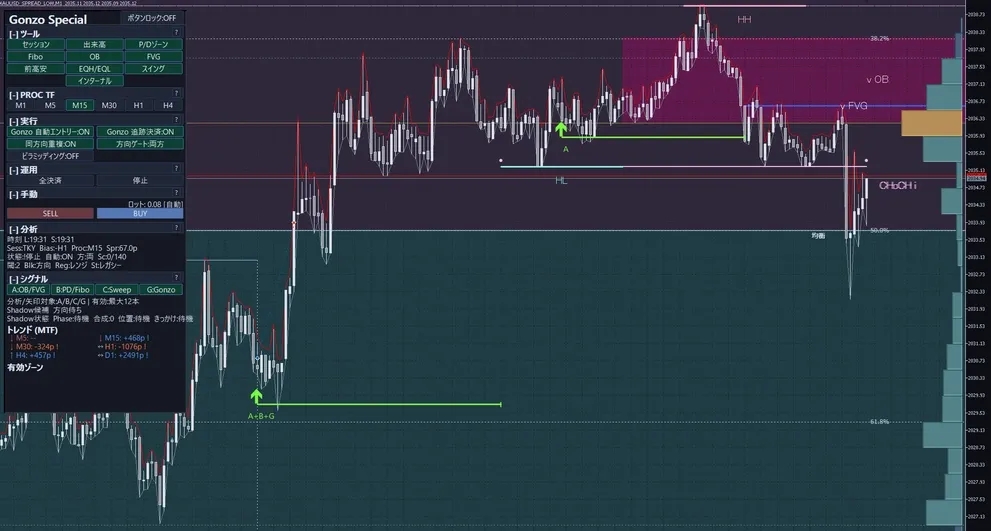
| A | 反応候補の価格帯を示すシグナルです。まず「どこで待つか」を決める土台として見ます。 |
| B | 補足シグナルです。価格帯が高すぎないか、安すぎないかを見る補強材です。主役ではなく補足として使います。 |
| C | 入るきっかけを見るシグナルです。A+Cは比較的見やすい組み合わせですが、それだけで売買を決める意味ではありません。 |
| G | Gonzo側の別系統の判定です。A/B/Cの代わりではなく、重なったときの後押しとして見ます。NexusではG NX表記になる場合があります。 |
| A+C | 「待つ場所」と「入るきっかけ」がそろった形として最初に観察しやすい組み合わせです。 |
| A+B+C | 場所、補足、きっかけが重なった見え方です。条件は多いですが利益保証ではありません。 |
| A+B+C+G | さらにG系の後押しも重なった形です。方向、時間帯、Spr、State、Blk、ロットを必ず合わせて見ます。 |
5. リスク%ロット計算仕様
リスク%方式は、口座資金と初期SLから注文ロットを計算する機能です。最初から使う必要はありません。まず固定ロット0.01で動作を確認し、必要な場合だけ切り替えてください。
| 手順 | 仕様 |
|---|---|
| 1. 有効条件 | ロット計算モードで『1取引あたりのリスク%』を選び、リスク率を0より大きくすると使われます。固定ロットを選んだ場合は固定ロット値を使います。 |
| 2. 基準資金 | 『リスク計算に使う資金』で、残高または有効証拠金を選びます。 |
| 3. リスク金額 | リスク金額 = 基準資金 × リスク率 ÷ 100です。1.00は1%、0.50は0.5%です。初期値は1.00です。 |
| 4. 1ロットあたりの想定損失 | 実際のエントリー価格と初期SLを使い、1.00ロットでSLに到達した場合の損失を口座通貨で計算します。 |
| 5. ロット算出 | リスク金額を1ロットあたりの想定損失で割り、ブローカーの最大ロットとロット刻みに合わせて切り下げます。 |
| 6. 注文を出さないケース | 初期SLがない、損失額を計算できない、計算ロットが最小ロット未満の場合は注文を出しません。固定ロットには切り替わりません。 |
| 7. ピラミッディング時 | 追加注文も1件ごとに同じリスク%で計算します。ピラミッディングをONにすると、口座全体の合計リスクは増えます。 |
| 8. 注意 | 設定した率はロット計算の基準です。スプレッド拡大、滑り、窓開け、約定条件により、実際の損失がその率以内に収まる保証はありません。 |
6. SMC用語ミニ辞典
| 用語 | 説明 |
|---|---|
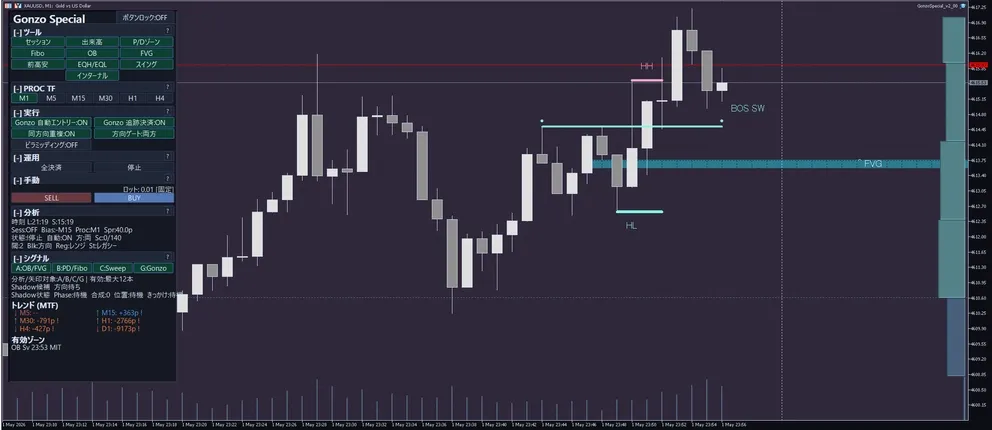
| OB | 反応候補になりやすい価格帯です。Aシグナルの土台として使われます。 |
| FVG | 値が飛んだ隙間のような価格帯です。埋めに来る動きを見る材料です。 |
| EQH/EQL | 同じような高値/安値です。流動性が溜まりやすい場所として見ます。 |
| Swing | 大きめの波に対する構造です。地合いを広めに見る時に使います。 |
| Internal | より細かい波の構造です。直近の細かい変化を見る時に使います。 |
| P/D zone | 現在価格が割高側か割安側かを見るゾーンです。Bシグナルの補足にも関わります。 |
| Fibo | 戻り率の目安です。P/Dゾーンと重ねて位置の妥当性を見る時に使います。 |
| Sessions | 東京/ロンドン/ニューヨークなどの時間帯です。動きやすい時間かの確認に使います。 |
| Volume | どの価格帯に出来高が集まっているかを見る補助表示です。 |
7. 半裁量・手動運用フロー
| 運用 | 手順 |
|---|---|
| 全自動ベースライン | 自動売買を許可=true、Gonzo自動エントリー=true、Gonzo自動決済・追跡=true、固定ロット0.01から開始。PROC TFはM15、狭スプレッドのXAUUSDで確認します。 |
| 観察のみ | 半裁量EAの売買を完全に止めたい場合は自動売買を許可=false。表示・通知を見ながら新規だけ止めたい場合はGonzo自動エントリー=false、自動決済・追跡は目的に応じて維持します。 |
| シグナル監視+手動エントリー | A/B/C/G、TOOLS、ANALYTICS、Spr、State、Blkを確認し、方向・時間帯・スプレッド・ロットが許容できる時だけBUY/SELLを使います。 |
| 手動エントリー+半裁量EA管理 | Gonzo自動エントリー=false、Gonzo自動決済・追跡=true。Special/Nexusは手動BUY/SELL時のSL/TP付帯が初期値falseです。 手動ポジションのSL/TPと管理範囲を必ず確認します。 |
| パネル手動・ラピッド操作 | BUY/SELL、Close All、Stop/KILL、Compact、Resetを使います。長押し・連打系の操作は誤発注防止のためデモで挙動を確認してから使います。 |
| Close Allと緊急停止 | Close Allは現在の銘柄とマジックナンバー範囲を確認して実行します。緊急停止は新規や管理動作を止める目的で使い、既存ポジションの状態を必ず確認します。 |
| 重複・追加ポジション | ピラミッディングは任意機能で、初期値はfalseです。同方向重複や追加ポジションは合計リスクを増やします。 |
| 時間リスク制御 | Special/Nexusは週末リスク制御と日次ロールオーバー制御、Liteは日次ロールオーバー制御と金曜リスク制御を使います。どれも損失を防ぐ保証ではありません。 |
やってはいけないこと
- 同じXAUUSD口座で複数商品を同じマジックナンバーのまま動かさない。
- 表示だけの切替を、自動売買条件の変更や利益保証として扱わない。
- 自動決済・追跡をfalseにしたまま、半裁量EAが出口管理してくれると期待しない。
- M1/M5/M15/M30/H1/H4以外の特殊な秒足前提で説明しない。
- 取引が少ない期間の後に検証なしでロットを上げない。
- バックテスト結果を将来利益や損失回避の保証として扱わない。
8. 設定一覧
以下はMT5の設定画面に表示される項目だけを、表示順・グループ別に整理したものです。
| MT5の設定画面の項目名 / MT5 setting item | 初期値 / Initial value | 表示値・入力例 / Visible value or input example | 何を変えるか / What it controls | 変更する場面 / When to change | 注意点 / Caution |
|---|---|---|---|---|---|
| マジックナンバー / Magic number | 507001 | 数値入力 / numeric input | この半裁量EAが管理する注文とポジションの識別番号です。 | 同じ口座で別の半裁量EAや別設定を使う場合に変更します。 | 同じ銘柄で複数の半裁量EAを動かす場合は重複させないでください。 |
| 取引方向 / Trade direction | 両方 / Both | 買いのみ / Buy only、売りのみ / Sell only、両方 / Both、停止 / Disabled | 自動エントリーの方向を制限します。 | 買いか売りの片方だけを使う場合に変更します。 | 変更すると取引数と成績も変わります。 |
| ロット計算モード / Lot sizing mode | 固定ロット / Fixed lot | 固定ロット / Fixed lot、1取引あたりのリスク% / Risk % per trade | 固定ロットとリスク%方式を切り替えます。 | 口座資金に合わせて自動計算したい場合だけリスク%方式を選びます。 | 初回は固定ロット0.01で確認してください。 |
| 固定ロット / Fixed lot | 0.01 | 数値入力 / numeric input | 固定ロットを選んだ時の注文ロットです。 | 固定ロットで運用する場合に変更します。 | XAUUSDはロット差の影響が大きいため、急に上げないでください。 |
| 1取引あたりのリスク率(1.00=1%) / Risk per trade (1.00=1%) | 1.00 | 数値入力 / numeric input | 1注文に割り当てるリスク率です。 | リスク%方式を使う場合に設定します。 | 追加注文にも1件ずつ適用されるため、ピラミッディング時は合計リスクが増えます。 |
| リスク計算に使う資金 / Capital basis for risk | 残高 / Balance | 残高 / Balance、有効証拠金 / Equity | リスク%計算の基準資金を選びます。 | 含み損益を計算へ反映したい場合は有効証拠金を選びます。 | 有効証拠金を選ぶと、保有中の損益で次回ロットが変わります。 |
| MT5の設定画面の項目名 / MT5 setting item | 初期値 / Initial value | 表示値・入力例 / Visible value or input example | 何を変えるか / What it controls | 変更する場面 / When to change | 注意点 / Caution |
|---|---|---|---|---|---|
| 自動売買を許可 / Allow auto trading | true | true / false | 半裁量EAの売買動作全体を許可します。 | チャートに残したまま売買を止める場合はfalseにします。 | MT5側の自動売買許可も別に必要です。 |
| Gonzo自動エントリー / Gonzo auto entry | true | true / false | Gonzoの新規自動エントリーを許可します。 | 表示や通知だけを使う場合はfalseにします。 | falseでも自動決済・追跡がtrueなら、既存ポジションの管理は続きます。 |
| Gonzo自動決済・追跡 / Gonzo auto close and tracking | true | true / false | Gonzoの自動決済と保有後の追跡を許可します。 | 既存ポジションを半裁量EAに管理させる場合はtrueにします。 | falseにすると半裁量EAによる決済・SL/TP更新・追跡が止まります。 |
| Gonzo同方向重複を許可 / Allow same-direction overlap | true | true / false | 同方向の新規ポジションが重なることを許可します。 | 重複を抑えたい場合はfalseにします。 | 同方向に重なると合計ロットと含み損も増えます。 |
| ピラミッディングを有効化 / Enable pyramiding | false | true / false | 利益方向へ追加するピラミッディングを切り替えます。 | 掲載バックテスト条件を再現する場合など、合計リスクを確認したうえでONにします。 | 商品本体の初期値はOFFです。ページに残しているv3.01参考BTはONで取得しています。 |
| 保護モード / Protection mode | 標準モード / Standard mode | 標準モード / Standard mode、安定モード / Stability mode | v3.01の戦略動作を引き継ぐ標準モードと、長時間ポジション保持時の条件付き保護を加える安定モードを選びます。 | 長く持った弱いポジションへの追加保護を使いたい場合に安定モードへ変更します。 | 安定モードでも、すべてのポジションが安全に決済されるわけではありません。注文コメントには [Stable] が付きます。 |
| MT5の設定画面の項目名 / MT5 setting item | 初期値 / Initial value | 表示値・入力例 / Visible value or input example | 何を変えるか / What it controls | 変更する場面 / When to change | 注意点 / Caution |
|---|---|---|---|---|---|
| ロールオーバー制御を使う / Enable rollover control | false | true / false | 日次ロールオーバー制御のON/OFFです。 | ロールオーバー前後の新規停止やポジション処理を使う場合にtrueにします。 | 時刻はすべてブローカーのサーバー時刻です。 |
| 新規停止開始(サーバー時刻 HH:MM) / Entry-stop start (server HH:MM) | 23:50 | HH:MM | 新規エントリーを止める時刻です。 | 停止窓を広げる場合に早めます。 | ロールオーバー時刻、再開時刻と正しい順になるよう設定してください。 |
| ロールオーバー時刻(サーバー時刻 HH:MM) / Rollover time (server HH:MM) | 00:00 | HH:MM | 強制決済を選んだ場合の決済開始時刻です。 | ブローカーのロールオーバー時刻に合わせます。 | 日本時間やUTCへ自動変換されません。 |
| 新規再開(サーバー時刻 HH:MM) / Entry resume (server HH:MM) | 00:10 | HH:MM | 新規エントリーを再開する時刻です。 | スプレッドが戻るまで待ちたい場合に遅らせます。 | 遅くするほど取引機会は減ります。 |
| ポジション対応 / Position action | 何もしない(ポジション維持) / Keep positions | 維持、利益時決済、指定時刻に強制決済、利益時決済後に残りを強制決済 | 停止前から持っていたポジションをどう扱うか選びます。 | 利益へ転じたら閉じたい場合や、指定時刻に全決済したい場合に変更します。 | 利益時決済は停止開始前から持っていたポジションだけが対象です。 |
| MT5の設定画面の項目名 / MT5 setting item | 初期値 / Initial value | 表示値・入力例 / Visible value or input example | 何を変えるか / What it controls | 変更する場面 / When to change | 注意点 / Caution |
|---|---|---|---|---|---|
| 週末リスク制御を使う / Enable weekend risk control | false | true / false | 週末リスク制御のON/OFFです。 | 金曜から週明けまで新規停止やポジション処理を使う場合にtrueにします。 | 時刻はすべてブローカーのサーバー時刻です。 |
| 金曜の新規停止(サーバー時刻 HH:MM) / Friday entry stop (server HH:MM) | 21:00 | HH:MM | 金曜に新規エントリーを止める時刻です。 | 週末持ち越しを減らしたい時に設定します。 | 既存ポジションの扱いは『ポジション対応』で決めます。 |
| 再開曜日 / Resume day | 月曜日 / Monday | 日曜日 / Sunday、月曜日 / Monday | 週明けに再開する曜日です。 | ブローカーの取引開始日に合わせます。 | 市場が閉じている間は注文できません。 |
| 新規再開(サーバー時刻 HH:MM) / Entry resume (server HH:MM) | 01:00 | HH:MM | 週明けに新規エントリーを再開する時刻です。 | 開始直後のスプレッドを避けたい場合に遅らせます。 | サーバー時刻で設定してください。 |
| ポジション対応 / Position action | 何もしない(ポジション維持) / Keep positions | 維持、利益時決済、指定時刻に強制決済、利益時決済後に残りを強制決済 | 停止前から持っていたポジションをどう扱うか選びます。 | 利益へ転じたら閉じる、または金曜中に全決済する場合に変更します。 | 強制決済は金曜終盤のスプレッドや流動性の影響を受けます。 |
| 金曜の強制決済開始(サーバー時刻 HH:MM) / Friday force cutoff (server HH:MM) | 23:30 | HH:MM | 強制決済を選んだ場合の決済開始時刻です。 | 市場終了より前に余裕を持って設定します。 | 新規停止時刻より後に設定してください。 |
| MT5の設定画面の項目名 / MT5 setting item | 初期値 / Initial value | 表示値・入力例 / Visible value or input example | 何を変えるか / What it controls | 変更する場面 / When to change | 注意点 / Caution |
|---|---|---|---|---|---|
| 年末年始リスク制御を使う / Enable year-end risk control | false | true / false | 年末年始リスク制御のON/OFFです。 | 薄商いの期間に新規停止やポジション処理を使う場合にtrueにします。 | 時刻はすべてブローカーのサーバー時刻です。 |
| 新規停止開始(サーバー時刻 MM-DD HH:MM) / Block start (server MM-DD HH:MM) | 12-20 00:00 | MM-DD HH:MM | 年末に新規エントリーを止める日時です。 | 利用する停止期間に合わせて変更します。 | 年を入力せず、毎年同じ月日で判定します。 |
| 新規再開(サーバー時刻 MM-DD HH:MM) / Entry resume (server MM-DD HH:MM) | 01-05 00:00 | MM-DD HH:MM | 年明けに新規エントリーを再開する日時です。 | 利用する再開日に合わせて変更します。 | 停止開始より後の年跨ぎ日時として設定してください。 |
| ポジション対応 / Position action | 何もしない(ポジション維持) / Keep positions | 維持、利益時決済、指定時刻に強制決済、利益時決済後に残りを強制決済 | 停止前から持っていたポジションをどう扱うか選びます。 | 利益へ転じたら閉じる、または年末に全決済する場合に変更します。 | 強制決済は薄商い時のスプレッドや流動性の影響を受けます。 |
| 強制決済開始(サーバー時刻 MM-DD HH:MM) / Force cutoff (server MM-DD HH:MM) | 12-30 23:00 | MM-DD HH:MM | 強制決済を選んだ場合の決済開始日時です。 | 年末休場より前に余裕を持って設定します。 | 新規停止開始後、再開日時より前に設定してください。 |
| MT5の設定画面の項目名 / MT5 setting item | 初期値 / Initial value | 表示値・入力例 / Visible value or input example | 何を変えるか / What it controls | 変更する場面 / When to change | 注意点 / Caution |
|---|---|---|---|---|---|
| 分析基準TF / Analysis timeframe | M15 / 15-minute | M1 / M5 / M15 / M30 / H1 / H4 など | 分析・描画・シグナル表示の基準時間足です。初期値はM15です。 | 見え方を変えたい時にM1/M5/M15/M30/H1/H4などへ変更します。 | MT5上部のチャート時間足や半裁量EA内部の売買本体とは別物です。迷ううちはM15のまま使ってください。 |
| Aシグナルを表示 / Show A signals | true | true / false | Aシグナルの表示を切り替えます。反応候補の価格帯を見る土台です。 | 待つ場所を見たい時はtrue。表示を減らしたい時はfalse。 | 表示シグナルは判断補助です。A単独で売買を決めないでください。 |
| Bシグナルを表示 / Show B signals | true | true / false | Bシグナルの表示を切り替えます。価格位置の補強材料です。 | AやCの位置確認を補助したい時。 | Bは主役ではなく補助として扱ってください。 |
| Cシグナルを表示 / Show C signals | true | true / false | Cシグナルの表示を切り替えます。入るきっかけの観察に使います。 | A+Cのように場所ときっかけを合わせて観察したい時。 | C単独やA+Cだけで利益が約束されるわけではありません。 |
| Gonzoの矢印を表示 / Show Gonzo arrows | true | true / false | Gonzo矢印の表示を切り替えます。 | 自動売買の候補や手動監視の方向感を見たい時。 | 矢印は表示・判断補助です。必ずスプレッド、方向、状態、リスクを合わせて見てください。 |
| MT5の設定画面の項目名 / MT5 setting item | 初期値 / Initial value | 表示値・入力例 / Visible value or input example | 何を変えるか / What it controls | 変更する場面 / When to change | 注意点 / Caution |
|---|---|---|---|---|---|
| 通知を使う / Enable notifications | false | true / false | 通知全体のマスタースイッチです。 | シグナル条件をスマホ・メール・音で確認したい時にtrueにします。 | 通知先や条件がtrueでも、この設定がfalseなら通知は出ません。MT5側の通知設定も必要です。 |
| 同一バーは1回だけ通知 / Notify once per bar | true | true / false | 同じローソク足内の重複通知を抑えます。 | 通知過多を避けたい場合はtrueを維持します。 | falseにすると同じバーで複数通知が出る場合があります。 |
| MT5の設定画面の項目名 / MT5 setting item | 初期値 / Initial value | 表示値・入力例 / Visible value or input example | 何を変えるか / What it controls | 変更する場面 / When to change | 注意点 / Caution |
|---|---|---|---|---|---|
| ポップアップ通知 / Popup notification | true | true / false | MT5上のポップアップ通知を使います。 | PC画面で確認したい時。 | 通知マスターがfalseなら出ません。 |
| スマホPush通知 / Mobile push notification | false | true / false | MT5スマホPush通知を使います。 | 外出中もシグナルを受けたい時。 | MT5のMetaQuotes ID設定が必要です。通知マスターがfalseなら出ません。 |
| メール通知 / Email notification | false | true / false | MT5メール通知を使います。 | メールで履歴を残したい時。 | MT5メール設定が必要です。通知マスターがfalseなら出ません。 |
| サウンド通知 / Sound notification | false | true / false | 音で通知します。 | 画面を見続けない時の補助として使います。 | サウンドファイル名が正しく、通知マスターがtrueである必要があります。 |
| 通知サウンドファイル / Notification sound file | alert.wav | テキスト入力 / text input | サウンド通知で再生するファイル名です。 | 好みの音へ変更したい時。 | MT5が参照できる音声ファイル名にしてください。 |
| MT5の設定画面の項目名 / MT5 setting item | 初期値 / Initial value | 表示値・入力例 / Visible value or input example | 何を変えるか / What it controls | 変更する場面 / When to change | 注意点 / Caution |
|---|---|---|---|---|---|
| A条件で通知 / Notify on A | false | true / false | Aの条件が表示上そろった時の通知を許可します。 | 必要な組み合わせだけtrueにし、通知過多を避けます。 | 通知は判断補助です。条件が多いほど厳しめに見えますが、利益を保証しません。 |
| B条件で通知 / Notify on B | false | true / false | Bの条件が表示上そろった時の通知を許可します。 | 必要な組み合わせだけtrueにし、通知過多を避けます。 | 通知は判断補助です。条件が多いほど厳しめに見えますが、利益を保証しません。 |
| C条件で通知 / Notify on C | false | true / false | Cの条件が表示上そろった時の通知を許可します。 | 必要な組み合わせだけtrueにし、通知過多を避けます。 | 通知は判断補助です。条件が多いほど厳しめに見えますが、利益を保証しません。 |
| G条件で通知 / Notify on G | false | true / false | Gの条件が表示上そろった時の通知を許可します。 | 必要な組み合わせだけtrueにし、通知過多を避けます。 | 通知は判断補助です。条件が多いほど厳しめに見えますが、利益を保証しません。 |
| MT5の設定画面の項目名 / MT5 setting item | 初期値 / Initial value | 表示値・入力例 / Visible value or input example | 何を変えるか / What it controls | 変更する場面 / When to change | 注意点 / Caution |
|---|---|---|---|---|---|
| A+B条件で通知 / Notify on A + B | false | true / false | A+Bの条件が表示上そろった時の通知を許可します。 | 必要な組み合わせだけtrueにし、通知過多を避けます。 | 通知は判断補助です。条件が多いほど厳しめに見えますが、利益を保証しません。 |
| A+C条件で通知 / Notify on A + C | false | true / false | A+Cの条件が表示上そろった時の通知を許可します。 | 必要な組み合わせだけtrueにし、通知過多を避けます。 | 通知は判断補助です。条件が多いほど厳しめに見えますが、利益を保証しません。 |
| A+G条件で通知 / Notify on A + G | false | true / false | A+Gの条件が表示上そろった時の通知を許可します。 | 必要な組み合わせだけtrueにし、通知過多を避けます。 | 通知は判断補助です。条件が多いほど厳しめに見えますが、利益を保証しません。 |
| B+C条件で通知 / Notify on B + C | false | true / false | B+Cの条件が表示上そろった時の通知を許可します。 | 必要な組み合わせだけtrueにし、通知過多を避けます。 | 通知は判断補助です。条件が多いほど厳しめに見えますが、利益を保証しません。 |
| B+G条件で通知 / Notify on B + G | false | true / false | B+Gの条件が表示上そろった時の通知を許可します。 | 必要な組み合わせだけtrueにし、通知過多を避けます。 | 通知は判断補助です。条件が多いほど厳しめに見えますが、利益を保証しません。 |
| C+G条件で通知 / Notify on C + G | false | true / false | C+Gの条件が表示上そろった時の通知を許可します。 | 必要な組み合わせだけtrueにし、通知過多を避けます。 | 通知は判断補助です。条件が多いほど厳しめに見えますが、利益を保証しません。 |
| MT5の設定画面の項目名 / MT5 setting item | 初期値 / Initial value | 表示値・入力例 / Visible value or input example | 何を変えるか / What it controls | 変更する場面 / When to change | 注意点 / Caution |
|---|---|---|---|---|---|
| A+B+C条件で通知 / Notify on A + B + C | false | true / false | A+B+Cの条件が表示上そろった時の通知を許可します。 | 必要な組み合わせだけtrueにし、通知過多を避けます。 | 通知は判断補助です。条件が多いほど厳しめに見えますが、利益を保証しません。 |
| A+B+G条件で通知 / Notify on A + B + G | false | true / false | A+B+Gの条件が表示上そろった時の通知を許可します。 | 必要な組み合わせだけtrueにし、通知過多を避けます。 | 通知は判断補助です。条件が多いほど厳しめに見えますが、利益を保証しません。 |
| A+C+G条件で通知 / Notify on A + C + G | false | true / false | A+C+Gの条件が表示上そろった時の通知を許可します。 | 必要な組み合わせだけtrueにし、通知過多を避けます。 | 通知は判断補助です。条件が多いほど厳しめに見えますが、利益を保証しません。 |
| B+C+G条件で通知 / Notify on B + C + G | false | true / false | B+C+Gの条件が表示上そろった時の通知を許可します。 | 必要な組み合わせだけtrueにし、通知過多を避けます。 | 通知は判断補助です。条件が多いほど厳しめに見えますが、利益を保証しません。 |
| A+B+C+G条件で通知 / Notify on A + B + C + G | false | true / false | A+B+C+Gの条件が表示上そろった時の通知を許可します。 | 必要な組み合わせだけtrueにし、通知過多を避けます。 | 通知は判断補助です。条件が多いほど厳しめに見えますが、利益を保証しません。 |
| MT5の設定画面の項目名 / MT5 setting item | 初期値 / Initial value | 表示値・入力例 / Visible value or input example | 何を変えるか / What it controls | 変更する場面 / When to change | 注意点 / Caution |
|---|---|---|---|---|---|
| セッション帯を表示 / Show session zones | true | true / false | 東京・ロンドン・ニューヨークなどの時間帯表示を切り替えます。 | 動きやすい時間帯を確認したい時。 | セッション表示は売買保証ではありません。ブローカー時間差にも注意してください。 |
| 出来高プロファイルを表示 / Show volume profile | true | true / false | 価格帯ごとの出来高の偏りを補助表示します。 | 滞留しやすい価格帯や抜けやすい帯を見たい時。 | 出来高表示は補助です。重い場合や見づらい場合はfalseにします。 |
| P/Dゾーンを表示 / Show premium/discount zones | true | true / false | 価格が割高側・割安側のどちらにいるかを見る補助表示です。 | Bシグナルや待ち位置の妥当性を見たい時。 | ゾーンだけで売買を決めないでください。 |
| Fiboを表示 / Show Fibonacci levels | true | true / false | 戻り率の目安を表示します。 | P/Dゾーンや反応候補と重ねて位置を確認したい時。 | Fibo単独で売買を決めないでください。 |
| 前高安を表示 / Show previous highs/lows | true | true / false | 前回高値・安値の目安を表示します。 | 流動性や反応候補を確認したい時。 | 近い水準ではスプレッドや急変動に注意してください。 |
| OBを表示 / Show order blocks | false | true / false | 反応候補になりやすい価格帯を表示します。 | Aシグナルや待ち位置の背景を見たい時。 | 初期値falseです。表示を増やすほどチャートは重く・見づらくなる場合があります。 |
| FVGを表示 / Show FVG | false | true / false | 値が飛んだ隙間のような価格帯を表示します。 | 埋めに来る動きや反応候補を見たい時。 | 初期値falseです。表示は補助であり売買保証ではありません。 |
| EQH/EQLを表示 / Show equal highs/lows | false | true / false | 同じような高値・安値を表示します。 | 流動性が溜まりやすい水準を見たい時。 | 初期値falseです。近辺では急変動やだましに注意してください。 |
| スイングを表示 / Show swing structure | false | true / false | 大きめの波の構造表示を切り替えます。 | 広めの地合いを確認したい時。 | 初期値falseです。短期判断とは分けて見てください。 |
| インターナルを表示 / Show internal structure | false | true / false | 細かい波の構造表示を切り替えます。 | 直近の細かい構造を確認したい時。 | 初期値falseです。表示を増やしすぎると判断が散らばります。 |
| 手動エントリー時にSL/TPを付帯 / Attach SL/TP to manual entries | false | true / false | パネルの手動BUY/SELLで入ったポジションにSL/TPを付けるかを決めます。 | 手動エントリーを半裁量EAの出口管理に近づけたい場合はtrueにします。Special/Nexusは初期値false、Liteは初期値trueです。 | falseの時は手動側でSL/TPを必ず確認してください。trueでも約定条件・スプレッド・ブローカー制約で想定どおりにならない場合があります。 |
| MT5の設定画面の項目名 / MT5 setting item | 初期値 / Initial value | 表示値・入力例 / Visible value or input example | 何を変えるか / What it controls | 変更する場面 / When to change | 注意点 / Caution |
|---|---|---|---|---|---|
| 表示言語 / Display language | 日本語 / Japanese | 日本語 / Japanese、英語 / English | パネルや表示文言の言語を切り替えます。 | 日本語・英語表示を切り替えたい時。 | 売買ロジックや成績には影響しません。 |
9. 時間リスク制御の実例
日次ロールオーバー制御の例
| シナリオ | 設定例 | 想定動作 | 注意点 |
|---|---|---|---|
| 新規だけ止める | 制御=true、23:50停止、00:00ロールオーバー、00:10再開、ポジション対応=維持 | 23:50から00:10まで新規エントリーを止めます。 | 時刻はサーバー時刻です。 |
| 利益へ転じたら決済 | 制御=true、23:00停止、00:00ロールオーバー、01:00再開、ポジション対応=停止前からのポジションを利益時に決済 | 23:00より前から持っていたポジションだけを監視し、停止時間中に利益へ転じたら決済します。 | この設定は強制損切りではありません。 |
| 00:00に全決済 | ポジション対応=指定時刻に全ポジションを強制決済 | 00:00以降に管理対象ポジションの全決済を試みます。 | スプレッドが広い時間の成行決済になる場合があります。 |
| 利益時決済後、00:00に残りを全決済 | ポジション対応=利益時に決済し、残りは指定時刻に強制決済 | 停止開始後は利益へ転じたポジションを決済し、00:00以降に残りも決済します。 | 決済価格は約定環境の影響を受けます。 |
週末リスク制御の例
| シナリオ | 設定例 | 想定動作 | 注意点 |
|---|---|---|---|
| 新規だけ止める | 制御=true、金曜21:00停止、月曜01:00再開、ポジション対応=維持 | 停止時間中の新規エントリーを止め、既存ポジションは通常管理を続けます。 | 時刻はサーバー時刻です。 |
| 利益へ転じたら決済 | 制御=true、金曜18:00停止、月曜01:00再開、ポジション対応=停止前からのポジションを利益時に決済 | 停止前から持っていたポジションだけを監視し、停止時間中に利益へ転じたら決済します。 | 停止後に入ったポジションは対象外です。 |
| 金曜の指定時刻に全決済 | ポジション対応=指定時刻に全ポジションを強制決済、強制決済開始=23:30 | 金曜23:30以降に管理対象ポジションの全決済を試みます。 | 市場終了間際はスプレッドと約定に注意してください。 |
| 利益時決済後、残りを全決済 | ポジション対応=利益時に決済し、残りは指定時刻に強制決済 | 停止開始後は利益へ転じたポジションを決済し、23:30以降に残りも決済します。 | 最も強い週末持ち越し回避設定です。 |
年末年始リスク制御の例
| シナリオ | 設定例 | 想定動作 | 注意点 |
|---|---|---|---|
| 年末年始は新規だけ止める | 制御=true、12-20 00:00停止、01-05 00:00再開、ポジション対応=維持 | 停止期間中の新規エントリーを止め、既存ポジションは通常管理を続けます。 | 月日と時刻はサーバー時刻です。 |
| 利益へ転じたら決済 | ポジション対応=停止前からのポジションを利益時に決済 | 停止前から持っていたポジションが停止期間中に利益へ転じたら決済します。 | 含み損のまま強制決済する設定ではありません。 |
| 年末に全決済 | ポジション対応=指定時刻に全ポジションを強制決済、強制決済開始=12-30 23:00 | 12月30日23:00以降に管理対象ポジションの全決済を試みます。 | 薄商い時のスプレッドと流動性に注意してください。 |
| 利益時決済後、残りを全決済 | ポジション対応=利益時に決済し、残りは指定時刻に強制決済 | 停止開始後は利益へ転じたポジションを決済し、指定日時以降に残りも決済します。 | 最も強い年末持ち越し回避設定です。 |
10. FAQ・トラブルシュート
| 質問 | 回答 |
|---|---|
| Q. リスクを1%にしたい時は? | 『1取引あたりのリスク率』へ1.00と入力します。0.50は0.5%、0.01は0.01%です。 |
| Q. リスク%方式なら損失は必ず設定率以内ですか? | いいえ。ロット計算の基準です。滑り、窓開け、スプレッド、約定条件により実損失は変わります。 |
| Q. リスク%の計算に失敗したら固定ロットで注文しますか? | いいえ。初期SLがない、計算できない、最小ロット未満のいずれかでは、その注文を出しません。 |
| Q. 標準モードと安定モードの違いは? | 標準モードはv3.01の戦略動作を引き継ぎます。安定モードは、条件に合った主力ポジションへ30分・40分の追加保護を使います。 |
| Q. 安定モードなら30分か40分で必ず決済しますか? | いいえ。値動き、上位足、現在の保護状態が条件に合った場合だけ、早期決済またはSL変更を行います。 |
| Q. 時間帯制御はサマータイムを自動調整しますか? | しません。入力時刻はブローカーのサーバー時刻として固定で判定します。 |
| Q. 取引が出ません。 | 自動売買許可、Gonzo自動エントリー、取引方向、Spr、State、Blk、各時間帯制御、MT5側の自動売買許可を確認してください。 |
| Q. 手動ポジションを半裁量EAに管理させたい。 | Gonzo自動エントリーをfalse、自動決済・追跡をtrueにする使い方があります。SL/TPとマジックナンバーの対象範囲は必ず確認してください。 |
| Q. 複数のGonzo商品を同時に使えますか? | 使えますが、マジックナンバーを分け、口座全体のロット、同方向重複、持ち越し、DD許容を合算して管理してください。 |
English product page
Gonzo Special is a semi-discretionary XAUUSD EA built around automatic trading, with optional signal display, SMC-style analysis, notifications, and manual panel controls. Version 4.02 keeps Standard mode as the default, updates Stability-mode position management, and adds three-decimal quote support, a configurable entry-spread limit, optional cross-Gonzo entry control, and a panel-visibility input.
Changes from v4.00 to v4.02
- Stability mode now manages a remaining pyramiding position more cautiously after the earlier position has closed.
- Three-decimal XAUUSD quotes are supported.
- The maximum entry spread can be set as a price difference. The default is 0.22; values of 0 or less disable it.
- An optional cross-Gonzo control can block new Special entries while Nexus or Flanker holds a position in the same account. It is OFF by default.
- Control-panel visibility can be selected in the inputs. It is ON by default, and automatic trading continues when the panel is hidden.
Published-backtest SET: GonzoSpecial_v4_02_Backtest_Stability_Pyramiding_ON.set
Fixed 0.01 lot, Stability mode, pyramiding ON, and no new entries from Friday 18:50 until Monday 01:00. Daily rollover control is OFF.
Weekend/daily rollover protection SET: GonzoSpecial_v4_02_Stability_Daily_Weekend_Protection.set
Fixed 0.01 lot, Stability mode, pyramiding OFF, no new entries from Friday 18:00 until Monday 01:00 or daily from 23:00 until 01:00. Positions opened before the block may close when profitable.
Neither SET changes panel visibility.
What changed from v3.01 to v4.00
Standard mode (default):Carries forward the v3.01 strategy behavior.
Stability mode:Checks selected main-strategy positions at 30 and 40 minutes. It only closes or tightens protection when the path and higher-timeframe conditions match; it is not a time-only exit.
Lot sizing: changed from v3.01:v3.01 used an on/off risk-lot switch and allocated the available risk budget across stop distance, existing managed risk, and projected position slots. It could fall back to fixed lot when sizing failed. v4.00 provides explicit Fixed lot and Risk % per trade modes, defines 1.00 as 1%, and sizes every order from the order-time ASK/BID and initial SL in account currency. An invalid or below-minimum result blocks the order instead of falling back. Every pyramiding order receives the configured percentage, so aggregate account risk increases. Use v4.02 SET files rather than reusing v3.01 values.
Time controls: changed from v3.01:v3.01 already included weekend and rollover controls. v4.00 redesigns them around one consistent start/cutoff/resume and position-action model and adds year-end control. Positions can be kept, closed when profitable if opened before the block, force-closed at cutoff, or profit-closed first with the remainder force-closed. All controls are OFF by default. Times are fixed broker server time; there is no automatic conversion to local time, UTC, London time, or daylight-saving time.
Included SET files:Version 4.02 includes one SET for the published backtest and one conservative SET for weekend and daily rollover protection. Their purposes and settings are listed above.
Display and operation:Panel controls, A/B/C/G signals, notifications, SMC analysis, and manual support remain available.
Defaults and retained BT:Product defaults are Standard mode, pyramiding OFF, and all time controls OFF. The current published backtest uses the included v4.02 reproduction SET and therefore differs from product defaults.
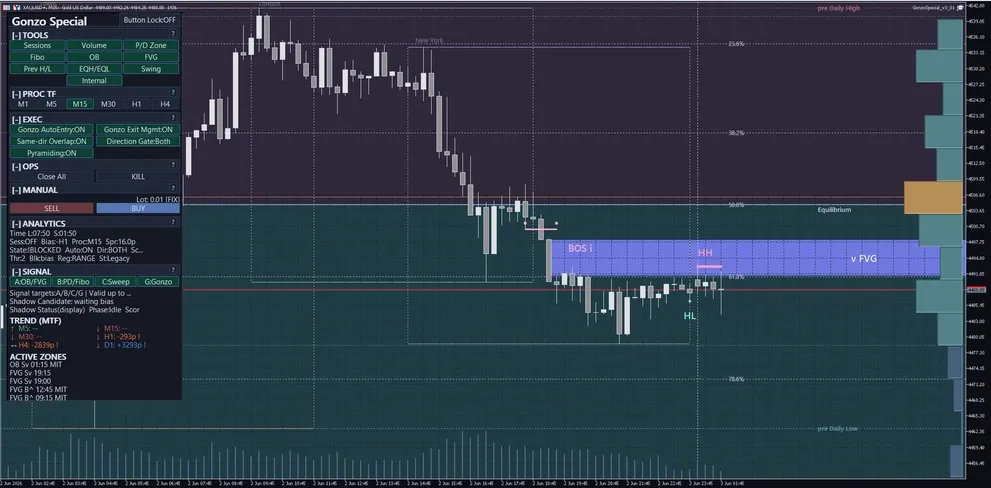
Product overview
| Item | Details |
|---|---|
| Target | XAUUSD / GOLD |
| Platform | MetaTrader 5 semi-discretionary EA |
| Version | 4.02 |
| Protection mode | Standard mode (default) / Stability mode |
| Lot sizing | Fixed lot 0.01 by default; Risk % per trade is optional. |
| Pyramiding | Optional; OFF by default. |
| Time controls | Separate rollover, weekend, and year-end controls; all OFF by default. |
| Display and operation | Panel, A/B/C/G signals, notifications, SMC analysis, and manual controls. |
| Official page | GogoJungle English product page |
Position in the Gonzo lineup
| Product | Positioning | Best fit | Main difference |
|---|---|---|---|
| Gonzo Special | Full-feature model | Automatic trading with optional display, notifications, and manual controls | A/B/C/G, notifications, SMC analysis, panel controls, optional pyramiding |
| Gonzo Nexus | Separate-logic model | Combining trade timing that differs from Special | A/B/C/G NX and a separate trading-logic family |
| Gonzo Special Lite | Reduced-feature model | Automatic trading with fewer settings | Gonzo arrows with a smaller settings set |
Version 4.02 backtest results
Company I and Company V were tested with the included published-backtest SET. Both use fixed 0.01 lot, Stability mode, and pyramiding ON. The broker, account currency, and test period differ, so the results are shown separately.
| Environment and period | SET file | Protection / pyramiding | Weekend / daily rollover control |
|---|---|---|---|
| Company I / USD 2019.01.01-2026.01.01 Deposit 5,000 USD / 1:500 | GonzoSpecial_v4_02_Backtest_Stability_Pyramiding_ON.set | Stability / ON | No new entries Fri 18:50-Mon 01:00; open positions remain under normal management; daily rollover control OFF |
| Company V / JPY (reference) 2023.12.11-2026.08.15 Deposit 1,000,000 JPY / 1:500 | GonzoSpecial_v4_02_Backtest_Stability_Pyramiding_ON.set | Stability / ON | No new entries Fri 18:50-Mon 01:00; open positions remain under normal management; daily rollover control OFF |
| Environment / configuration | Trades | Win rate | PF | RF | Net profit | Maximum equity DD (amount) |
|---|---|---|---|---|---|---|
| Company I / published backtest | 2,154 | 96.56% | 13.10 | 43.64 | +4,438.66 USD | 101.72 USD |
| Company V / published backtest (reference) | 1,077 | 96.56% | 15.20 | 27.46 | +375,798 JPY | 13,685 JPY |
Maximum equity drawdown is shown as a money amount and includes floating loss. PF compares gross profit with gross loss; RF compares net profit with maximum drawdown.
Company V is a reference value because its tester log retains some historical-data and order-execution warnings even though the tester screen shows 100% history quality. Company I is the primary published-backtest reference.
English operation manual
This section explains the settings and panel controls that buyers are most likely to use. For a first run, keep the defaults and verify operation on demo or in the Strategy Tester.
1. First setup
| Step | Action | Caution |
|---|---|---|
| 1 | Attach the EA to an XAUUSD / GOLD chart and confirm MT5 platform auto-trading permission. | Broker symbol naming can differ, but public operation is described as XAUUSD / GOLD. |
| 2 | Start with fixed lot 0.01, default settings, and PROC TF M15 on demo or in the Strategy Tester. | Do not increase lot or enable risk-based sizing immediately. |
| 3 | Check panel Spr, State, Blk, Auto, Dir, Sc, and Thr. | Wide Spr can degrade entries, exits, SL/TP execution, and tracking. |
| 4 | Use separate magic numbers for multiple products or charts. | This prevents management scope from mixing across EAs. |
2. Three timeframe roles
| Timeframe | Role |
|---|---|
| MT5 chart timeframe | Optional; M1 is not required. It changes the visible candles but not the internal trading core. |
| PROC TF / analysis timeframe | Select M1, M5, M15, M30, H1, or H4. The default is M15. It changes analysis, drawing, and signal display. |
| Internal logic timeframe | The trading core uses its own timeframe references. The user does not need to change them. |
3. Panel labels and button behavior
| Panel area | Visible label | Values or states | Action | Caution |
|---|---|---|---|---|
| Header | Product name, lock, compact/status line | Product name, button lock state, and run/stop status | Check panel state and prevent accidental changes | When locked, accidental edits are reduced but layout changes are limited. |
| TOOLS | Session / Volume / P/D / Fibo / OB / FVG / Prev H/L / EQH/EQL / Swing / Internal | Sessions, Volume, P/D zone, Fibo, OB, FVG, Prev H/L, EQH/EQL, Swing, Internal. In Lite, use only the items actually visible and do not treat them as full Special/Nexus controls. | Toggle analysis overlays for waiting zones and structure context. | TOOLS are visual analysis aids, not entry guarantees. |
| PROC TF | M1 / M5 / M15 / M30 / H1 / H4, such as PROC:M15 | Selected analysis timeframe | Switches the analysis/drawing/signal-display basis. | Separate from the MT5 chart timeframe and the internal logic timeframe. |
| EXEC | Auto Entry, Auto Close/Tracking, Overlap, Direction, Pyramiding, Preset/Frequency/Aggregation | Panel ON/OFF states or selected values | Controls new entries, exits/tracking, direction, overlap, and optional add-on exposure. | Auto Entry and Auto Close are separate. You may stop entries while keeping exit management. |
| OPS | Close All, Stop/KILL, Compact, Spacing, Reset, Manual rapid/interval | Confirmation, running, or stopped states | Close positions, stop operation, compact the panel, or reset display/runtime states. | Confirm symbol and magic-number scope before using Close All. |
| MANUAL | Lot, SELL, BUY, Manual SL/TP | Lot: 0.01 [FIX], Lot: 0.01 [AUTO], etc. | Places panel manual BUY/SELL orders. | Risk-based lot changes the displayed lot. Manual SL/TP attachment default differs by product. |
| ANALYTICS | Time, Session, Bias, Proc, Spr, State, Auto, Dir, Sc, Thr, Blk, Reg, St, Sig | Spr:xx.xp, State:READY/SETUP/BLOCKED, Sc:x/y, Thr:x, Blk:reason, etc. | Check spread, readiness, direction, score, threshold, and blockers. | Wide Spr can degrade entries, exits, SL/TP execution, and tracking. |
| SIGNAL | A / B / C / G or Gonzo arrows | A/B/C/G display, target line, remaining validity, and candidate/no/idle chips. | Use for alerts and manual/semi-discretionary decision support. | Signals do not guarantee profit. Check direction, session, spread, and blockers. |
Panel abbreviations
| Abbreviation | Meaning |
|---|---|
| Spr | Current spread, shown in pips such as xx.xp. Use it to confirm narrow-spread operation. |
| State | Current readiness such as READY, SETUP, or BLOCKED. |
| Blk | Current blocker reason, such as direction, time, spread, score, or risk-control window. |
| Sc | Current score, often shown as x/y. |
| Thr | Required threshold used to judge whether score is sufficient. |
| Reg | Market-regime context label, not a guarantee. |
| St | Strategy/state label for context. |
| Sig | Signal age or remaining validity when displayed. |
4. Reading A/B/C/G signals
| Signal | Meaning |
|---|---|
| A | Candidate reaction-zone signal. Use it first to decide where to wait. |
| B | Supporting signal for checking whether the price area is too high or too low. Treat it as support, not the main trigger. |
| C | Timing signal. A+C is easy to observe because it combines waiting zone and timing, but it is not a standalone trade rule. |
| G | Gonzo-family confirmation layer. It does not replace A/B/C; treat it as additional support when it overlaps. Nexus may show this as G NX. |
| A+C | A readable combination of where to wait and when timing begins to align. |
| A+B+C | A stricter-looking overlap of zone, support, and timing. More overlap does not guarantee profit. |
| A+B+C+G | A further overlap including the Gonzo-family layer. Still check direction, session, Spr, State, Blk, and lot size. |
5. Risk-percent lot-sizing formula
Risk % per trade calculates order volume from account capital and the initial stop. It is optional. Start with fixed lot 0.01 and enable risk sizing only after verifying the resulting volume.
| Step | Specification |
|---|---|
| 1. When active | Select Risk % per trade as Lot sizing mode and use a positive risk percentage. Fixed lot mode uses the Fixed lot value. |
| 2. Capital basis | Choose Balance or Equity under Capital basis for risk. |
| 3. Risk money | Risk money = selected capital x Risk % / 100. 1.00 means 1%; 0.50 means 0.5%. The default is 1.00. |
| 4. Loss per 1.00 lot | The EA uses the actual entry and initial SL to calculate the estimated stop loss for 1.00 lot in account currency. |
| 5. Volume | Risk money is divided by loss per lot, capped by broker maximum volume, and rounded down to the broker volume step. |
| 6. Order blocked | The order is blocked when the initial SL is missing, the loss cannot be calculated, or the result is below the broker minimum lot. It does not fall back to fixed lot. |
| 7. Pyramiding | Every added order receives the full Risk % calculation, so aggregate account risk rises when pyramiding is enabled. |
| 8. Important | Risk % is a sizing basis, not a guaranteed loss cap. Slippage, gaps, spread, and execution conditions can change the realized loss. |
6. SMC glossary
| Term | Explanation |
|---|---|
| OB | Potential reaction zone, often used as background for A signals. |
| FVG | Gap-like price area used to observe potential fill/reaction behavior. |
| EQH/EQL | Equal highs/lows, often watched as liquidity-prone levels. |
| Swing | Broader market-structure wave used for larger context. |
| Internal | Finer short-term structure used for recent context. |
| P/D zone | Premium/discount zone showing whether price is relatively high or low. |
| Fibo | Fibonacci reference for checking retracement context with P/D zones. |
| Sessions | Tokyo/London/New York style time zones used to confirm active sessions. |
| Volume | Volume profile or volume concentration by price area. |
7. Semi-discretionary and manual operation flow
| Workflow | Steps |
|---|---|
| Full-auto baseline | Allow auto trading=true, Gonzo auto entry=true, Gonzo auto close and tracking=true, fixed lot 0.01, PROC TF M15, and a narrow-spread XAUUSD chart. |
| Observation only | Set Allow auto trading=false when you want no EA trading. To monitor displays while stopping new entries only, set Gonzo auto entry=false and keep auto close/tracking according to your plan. |
| Signal monitor + manual entry | Use A/B/C/G, TOOLS, ANALYTICS, Spr, State, and Blk. Press BUY/SELL only when direction, session, spread, and lot size are acceptable. |
| Manual entry + EA management | Set Gonzo auto entry=false and Gonzo auto close and tracking=true. Special/Nexus initially do not attach SL/TP to panel manual BUY/SELL entries. Always confirm SL/TP and management scope. |
| Panel/manual rapid operation | Use BUY/SELL, Close All, Stop/KILL, Compact, and Reset. Test any long-press or rapid style operation on demo first to avoid accidental orders. |
| Close All and emergency stop | Confirm symbol and magic-number scope before Close All. Use emergency stop to stop new or management actions, then confirm existing positions manually. |
| Overlap and add-on exposure | Pyramiding is optional and initially false. Same-direction overlap and add-on positions increase total exposure. |
| Time-risk controls | Special/Nexus use Weekend Risk Control and Daily Rollover Control. Lite uses Daily Rollover Control and Friday Risk Control. None of these guarantees loss prevention. |
What not to do
- Do not run multiple Gonzo products on the same XAUUSD account with the same magic number unless you intentionally want scopes to overlap.
- Do not treat display toggles as trading guarantees or automatic entry-rule changes.
- Do not turn off auto close/tracking and still expect EA exit management.
- Do not describe the system as relying on unsupported seconds timeframes.
- Do not increase lot size after a quiet period without testing.
- Do not treat backtest evidence as a guarantee of future profit or loss avoidance.
8. Settings reference
The list below uses only MT5 setting labels visible to the user, in release order and grouped for readability.
| MT5 setting item | Initial value | Visible value or input example | What it controls | When to change | Caution |
|---|---|---|---|---|---|
| マジックナンバー / Magic number | 507001 | numeric input | Identifies the orders and positions managed by this EA. | Change it when another EA or another setup runs on the same account. | Do not reuse the same number for multiple EAs on the same symbol. |
| 取引方向 / Trade direction | 両方 / Both | Buy only / Sell only / Both / Disabled | Limits automatic entry direction. | Use it when running only one direction. | Changing it changes trade count and performance. |
| ロット計算モード / Lot sizing mode | 固定ロット / Fixed lot | Fixed lot / Risk % per trade | Switches between fixed and risk-based sizing. | Select Risk % only after verifying the calculated volume. | Start with fixed lot 0.01. |
| 固定ロット / Fixed lot | 0.01 | numeric input | Order volume in Fixed lot mode. | Change it for fixed-volume operation. | XAUUSD exposure changes quickly with lot size. |
| 1取引あたりのリスク率(1.00=1%) / Risk per trade (1.00=1%) | 1.00 | numeric input | Risk percentage assigned to each order. | Used only in Risk % per trade mode. | Each pyramiding order also receives the full percentage. |
| リスク計算に使う資金 / Capital basis for risk | 残高 / Balance | Balance / Equity | Selects the capital used by the risk calculation. | Choose Equity if open P/L should affect the next volume. | Equity mode changes with floating P/L. |
| MT5 setting item | Initial value | Visible value or input example | What it controls | When to change | Caution |
|---|---|---|---|---|---|
| 自動売買を許可 / Allow auto trading | true | true / false | Master permission for EA trading actions. | Set false to stop EA trading while leaving it attached. | MT5 platform auto trading must also be enabled. |
| Gonzo自動エントリー / Gonzo auto entry | true | true / false | Allows new automatic Gonzo entries. | Set false for display/notification-only use. | Position management can remain active when auto close/tracking is true. |
| Gonzo自動決済・追跡 / Gonzo auto close and tracking | true | true / false | Allows automatic exits and post-entry management. | Keep true when the EA should manage existing positions. | False stops EA-driven exits and stop/target updates. |
| Gonzo同方向重複を許可 / Allow same-direction overlap | true | true / false | Allows same-direction positions to overlap. | Set false to restrict overlap. | Overlap increases aggregate exposure. |
| ピラミッディングを有効化 / Enable pyramiding | false | true / false | Enables profit-side pyramiding. | Enable only after checking aggregate risk or when reproducing the retained BT contract. | Product default is OFF; the retained v3.01 reference BT used ON. |
| 保護モード / Protection mode | 標準モード / Standard mode | Standard mode / Stability mode | Selects the v3.01-style Standard behavior or conditional 30/40-minute Stability protection. | Use Stability when you want extra handling for selected weak positions. | Not every position is closed at 30 or 40 minutes. Stability comments include [Stable]. |
| MT5 setting item | Initial value | Visible value or input example | What it controls | When to change | Caution |
|---|---|---|---|---|---|
| ロールオーバー制御を使う / Enable rollover control | false | true / false | Enables Daily Rollover Control. | Use it for an entry-stop window or position action around rollover. | All times are broker server time. |
| 新規停止開始(サーバー時刻 HH:MM) / Entry-stop start (server HH:MM) | 23:50 | HH:MM | Time when new entries stop. | Move earlier to widen the block window. | Keep the start, rollover, and resume order valid. |
| ロールオーバー時刻(サーバー時刻 HH:MM) / Rollover time (server HH:MM) | 00:00 | HH:MM | Cutoff used by force-close actions. | Match the broker rollover time. | No JST, UTC, London, or DST conversion is applied. |
| 新規再開(サーバー時刻 HH:MM) / Entry resume (server HH:MM) | 00:10 | HH:MM | Time when new entries resume. | Move later if spread remains wide. | A longer block reduces trade opportunities. |
| ポジション対応 / Position action | 何もしない(ポジション維持) / Keep positions | Keep / close pre-window positions when profitable / force at cutoff / profit then force | Selects how positions opened before the stop window are handled. | Change it for profit-close or force-close behavior. | Profit-close applies only to positions opened before the block started. |
| MT5 setting item | Initial value | Visible value or input example | What it controls | When to change | Caution |
|---|---|---|---|---|---|
| 週末リスク制御を使う / Enable weekend risk control | false | true / false | Enables Weekend Risk Control. | Use it to block entries and manage pre-window positions through the weekend. | All times are broker server time. |
| 金曜の新規停止(サーバー時刻 HH:MM) / Friday entry stop (server HH:MM) | 21:00 | HH:MM | Friday time when new entries stop. | Set it to reduce weekend carry. | Position handling is selected separately. |
| 再開曜日 / Resume day | 月曜日 / Monday | Sunday / Monday | Selects the resume day. | Match the broker trading week. | Orders cannot execute while the market is closed. |
| 新規再開(サーバー時刻 HH:MM) / Entry resume (server HH:MM) | 01:00 | HH:MM | Time when new entries resume. | Move later to avoid the opening spread. | Use broker server time. |
| ポジション対応 / Position action | 何もしない(ポジション維持) / Keep positions | Keep / close pre-window positions when profitable / force at cutoff / profit then force | Selects how positions opened before the weekend block are handled. | Change it for profit-close or force-close behavior. | Force close can be affected by late-Friday liquidity and spread. |
| 金曜の強制決済開始(サーバー時刻 HH:MM) / Friday force cutoff (server HH:MM) | 23:30 | HH:MM | Cutoff used by weekend force-close actions. | Set it with enough time before market close. | It must be later than the Friday entry-stop time. |
| MT5 setting item | Initial value | Visible value or input example | What it controls | When to change | Caution |
|---|---|---|---|---|---|
| 年末年始リスク制御を使う / Enable year-end risk control | false | true / false | Enables Year-End Risk Control. | Use it to block entries and manage positions through the year-end window. | All times are broker server time. |
| 新規停止開始(サーバー時刻 MM-DD HH:MM) / Block start (server MM-DD HH:MM) | 12-20 00:00 | MM-DD HH:MM | Date and time when new entries stop. | Change it for the desired year-end window. | The same month/day is used every year. |
| 新規再開(サーバー時刻 MM-DD HH:MM) / Entry resume (server MM-DD HH:MM) | 01-05 00:00 | MM-DD HH:MM | Date and time when entries resume. | Change it for the desired restart date. | Set a valid year-crossing window. |
| ポジション対応 / Position action | 何もしない(ポジション維持) / Keep positions | Keep / close pre-window positions when profitable / force at cutoff / profit then force | Selects how positions opened before the year-end block are handled. | Change it for profit-close or force-close behavior. | Year-end liquidity and spread can affect force close. |
| 強制決済開始(サーバー時刻 MM-DD HH:MM) / Force cutoff (server MM-DD HH:MM) | 12-30 23:00 | MM-DD HH:MM | Cutoff used by force-close actions. | Set it before the expected holiday closure. | It must be after block start and before resume. |
| MT5 setting item | Initial value | Visible value or input example | What it controls | When to change | Caution |
|---|---|---|---|---|---|
| 分析基準TF / Analysis timeframe | M15 / 15-minute | M1 / M5 / M15 / M30 / H1 / H4 etc. | Analysis/display/signal timeframe. The initial value is M15. | Change to M1/M5/M15/M30/H1/H4 etc. when you want a different analysis view. | This is separate from the MT5 chart timeframe and the internal trading core. Keep M15 until you understand the difference. |
| Aシグナルを表示 / Show A signals | true | true / false | Shows or hides A signals, used as a candidate reaction zone reference. | Keep true when you want to see where to wait; set false to reduce overlays. | A is decision support, not a standalone trade trigger. |
| Bシグナルを表示 / Show B signals | true | true / false | Shows or hides B signals, a supporting price-location signal. | Use as a helper for checking A/C context. | B is a supporting signal, not the main decision by itself. |
| Cシグナルを表示 / Show C signals | true | true / false | Shows or hides C signals, used to observe entry timing. | Use when observing combinations such as A+C. | C alone or A+C does not promise profit. |
| Gonzoの矢印を表示 / Show Gonzo arrows | true | true / false | Shows or hides Gonzo arrows. | Use to monitor candidate direction and manual decision context. | Arrows are display/decision support. Always check spread, direction, state, and risk. |
| MT5 setting item | Initial value | Visible value or input example | What it controls | When to change | Caution |
|---|---|---|---|---|---|
| 通知を使う / Enable notifications | false | true / false | Master switch for notifications. | Set true when you want signal conditions sent to popup, push, email, or sound. | If false, channel/condition settings will not send alerts. MT5 terminal notification setup is also required. |
| 同一バーは1回だけ通知 / Notify once per bar | true | true / false | Suppresses repeated alerts on the same bar. | Keep true to avoid alert spam. | If false, multiple alerts can occur within the same bar. |
| MT5 setting item | Initial value | Visible value or input example | What it controls | When to change | Caution |
|---|---|---|---|---|---|
| ポップアップ通知 / Popup notification | true | true / false | Uses MT5 popup notifications. | Use when monitoring on the desktop terminal. | Requires the notification master to be true. |
| スマホPush通知 / Mobile push notification | false | true / false | Uses MT5 mobile push notifications. | Use when you want alerts away from the desktop. | Requires MT5 mobile notification setup and the notification master to be true. |
| メール通知 / Email notification | false | true / false | Uses MT5 email notifications. | Use when you want email records. | Requires MT5 email setup and the notification master to be true. |
| サウンド通知 / Sound notification | false | true / false | Plays a sound alert. | Use as an audio cue when not watching the chart constantly. | Requires a valid sound file and the notification master to be true. |
| 通知サウンドファイル / Notification sound file | alert.wav | text input | Sound file used for sound notifications. | Change it when you want a different alert sound. | Use a file name that MT5 can access. |
| MT5 setting item | Initial value | Visible value or input example | What it controls | When to change | Caution |
|---|---|---|---|---|---|
| A条件で通知 / Notify on A | false | true / false | Enables alerts when the A condition or combination is met on the display side. | Enable only the combinations you actually want to monitor. | Alerts are decision support. More conditions may look stricter, but they do not guarantee profit. |
| B条件で通知 / Notify on B | false | true / false | Enables alerts when the B condition or combination is met on the display side. | Enable only the combinations you actually want to monitor. | Alerts are decision support. More conditions may look stricter, but they do not guarantee profit. |
| C条件で通知 / Notify on C | false | true / false | Enables alerts when the C condition or combination is met on the display side. | Enable only the combinations you actually want to monitor. | Alerts are decision support. More conditions may look stricter, but they do not guarantee profit. |
| G条件で通知 / Notify on G | false | true / false | Enables alerts when the G condition or combination is met on the display side. | Enable only the combinations you actually want to monitor. | Alerts are decision support. More conditions may look stricter, but they do not guarantee profit. |
| MT5 setting item | Initial value | Visible value or input example | What it controls | When to change | Caution |
|---|---|---|---|---|---|
| A+B条件で通知 / Notify on A + B | false | true / false | Enables alerts when the A+B condition or combination is met on the display side. | Enable only the combinations you actually want to monitor. | Alerts are decision support. More conditions may look stricter, but they do not guarantee profit. |
| A+C条件で通知 / Notify on A + C | false | true / false | Enables alerts when the A+C condition or combination is met on the display side. | Enable only the combinations you actually want to monitor. | Alerts are decision support. More conditions may look stricter, but they do not guarantee profit. |
| A+G条件で通知 / Notify on A + G | false | true / false | Enables alerts when the A+G condition or combination is met on the display side. | Enable only the combinations you actually want to monitor. | Alerts are decision support. More conditions may look stricter, but they do not guarantee profit. |
| B+C条件で通知 / Notify on B + C | false | true / false | Enables alerts when the B+C condition or combination is met on the display side. | Enable only the combinations you actually want to monitor. | Alerts are decision support. More conditions may look stricter, but they do not guarantee profit. |
| B+G条件で通知 / Notify on B + G | false | true / false | Enables alerts when the B+G condition or combination is met on the display side. | Enable only the combinations you actually want to monitor. | Alerts are decision support. More conditions may look stricter, but they do not guarantee profit. |
| C+G条件で通知 / Notify on C + G | false | true / false | Enables alerts when the C+G condition or combination is met on the display side. | Enable only the combinations you actually want to monitor. | Alerts are decision support. More conditions may look stricter, but they do not guarantee profit. |
| MT5 setting item | Initial value | Visible value or input example | What it controls | When to change | Caution |
|---|---|---|---|---|---|
| A+B+C条件で通知 / Notify on A + B + C | false | true / false | Enables alerts when the A+B+C condition or combination is met on the display side. | Enable only the combinations you actually want to monitor. | Alerts are decision support. More conditions may look stricter, but they do not guarantee profit. |
| A+B+G条件で通知 / Notify on A + B + G | false | true / false | Enables alerts when the A+B+G condition or combination is met on the display side. | Enable only the combinations you actually want to monitor. | Alerts are decision support. More conditions may look stricter, but they do not guarantee profit. |
| A+C+G条件で通知 / Notify on A + C + G | false | true / false | Enables alerts when the A+C+G condition or combination is met on the display side. | Enable only the combinations you actually want to monitor. | Alerts are decision support. More conditions may look stricter, but they do not guarantee profit. |
| B+C+G条件で通知 / Notify on B + C + G | false | true / false | Enables alerts when the B+C+G condition or combination is met on the display side. | Enable only the combinations you actually want to monitor. | Alerts are decision support. More conditions may look stricter, but they do not guarantee profit. |
| A+B+C+G条件で通知 / Notify on A + B + C + G | false | true / false | Enables alerts when the A+B+C+G condition or combination is met on the display side. | Enable only the combinations you actually want to monitor. | Alerts are decision support. More conditions may look stricter, but they do not guarantee profit. |
| MT5 setting item | Initial value | Visible value or input example | What it controls | When to change | Caution |
|---|---|---|---|---|---|
| セッション帯を表示 / Show session zones | true | true / false | Shows or hides session zones such as Tokyo, London, and New York. | Use when checking active sessions. | Session display is not a trade guarantee. Be aware of broker time differences. |
| 出来高プロファイルを表示 / Show volume profile | true | true / false | Shows or hides volume profile support by price area. | Use when checking where activity is concentrated. | Volume display is only a visual aid. Set false if it is heavy or cluttered. |
| P/Dゾーンを表示 / Show premium/discount zones | true | true / false | Shows premium/discount zones to judge whether price is relatively high or low. | Use when checking B-signal or waiting-zone context. | Do not trade from this zone alone. |
| Fiboを表示 / Show Fibonacci levels | true | true / false | Shows Fibonacci reference levels. | Use together with premium/discount or reaction zones. | Do not use Fibonacci alone as a trade decision. |
| 前高安を表示 / Show previous highs/lows | true | true / false | Shows previous high/low references. | Use when checking liquidity and reaction levels. | Be careful around nearby levels because spread and volatility can change quickly. |
| OBを表示 / Show order blocks | false | true / false | Shows order block areas, potential reaction zones. | Use when you want background context for A signals or waiting zones. | Initially false. More overlays can make the chart heavier and harder to read. |
| FVGを表示 / Show FVG | false | true / false | Shows FVG areas, gap-like price zones. | Use when observing fill/reaction behavior. | Initially false. Display is only a visual aid, not a trade guarantee. |
| EQH/EQLを表示 / Show equal highs/lows | false | true / false | Shows equal highs/lows. | Use to identify liquidity-prone levels. | Initially false. Be cautious of fast moves and false breaks around these levels. |
| スイングを表示 / Show swing structure | false | true / false | Shows or hides swing structure. | Use for a broader market-structure view. | Initially false. Keep it separate from short-term triggers. |
| インターナルを表示 / Show internal structure | false | true / false | Shows or hides internal short-term structure. | Use for near-term structure context. | Initially false. Too many overlays can distract decisions. |
| 手動エントリー時にSL/TPを付帯 / Attach SL/TP to manual entries | false | true / false | Controls whether panel manual BUY/SELL entries receive SL/TP. | Set true if you want manual entries closer to the EA-managed workflow. Special/Nexus are initially false; Lite is initially true. | When false, confirm manual SL/TP yourself. Even when true, broker conditions, spread, and execution constraints can affect results. |
| MT5 setting item | Initial value | Visible value or input example | What it controls | When to change | Caution |
|---|---|---|---|---|---|
| 表示言語 / Display language | 日本語 / Japanese | Japanese, English | Switches panel/display language. | Use when you prefer Japanese or English display. | It does not change trading logic or performance. |
9. Time-risk control examples
Daily Rollover Control examples
| Scenario | Settings example | Expected behavior | Caution |
|---|---|---|---|
| Block new entries only | Enabled; stop 23:50; rollover 00:00; resume 00:10; Position action=Keep | Blocks new entries from 23:50 to 00:10. | Times are broker server time. |
| Close when profitable | Enabled; stop 23:00; rollover 00:00; resume 01:00; Position action=Close pre-window positions when profitable | Only positions opened before 23:00 are closed if they turn profitable during the block. | This is not a forced stop-loss. |
| Force close at 00:00 | Position action=Force close all positions at cutoff | Attempts to close all managed positions from 00:00. | Execution may occur during a wide-spread period. |
| Profit close, then force | Position action=Close when profitable, then force close remaining at cutoff | Closes qualifying profitable positions first, then closes the remainder from 00:00. | Execution depends on broker conditions. |
Weekend Risk Control examples
| Scenario | Settings example | Expected behavior | Caution |
|---|---|---|---|
| Block new entries only | Enabled; Friday stop 21:00; Monday resume 01:00; Position action=Keep | Blocks new entries and leaves existing positions under normal management. | Times are broker server time. |
| Close when profitable | Enabled; Friday stop 18:00; Monday resume 01:00; Position action=Close pre-window positions when profitable | Only positions opened before the block are closed if they turn profitable during the block. | Positions opened after the block are not included. |
| Force close Friday | Position action=Force close at cutoff; cutoff 23:30 | Attempts to close all managed positions from Friday 23:30. | Late-Friday spread and liquidity can affect execution. |
| Profit close, then force | Position action=Close when profitable, then force close remaining at cutoff | Closes qualifying profitable positions first, then closes the remainder from 23:30. | This is the strongest weekend carry-control option. |
Year-End Risk Control examples
| Scenario | Settings example | Expected behavior | Caution |
|---|---|---|---|
| Block new entries only | Enabled; stop 12-20 00:00; resume 01-05 00:00; Position action=Keep | Blocks new entries and leaves existing positions under normal management. | Dates and times are broker server time. |
| Close when profitable | Position action=Close pre-window positions when profitable | Positions opened before the block are closed if they turn profitable during the block. | Losing positions are not force-closed by this action. |
| Force close before year-end | Position action=Force close at cutoff; cutoff 12-30 23:00 | Attempts to close all managed positions from the cutoff. | Holiday liquidity and spread can affect execution. |
| Profit close, then force | Position action=Close when profitable, then force close remaining at cutoff | Closes qualifying profitable positions first, then closes the remainder at the cutoff. | This is the strongest year-end carry-control option. |
10. FAQ and troubleshooting
| Question | Answer |
|---|---|
| Q. What value means 1% risk? | Enter 1.00 in Risk per trade. 0.50 means 0.5%, and 0.01 means 0.01%. |
| Q. Does Risk % guarantee the realized loss stays within that percentage? | No. It is the sizing basis. Slippage, gaps, spread, and execution conditions can change the realized loss. |
| Q. Does a failed risk calculation fall back to fixed lot? | No. Missing initial SL, calculation failure, or a below-minimum result blocks that order. |
| Q. What is the difference between Standard and Stability? | Standard carries forward the v3.01 strategy behavior. Stability adds conditional 30- and 40-minute protection to selected main-strategy positions. |
| Q. Does Stability always close at 30 or 40 minutes? | No. It acts only when price-path, higher-timeframe, and current-protection conditions match. |
| Q. Does time control adjust for DST automatically? | No. Every configured time is interpreted as fixed broker server time. |
| Q. Why are there no trades? | Check Allow auto trading, Gonzo auto entry, direction, Spr, State, Blk, each time control, and MT5 platform auto trading. |
| Q. Can the EA manage a manual position? | One workflow is Gonzo auto entry=false and auto close/tracking=true. Confirm SL/TP and magic-number scope. |
| Q. Can I run multiple Gonzo products together? | Yes, but separate magic numbers and manage account-wide lot, overlap, carry, and drawdown tolerance. |
1クリック注文
GogoJungleでのサービス購入が、かんたん・スピーディーで便利になります。
※コンビニ・銀行支払いの場合は、注文完了しますが入金の確認がされるまでは、商品をダウンロードすることは出来ません。
※クレジットカードの場合はカード情報の入力が必要になります。
●お支払い方法
GogoJungleを初めてご利用する方へ 商品のご利用まではかんたん3ステップ!
GogoJungleでは、会員様向けに、あなたの投資生活を豊かにするサービスをご用意しております。また、商品をご購入いただけるのは、会員様のみとなっております。今すぐ会員登録をして、GogoJungleを活用してみませんか!
