
Product outline
Community(0)
TimePair_ChangeKeys Indicators/E-books
TimePair_ChangeKeys
MetaTrader 4 の時間軸ボタンや通貨ペアの変更を、キーボードのキー1つに置き換えるインジケータです。
Sales Result 0 items
Reviews ★ 0.0 (0)
Category:
How to provide:
Indicator
Sales from:
03/09/2023
Last Updated:
03/10/2023
Version:
1.0
Available company:
Seller HiTS Agent
Seller's last login time: 9/29/2026 11:56:38
Read more seller information
TimePair_ChangeKeys
キー1つで時間軸と通貨を切替

MetaTrader 4 の時間軸ボタンや通貨ペアの変更を、キーボードのキー1つに置き換えるインジケータです。

MT4専用 4つのキーで切り替え 通貨ペア10組まで登録
こんな操作をしていませんか
時間足を変えるたびに、ツールバーの小さな M1 M5 M15 … を目で探してクリックしている。
通貨ペアを見比べるたびに、気配値表示からチャートへドラッグし直している。
切り替えるのが面倒でチャートを何枚も開き、1枚あたりが小さくなって結局どれも見づらい。
TimePair_ChangeKeys は、この切り替えを キー1つ にまとめます。
主な機能

チャートをクリックして選択した状態で、決めておいたキーを押すだけです。マウスに持ち替える必要はありません。線もボタンも文字も表示しないため、ローソク足や他のインジケーターの表示を妨げることもありません。

01
時間軸を1つ上げる・下げる

初期値は U キーで上位足へ、D キーで下位足へ。押すたびに1段ずつ動きます。

02
通貨ペアを次へ・前へ

初期値は N キーで次の通貨ペアへ、P キーで前の通貨ペアへ。時間軸はそのまま保たれます。

03
使うものだけに絞れる

見ない時間足はオフにでき、通貨ペアは使う分だけ登録します。要らないものを通り過ぎずに済みます。

04
キーは自由に決められる

4つのキーはそれぞれ好きな1文字に変更できます。大文字・小文字は区別しません。

押すたびに順番に送られ、端まで行くと先頭へ戻ります

どこまで進んだかを覚えておく必要はありません。同じキーを押し続ければ、登録したものを一周して元へ戻ってきます。

時間軸(初期値 U キー)
1分足 → 5分足 → 15分足 → … → 週足 → 月足 → 1分足へ戻る
通貨ペア(初期値 N キー)
通貨ペア 1 → 通貨ペア 2 → 通貨ペア 3 → … → 通貨ペア 1 へ戻る
降順キー(初期値 D / P)を押すと、逆向きに送られます。

時間軸は 1分足から月足へ向かう順に送られ、通貨ペアは設定画面に書いた順に送られます。並べたい順に登録しておけば、その順番で見比べられます。

使い方
STEP 1
チャートに入れる

切り替えて使いたいチャートに、このインジケーターを1つ適用します。チャートは1枚あれば足ります。

STEP 2
通貨ペアを登録する

設定画面で、見比べたい通貨ペアを見たい順に登録します。使わない時間足があれば、ここで無効にしておきます。

STEP 3
キーを押す

チャートをクリックして選択し、キーを押します。初期値のままなら U と D で時間軸、N と P で通貨ペアが切り替わります。

ご購入前にご確認ください
通貨ペア名は、お使いの口座に合わせて書き換えてください
  • 通貨ペアの初期値には USDJPY.oj5k のような接尾辞付きの銘柄名が入っています。銘柄名の書き方は業者ごとに違うため、そのままでは切り替わりません。
  • お使いの口座の気配値表示に出ている名前を、そのまま設定してください。存在しない名前や空欄は読み飛ばされます。
対応プラットフォームMetaTrader 4 専用です。MetaTrader 5 では動作しません。
キーが効く条件このインジケーターを入れたチャートが選択されているときに反応します。他のウィンドウや入力欄を操作している間は反応しません。
指定できるキー英字か数字を1文字です。2文字以上を書いた場合は最初の1文字だけが使われます。Ctrl や Shift との組み合わせには対応していません。
他のツールとの併用同じキーを使う他のインジケーターや EA を同じチャートに入れていると、両方が反応します。重ならないキーを選んでください。
時間軸の並び順1分足から月足へ向かう順で固定です。表示する・しないは選べますが、順番の入れ替えはできません。
切り替えたあとインジケーターはチャートに残るため、続けて何度でも切り替えられます。チャートに適用している他のインジケーターもそのまま残ります。
チャートへの表示線・ボタン・文字のいずれも表示しません。売買サインを出す機能はありません。
設定を変えたときキーや対象の変更は、設定画面で OK を押した時点から有効になります。
設定画面

設定は「時間軸」と「通貨ペア」の2つのグループに分かれています。時間軸は9種類すべてが最初から有効なので、通貨ペアの欄をお使いの口座の銘柄名に書き換えれば使い始められます。
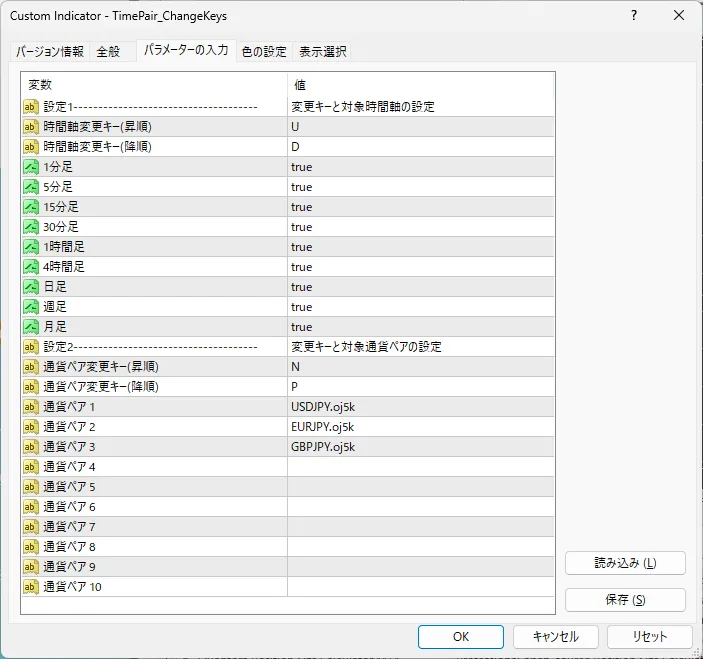
MT4 のパラメータ設定タブ
MT4 のパラメーター設定タブ
パラメータ一覧(全23項目)
項目説明
変更キーと対象時間軸の設定
時間軸変更キー(昇順)上位足へ切り替えるキーです。初期値は U です。有効にした時間軸の中で、押すたびに1段ずつ上がります。
時間軸変更キー(降順)下位足へ切り替えるキーです。初期値は D です。昇順キーの隣や、押し分けやすい位置のキーを選ぶと迷いません。
1分足/5分足/15分足/30分足/1時間足/4時間足/日足/週足/月足切り替えの対象にする時間足を、9つの項目で1つずつ選びます。最初はすべて有効です。使わない時間足を無効にしておくと、キーを押したときに通り過ぎなくなります。すべて無効にすると時間軸の切り替えは行われません。
変更キーと対象通貨ペアの設定
通貨ペア変更キー(昇順)次の通貨ペアへ切り替えるキーです。初期値は N です。時間軸のキーと重ならない文字にしてください。
通貨ペア変更キー(降順)前の通貨ペアへ戻るキーです。初期値は P です。行き過ぎたときに1つ戻れます。
通貨ペア 1 〜 通貨ペア 10切り替えたい通貨ペアを、見比べたい順に上から登録します。10組まで登録でき、使う分だけ埋めれば残りは空欄で構いません。ご利用の口座の銘柄名に合わせて書き換えてください。気配値表示に無い名前や空欄は読み飛ばされ、残った通貨ペアだけが順番に送られます。
TimePair_ChangeKeys — MetaTrader 4 用インジケーター
¥480 (taxed)
Provider/Distributor:
Sales site:
GogoJungle

●Payment

Mastercard Visa JCB Bank FamilyMart D2 D1
Product outline
Community(0)
Best Seller Ranking

For those using GogoJungle for the first time Easy 3 steps to use the product!

At GogoJungle, we provide services to enrich your investment life for our members. In addition, product purchases are limited to members. Why not register as a member now and make use of GogoJungle!

01
Enter user information and register as a member
02
Follow the instructions to make a purchase
03
Download from My Page
■ Important Matters and Risk Warnings Regarding Investment Products 【Financial Instruments Business Operator】
GogoJungle Inc.
Registration: Director-General of the Kanto Local Finance Bureau (Financial Instruments Business) No. 1960
【Member Association】
Investment Trusts Association, Japan
【Fees and Expenses】
The use of software, e-books, investment advisory services, etc., provided on our platform involves purchase prices determined for each product.
Additionally, when conducting actual financial instrument transactions (such as FX or CFD trading), costs such as transaction fees and spreads (the difference between the sell and buy price) may be incurred through the connected brokerage firms.
【Margin and Risk of Loss】
Transactions such as FX (Foreign Exchange Margin Trading) and CFD (Contract for Difference) allow for trading in amounts exceeding the deposited margin.
Therefore, due to sudden fluctuations in target indices (currency, commodity prices, etc.), there is a risk of incurring losses that exceed the deposited margin (loss exceeding principal).
Furthermore, financial instrument transactions involve risks such as price fluctuations, which may result in losses falling below or exceeding the initial investment principal.
【Nature of Services and Trading Entity】
The Company operates a platform (marketplace) providing investment software and information; we do not engage in the buying, selling, mediation, brokerage, or agency of financial instruments on behalf of customers.
The services and information provided are intended as reference for investment decisions and do not guarantee future profits or specific results.
While some services include investment advice, they do not constitute a mandate or solicitation to trade specific financial instruments.
Final investment decisions and the execution of trades must be made at the customer’s own risk and discretion.
