Product outline
Community(0)
ウィンドウの枠を消してキー操作で最大化できるインジケーター『WindowMaximizer』
MT4 / MT5 チャートの枠を消して(MT4) キーボードから最大化できるインジケーターです。
Sales Result 457 items
Reviews ★ 4.0
(1)
Category:
How to provide:
Indicator
Sales from:
06/17/2021
Last Updated:
10/29/2021
Version:
1.05
Available company:

Free
Already 457 users using!
Provider/Distributor:
Sales site:
GogoJungle

キーボードでチャートウィンドウの最大化と元のサイズに戻すが切り替えらるインジケーターです。ウィンドウ枠の表示非表示も選択できます。
※ ウィンドウ最大化のみの対応ですが MT5 版も同梱しています。
ウィンドウ枠を非表示にすれば、ほんの少しですがチャートを広く使えます。キーボードからチャートウィンドウの “最大化 ⇔ 元のサイズに戻す” 操作もできるので、このインジケーターを使えばもう枠いらずです。ウィンドウのアクティブサインも表示するので「今どの足 / 通貨ペアが選ばれてる?」か迷うこともありません。
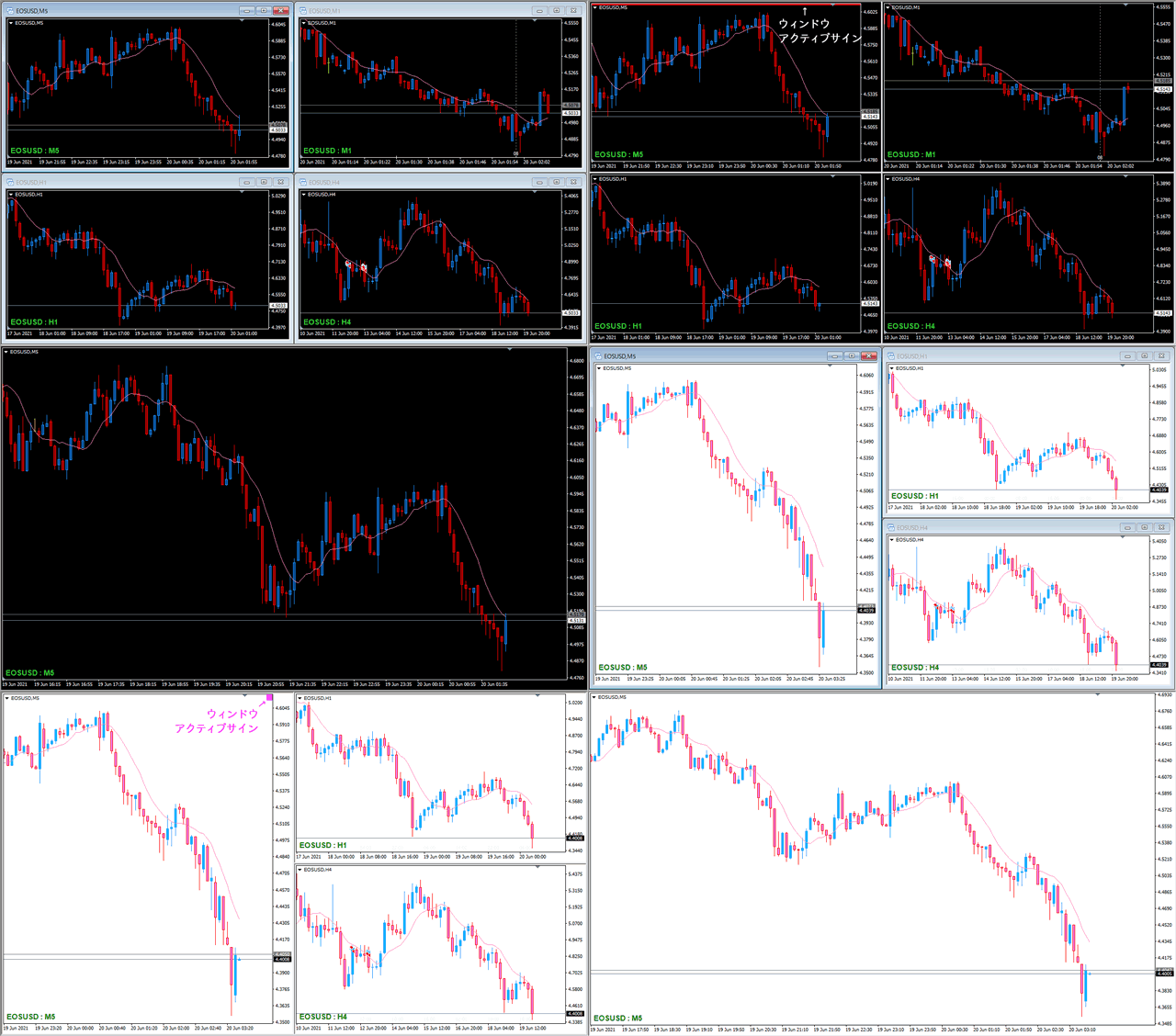
■バージョンアップ 1.05(2021.10.30)
- 【MT4】ウィンドウ枠非表示の動作を安定化させました。
- 状態記憶処理を見直して最適化しました。
- ウィンドウの最大化のみの対応ですが MT5 版を同梱しました。
■バージョンアップ 1.04(2021.07.13)
- ウィンドウを最大化したときはアクティブサインを表示しないよう修正しました。
■バージョンアップ 1.03(2021.06.25)
- ウィンドウ枠を表示した状態で時間足を切り替えてもウィンドウ枠が消えないよう修正しました。
■バージョンアップ 1.02(2021.06.22)
- アクティブサイン(Line)がチャートの幅一杯に表示されないことがある不具合を修正しました。
■バージョンアップ 1.01(2021.06.18)
- アクティブサインの位置の監視タイミングを減らして負荷を軽減させました。
設定項目
このインジケーターはウィンドウ操作のため、user32.dll(Windows User API)を使用しています。プロパティの全般タブで「DLLの使用を許可する」にチェックを入れてください。
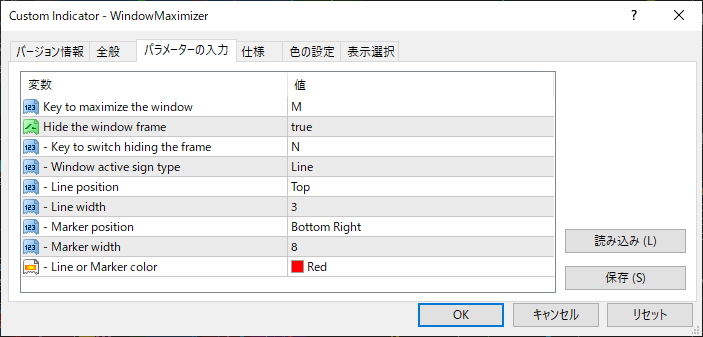
- 【MT4 / MT5】Key to maximize the window - ウィンドウの最大化 ⇔ 元に戻す操作を実行するキーボードキー(M)
- 【MT4 のみ】Hide the window frame – ウィンドウ枠を隠す
複数のチャートを表示させて利用される方が多いと思いますが、一組の中のウィンドウ全てに適用することをおすすめします。適用非適用が混合した状態でウィンドウの整列を行うと、適用したウィンドウへのアクセスが困難になることがあります。この状態になってしまった場合は“ N ”キーでウィンドウ枠を戻せますので、全てのウィンドウ枠を表示させてから整列など再度実行してください。- Key to switch hiding the frame – ウィンドウ枠を一時的に表示非表示するキーボードキー(N)
- Window active sign type – ウィンドウのアクティブ状態を表示するサインのタイプ
ウィンドウ枠を非表示にするとそのウィンドウがアクティブかどうかの判断ができなくなるのでアクティブサインを表示します。チャートをクリックではなく、各チャートのタブ でアクティブにした場合はスグに反映されませんが、次のティックで反映されます。ライン表示とマーカー表示が選べます。
 - Line position – アクティブサイン(Line の場合)の表示位置
- Line width – アクティブサイン(Line の場合)の幅
- Marker position – アクティブサイン(Marker の場合)の表示位置
- Marker width – アクティブサイン(Marker の場合)の高さと幅
- Line or Marker color – アクティブサインの色
Free
Already 457 users using!
Provider/Distributor:
Sales site:
GogoJungle
Product outline
Community(0)
Best Seller Ranking
Recommended Products (Campaigns)
For those using GogoJungle for the first time Easy 3 steps to use the product!
At GogoJungle, we provide services to enrich your investment life for our members. In addition, product purchases are limited to members. Why not register as a member now and make use of GogoJungle!
01
Enter user information and register as a member
02
Follow the instructions to make a purchase
03
Download from My Page
