
AutoTrader Bridge 開発キット — 日経225先物の自動売買ツールを、ご自身の証券会社向けに組み上げる Windows 用キット

Product outline
Community(0)
AutoTrader Bridge 開発キット — 日経225先物の自動売買ツールを、ご自身の証券会社向けに組み上げる Windows 用キット Indicators/E-books
AutoTrader Bridge 開発キット — 日経225先物の自動売買ツールを、ご自身の証券会社向けに組み上げる Windows 用キット
AI(Claude Code)と一緒に部品を組み立てて、ご自身の証券会社で動く日経225先物の自動売買ツールを完成させる開発キット。画面は自分で設計、証券会社との通信部分は AI が作成
Sales Result 0 items
Reviews 0.0 (0)
Category:
How to provide:
Ebooks
Sales from:
09/21/2026
Last Updated:
09/21/2026
Version:
0.5.0

Follow 0 Followers 0
Seller's last login time: 9/22/2026 18:27:06
Read more seller information

AutoTrader Bridge 開発キットは、日経225先物(日経225Mini・日経225Micro)の自動売買ツール「ブリッジ」を、ご自身の証券会社向けに組み上げるための開発キットです。完成済みのブリッジを部品の形でお渡しし、AI(Claude Code)と一緒に組み立てます。

購入後すぐに稼働する完成品ではありません。売買の戦略(シグナル)は含まれていません。お手持ちの戦略(TradingView のアラートなど)から送られてくるシグナルを受信し、注文に変えて証券会社へ発注する側の仕組みです。

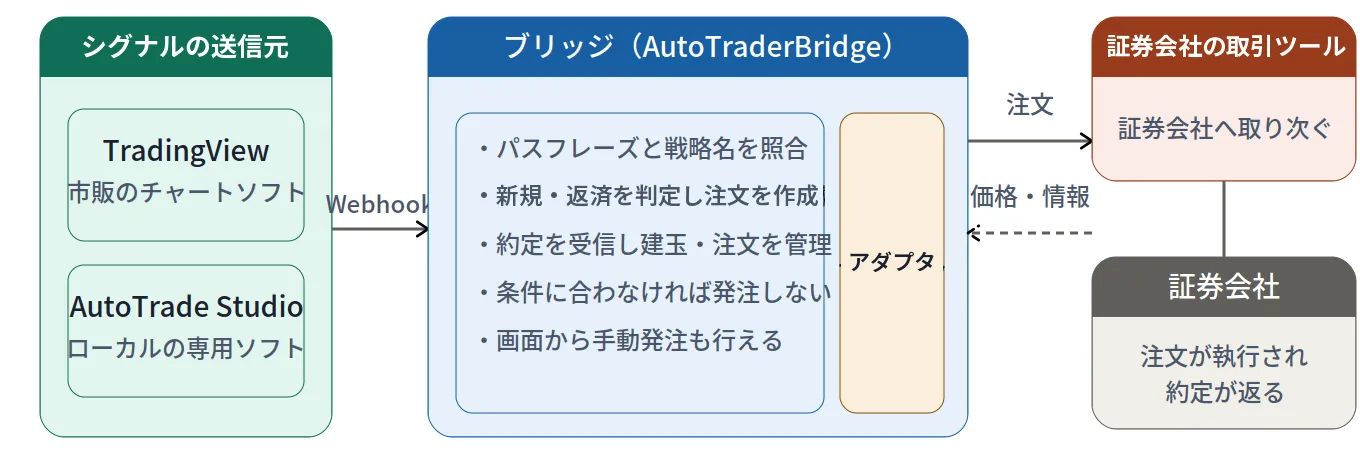
▼ 全体の構成:シグナルの送信元(お手持ちの戦略)→ ブリッジ(このキットで組み上げるもの)→ 証券会社

できあがるもの

ご自身の証券会社の口座で動く、Windows 用の自動売買ツールです。

  • シグナルを受信して、注文に変換し、証券会社へ発注
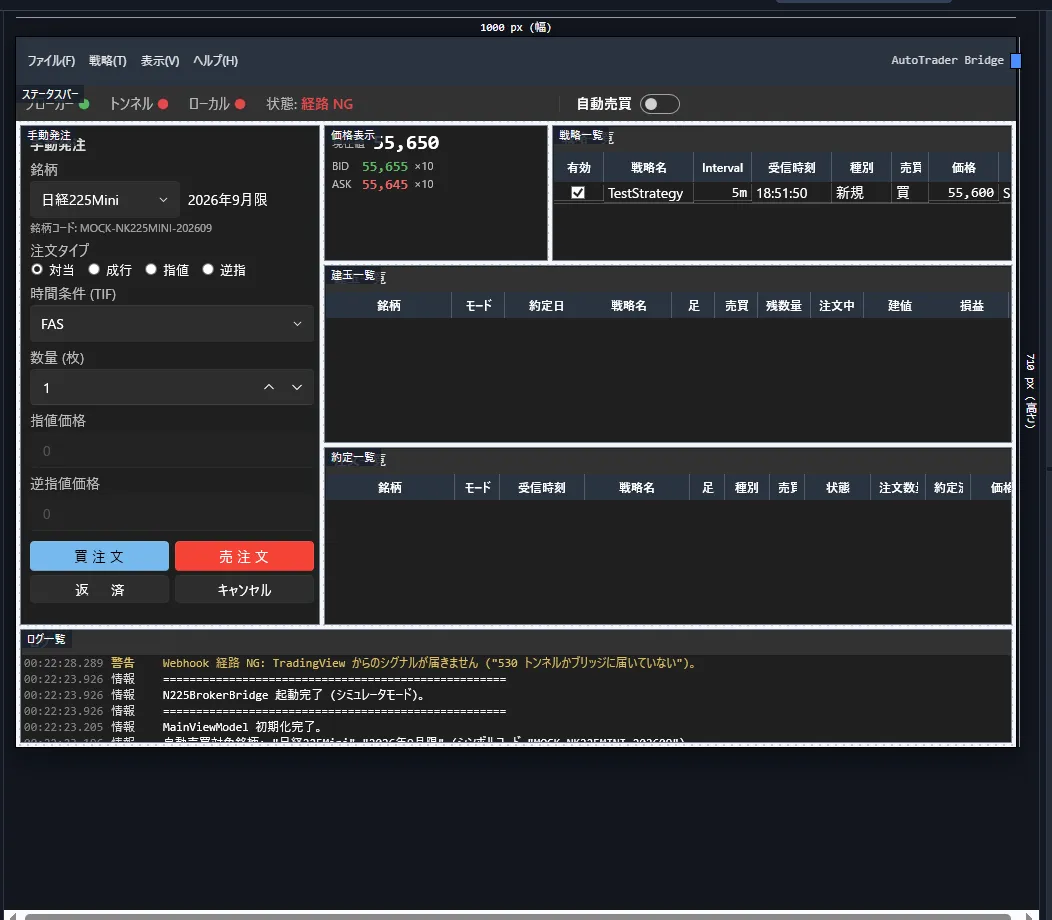
  • 建玉と注文の管理、価格の表示、画面からの手動の発注・返済・取消
  • 自動売買のスイッチ、確認ダイアログ、メール・LINE 通知
  • 画面の配置・大きさ・色は、キャンバスでご自身が設計したとおりになります

▼ できあがるブリッジの画面の例(用意された 5 つのレイアウトのうち「レイアウト 1」。手動発注・価格表示・戦略一覧・建玉一覧・約定一覧・ログ一覧を配置したもの)

作業の流れ(すべて 1 つの画面で行います)

  1. ZIP を解凍してセットアップを実行します(.NET 8 SDK はセットアップがインストールします)
  2. Claude Code(AI)を導入します
  3. 開発キットを起動し、キャンバスに画面ブロックを配置してレイアウトを作成します(自由配置、または用意された 5 つのレイアウトから選択)
  4. 一覧から該当する証券会社を選択します(お客様が入力するのはここだけです)
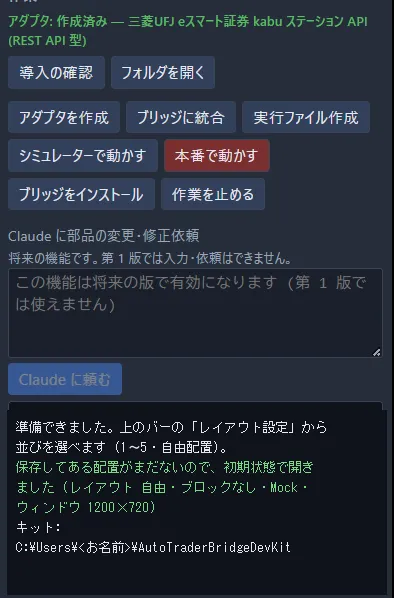
  5. [アダプタを作成]を押すと、証券会社と通信する部品(アダプタ)を AI が作成します。作成後に適合テストが自動で実行されます
  6. [ブリッジに統合]→[実行ファイル作成]で、テスト用のブリッジができあがります
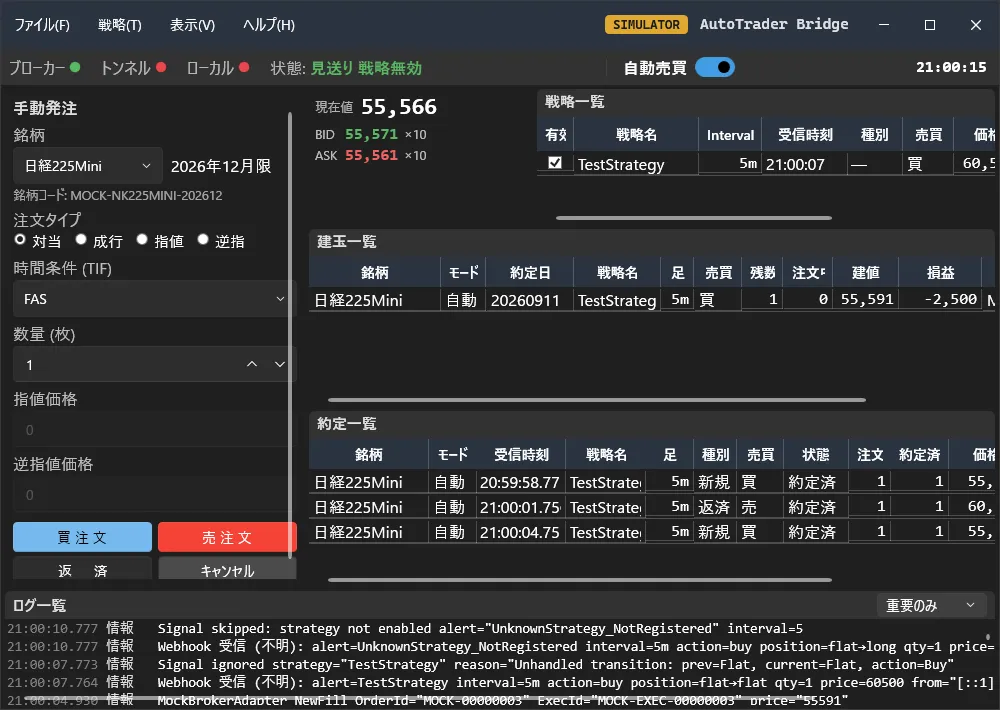
  7. シミュレーターで 7 つのテスト(受信 → 発注 → 約定 → 建玉)を自動売買 OFF と ON の両方で通します。注文は市場に出ません
  8. テストが 14 回すべて通ると[ブリッジをインストール]が押せるようになり、完成したブリッジがインストールされます。以後はデスクトップのアイコンから起動します

▼ 開発キットの画面(ダッシュボード):左が部品の一覧、中央が画面を設計するキャンバス、右が設定と作業のボタン。手順 3〜8 はすべてこの画面で行います
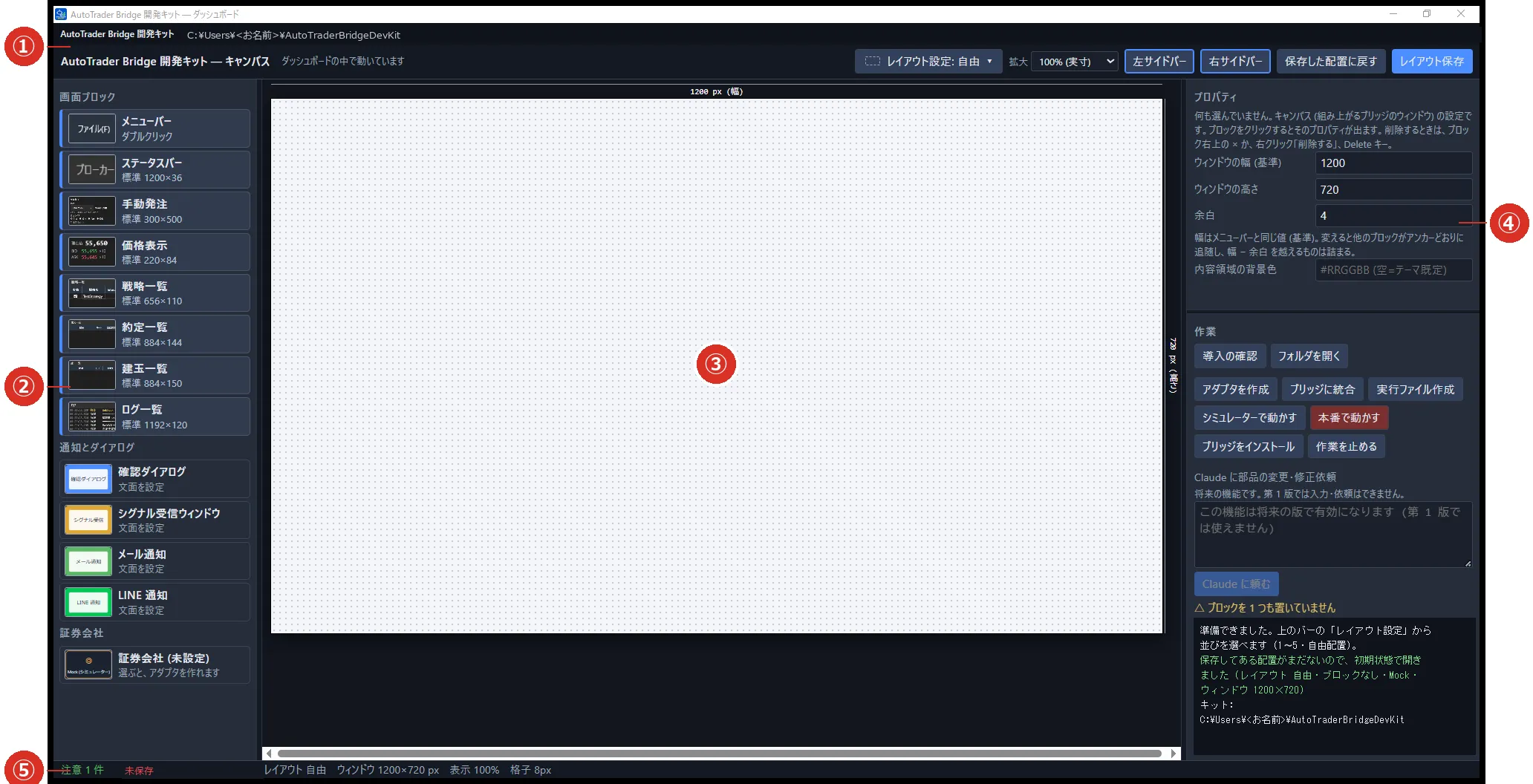
▼ 作業パネル(右下):手順 5〜8 のボタンが押す順に上から並んでいます。作業の経過と AI の報告は下の黒い枠に表示されます
▼ シミュレーターで起動したブリッジ(手順 7):テストシグナルを送り、受信 → 発注 → 約定 → 建玉が画面に表示されることを確認します

ご用意いただくもの

  • Windows 10/11 のパソコン(Mac ではお使いいただけません)
  • Claude Code(有料プラン)… アダプタの作成に使います。別途ご契約が必要です
  • 証券会社の取引ツールと、API の利用契約 … 実口座に接続するときに必要です。シミュレーターでお試しになるだけなら不要です
  • シグナルの送信元(TradingView のアラートなど)… お持ちでなくても、シミュレーターのテストシグナルで動作を確認できます

同梱されるもの

  • ダッシュボード(キャンバス・プロパティウィンドウ・作業パネル)
  • 画面ブロック 8 つ(メニューバー・ステータスバー・手動発注・価格表示・戦略一覧・約定一覧・建玉一覧・ログ一覧)と、通知とダイアログ 4 つ
  • 機能ブロック(受信・解釈・認証・自動売買ゲート・発注・同期・通知・トンネル)… 最初から組み込み済み
  • アダプタの雛形・指示書(記入例 2 種類=REST API 型・Excel アドイン型)・適合テスト・Claude Code 用の命令書
  • Mock(シミュレーター)と「シミュレーターのテスト」ウィンドウ
  • 証券会社の API に関係するもの以外のソースコード一式
  • マニュアル 2 冊(PDF)… 開発キットの操作マニュアル/完成したブリッジの操作マニュアル

対応する証券会社について

証券会社と通信する部品(アダプタ)は、お客様の環境で AI が作成します。証券会社の API のご利用はお客様ご自身のご契約によるため、作者の実装は同梱していません。一覧に無い証券会社でも、証券会社名と API の名称を入力すると、AI が公式の API 仕様書を探して指示書を記入し、アダプタを作成します(個人が国内の先物をプログラムから発注できる API を提供している証券会社が対象です)。

組み上げるブリッジは 1 つ、証券会社は 1 社です。


ご注意

  • 本製品は開発キット(部品・雛形・解説書・命令書)です。戦略・売買のシグナル・投資助言は含みません。売買の判断と結果の責任は、すべて利用者に帰属します
  • 先物取引は、証拠金を上回る損失が生じることがあります。余裕資金の範囲でご利用ください
  • 適合テストとシミュレーターのテストをすべて通っても、実際の口座での動作を保証するものではありません。実口座では必ず最小の枚数で確認してからご利用ください
  • 本製品(ソースコードを含む)は購入者本人の利用に限ります。再配布・転売・改変しての公開はできません
¥19,800 (taxed)
Provider/Distributor:
Sales site:
GogoJungle

Payment

Mastercard Visa JCB Bank FamilyMart D2 D1
Product outline
Community(0)
Best Seller Ranking
Recommended Products (Campaigns)

For those using GogoJungle for the first time Easy 3 steps to use the product!

At GogoJungle, we provide services to enrich your investment life for our members. In addition, product purchases are limited to members. Why not register as a member now and make use of GogoJungle!

01
Enter user information and register as a member
02
Follow the instructions to make a purchase
03
Download from My Page
■ Important Matters and Risk Warnings Regarding Investment Products 【Financial Instruments Business Operator】
GogoJungle Inc.
Registration: Director-General of the Kanto Local Finance Bureau (Financial Instruments Business) No. 1960
【Member Association】
Investment Trusts Association, Japan
【Fees and Expenses】
The use of software, e-books, investment advisory services, etc., provided on our platform involves purchase prices determined for each product.
Additionally, when conducting actual financial instrument transactions (such as FX or CFD trading), costs such as transaction fees and spreads (the difference between the sell and buy price) may be incurred through the connected brokerage firms.
【Margin and Risk of Loss】
Transactions such as FX (Foreign Exchange Margin Trading) and CFD (Contract for Difference) allow for trading in amounts exceeding the deposited margin.
Therefore, due to sudden fluctuations in target indices (currency, commodity prices, etc.), there is a risk of incurring losses that exceed the deposited margin (loss exceeding principal).
Furthermore, financial instrument transactions involve risks such as price fluctuations, which may result in losses falling below or exceeding the initial investment principal.
【Nature of Services and Trading Entity】
The Company operates a platform (marketplace) providing investment software and information; we do not engage in the buying, selling, mediation, brokerage, or agency of financial instruments on behalf of customers.
The services and information provided are intended as reference for investment decisions and do not guarantee future profits or specific results.
While some services include investment advice, they do not constitute a mandate or solicitation to trade specific financial instruments.
Final investment decisions and the execution of trades must be made at the customer’s own risk and discretion.
