NeuralFX Pro USDJPY
Sales performance 0 Book
Review ★ 0.0
(0)
Expert Advisors
MetaTrader 5
Sales from
8/12/2026
Last Updated At
7/27/2026
Version
1.2
My Profile
うりのすけ | FX×AI取引のプロ- Whole period
- 2 years
- 1 year
- 6 months
- 3 months
- 1 month
Profit
:
-103,400JPYProfit Factor
:
0.75Rate of return risk
?
:
-0.64Average Profit
:
10,854JPYAverage Loss
:
-11,008JPYBalance
?
:
896,600JPYRate of return (all periods) ?
:
-10.26%Win Rate
:
43.08%
(28/65)
Maximum Position
?
:
1Maximum Drawdown
?
:
15.91%
(161,200JPY)
Maximum Profit
:
22,200JPYMaximum Loss
:
-26,900JPYRecommended Margin
?
:
1,007,320JPYUnrealized P/L
:
0JPYDeposit
?
:
1,000,000JPYCurrency
:
JPY- Account
Operable Brokers
Usable with MT5-adopting brokers.
Forward testing (Profit)
Product Statistics
Product Comments
Monthly Statistics
2026
2025
2024
2023
2022
- Jan
- Feb
- Mar
- Apr
- May
- Jun
- Jul
- Aug
- Sep
- Oct
- Nov
- Dec
Calendar for Months
About EA's Strategy
Translating...
Currency Pairs
[USD/JPY]
Trading Style
[Day Trading]
[Swing Trading]
Maximum Number Position
3
Maximum Lot
1
Chart Time Frame
M1
Maximum Stop Loss
35
Take Profit
80
Straddle Trading
No
Application Type
Metatrader Auto Trading
Other File Usages
No
━━━━━━━━━━
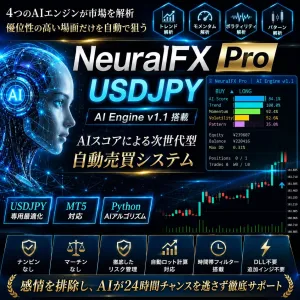
⬡ NeuralFX Pro USDJPY
AIニューラルネット搭載 ドル円完全自動売買EA
【MT5専用 / DLL不要】
━━━━━━━━━━
| ▶ 対応MT5 全ブローカー対応 | ▶ 口座縛り完全なし | ▶ DLL・外部ファイル不要 |
| ▶ トレーリングストップ搭載 | ▶ 自動ロット計算対応 | ▶ ブレークイーブン機能搭載 |
■ NeuralFX Pro とは?
NeuralFX Pro USDJPY は、4つのAIモジュールがリアルタイムで市場を解析し、 最終的な「AIスコア」として統合するドル円専用MT5自動売買EAです。
一般的なEAが単一の指標でエントリーを判断するのに対し、本EAはニューラルネットワーク風の重み付け合成ロジックを採用。 4つの独立した評価軸を組み合わせることで、相場の多角的な分析を実現しています。
エントリー時にはチャート上にAIスコアが数値で表示され、なぜそのタイミングで売買したのかが視覚的に確認できます。
■ 4つのAIモジュール
| ① Trend Score トレンド評価 |
EMA8・EMA21・EMA55・EMA89・EMA144・EMA200の6本の指数移動平均線を
シグモイド関数(ニューラルネット活性化関数)で活性化し、
マルチレイヤーのトレンド強度を算出します。 短期〜超長期まで全てのトレンド方向が一致したときに高スコアを出力します。 |
| ② Momentum Score モメンタム評価 |
RSI(14)・RSI(28)・MACD・ストキャスティクス(14,3,3)の複合モメンタムを
重み付けして定量化します。 複数の指標が同時に「買われ過ぎ・売られ過ぎ」を示すときのみ高評価を与えることで、 ダマシを排除します。 |
| ③ Volatility Score ボラティリティ評価 |
H4足とD1足のATR比率を分析し、「トレードに適したボラティリティ環境か」を自動判定します。 過熱相場(急騰・急落直後)や閑散相場(深夜・薄商い)を自動回避し、 エントリーの質を高めます。 |
| ④ Pattern Score パターン評価 |
エングルフィン(包み足)・ピンバー・インサイドバーなど、
トレーダーに広く知られるローソク足パターンをリアルタイムで自動検出します。 AIスコアの方向性と一致するパターンが出現したときに加点します。 |
■ チャート上のAI表示機能
本EAをチャートに適用すると、以下のビジュアルが自動表示されます。
| 表示要素 | 内容 |
|---|---|
| AIスコアパネル (左上常時表示) |
4つのAIスコアをプログレスバーでリアルタイム表示。 BUY/SELLシグナル、口座残高、最大ドローダウン、総トレード数を常時確認可能。 |
| シグナル矢印 | エントリーシグナル発生時、チャート上に▲BUY / ▼SELL矢印と そのときのAIスコア(例:AI:72%)が表示されます。 |
| AIバンド (動的サポレジライン) |
EMA55とATRを組み合わせたAIダイナミックバンドを水平線で表示。 相場のボラティリティに応じて幅が自動調整されます。 |
| ヒートマップ |
チャート上部に4つのAIスコアを色分け表示(青〜赤のグラデーション)。 市場の強弱を直感的に把握できます。 |
■ 取引仕様
| 項目 | 内容 |
|---|---|
| 対応通貨ペア | USD/JPY(ドル円)専用 |
| 使用時間足 | H4(メイン解析)+D1(トレンドフィルター) |
| トレーディングスタイル | デイトレード〜スイングトレード(ミックス) |
| 最大ロット数 | 1.0(パラメーターで変更可) |
| 最大ポジション数 | 1(両建てなし) |
| ストップロス | 35 pips(固定・変更可) |
| テイクプロフィット | 80 pips(固定・変更可) |
| トレーリングストップ | あり(開始・ステップ幅を調整可) |
| ブレークイーブン | あり(発動pipsを調整可) |
| 両建て | なし |
| DLL使用 | なし(MT5標準機能のみで動作) |
| 口座縛り | なし(国内MT5対応ブローカー全て対応) |
| 推奨証拠金 | 50,000円以上(0.01lot運用) 200,000円以上(0.1lot運用・推奨) |
| 推奨ブローカー | 外為ファイネスト・アヴァトレード・OANDA JAPAN ほか国内MT5対応各社 |
■ リスク管理機能
本EAには以下の5つのリスク管理機能が実装されています。
| No. | 機能 | 内容 |
|---|---|---|
| 1 | 全ポジション自動SL設定 | 全トレードにストップロスを自動設定。SLなしのポジションは作りません。 |
| 2 | トレーリングストップ | 利益が一定幅に達すると、SLが自動的に追従。利益を自動的に守ります。 |
| 3 | ブレークイーブン | 利益が一定幅に達するとSLをエントリー価格へ移動。損失リスクをゼロにします。 |
| 4 | 時間フィルター | 流動性の低い深夜・早朝・金曜夜のエントリーを自動回避します。 |
| 5 | スプレッドフィルター | スプレッドが設定値を超えた場合、自動的にエントリーをスキップします。 |
■ こんな方におすすめ
| ✔ | FX自動売買に興味があるが、どこから始めればいいか分からない方 |
| ✔ | チャートを常時監視できないが、ドル円取引を続けたい方 |
| ✔ | 感情的なトレードをなくし、ルールベースで取引したい方 |
| ✔ | 複数の指標を組み合わせた高精度なシグナルを求めている方 |
| ✔ | AI・機械学習を活用したトレードに興味がある方 |
■ 主要パラメーター一覧
▼ AIエンジン設定
| パラメーター名 | 初期値 | 説明 |
|---|---|---|
| AI_LookbackBars | 200 | EA起動に必要な最低バー数。変更不要。 |
| AI_SignalThreshold | 0.65 | エントリーするAIスコアの閾値。高いほど厳選(推奨:0.60〜0.75) |
| AI_AdaptiveMode | true | 相場環境に応じて閾値を自動微調整するモード |
▼ ロット・リスク管理
| パラメーター名 | 初期値 | 説明 |
|---|---|---|
| LotSize | 0.1 | AutoLot=falseのときの固定ロット数 |
| AutoLot | true | 証拠金に対してロットを自動計算する |
| RiskPercent | 1.5 | 1トレードのリスク率(証拠金の%)推奨:1.0〜2.0 |
| MaxLotSize | 1.0 | 自動ロット計算時の最大ロット上限 |
| MaxPositions | 1 | 同時保有できる最大ポジション数 |
▼ ストップ・利確設定
| パラメーター名 | 初期値 | 説明 |
|---|---|---|
| StopLoss_Pips | 35.0 | ストップロスの幅(pips) |
| TakeProfit_Pips | 80.0 | テイクプロフィットの幅(pips) |
| UseTrailingStop | true | トレーリングストップを有効にする |
| TrailStart_Pips | 20.0 | 利益がこのpipsに達したらトレール開始 |
| TrailStep_Pips | 10.0 | トレールの追従幅(pips) |
| UseBreakEven | true | ブレークイーブン機能を有効にする |
| BreakEven_Pips | 15.0 | 利益がこのpipsに達したらSLをコストへ移動 |
▼ フィルター設定
| パラメーター名 | 初期値 | 説明 |
|---|---|---|
| UseTimeFilter | true | 取引時間帯を制限する |
| TradingHourStart | 7 | 取引開始時間(GMT) |
| TradingHourEnd | 20 | 取引終了時間(GMT) |
| NoTradeOnFriday | true | 金曜18時GMT以降の新規エントリーを禁止 |
| MaxSpread | 30.0 | この値以上のスプレッドでエントリースキップ |
| MinVolatility | 5.0 | 最低ボラティリティ(pips)未満はスキップ |
■ 動作環境・必要条件
| プラットフォーム | MetaTrader 5(MT5)専用 |
| 対象通貨ペア | USDJPY のみ |
| 推奨MT5バージョン | build 3000以上 |
| DLL・外部ファイル | 不要 |
| 口座縛り | なし(ライセンス制限なし) |
| VPS | 推奨(PCをシャットダウンするとEAが停止します) |
| 推奨スペック | Windows 10/11、安定したインターネット接続 |
■ よくある質問(FAQ)
| Q. どのMT5証券会社でも使えますか? |
| A. はい。口座縛りはありません。MT5に対応している国内証券会社であればどこでも使用できます。 |
| Q. VPSは必須ですか? |
| A. 必須ではありませんが、PCをシャットダウンするとEAが停止します。24時間稼働させるにはVPSの使用を推奨します。 |
| Q. どれくらいの頻度で取引しますか? |
| A. 相場環境によって異なりますが、週2〜5回程度のエントリーが目安です。AIスコアが閾値に達した場合のみエントリーするため、無駄なトレードを行いません。 |
| Q. ナンピン・マーチンゲールはしますか? |
| A. しません。1エントリー1ポジションの安全なロジックです。 |
| Q. 初心者でも使えますか? |
| A. はい。デフォルトのパラメーターのままチャートに適用するだけで動作します。購入後30日間はメッセージにてサポートします。 |
■ ご注意・免責事項
|
・本EAは自動売買システムですが、将来の利益を保証するものではありません。 ・FX取引には元本割れのリスクがあります。余裕資金での運用を強く推奨します。 ・過去のバックテスト結果は将来の運用成績を保証するものではありません。 ・RiskPercentは2.0%以内での運用を強く推奨します。 ・購入後のご返金は対応しておりません。バックテスト結果をよくご確認の上ご購入ください。 ・サポートはご購入後30日間、ゴゴジャンのメッセージ機能にてご対応いたします。 |
━━━━━━━━━━
⬡ NeuralFX Pro USDJPY
AIが相場を解析し、最適なタイミングだけにエントリー。
感情に左右されない、ルールベースの自動売買をあなたの手に。
━━━━━━━━━━

Forward Test
Back Test
¥29,800 (taxed)
Provider/Distributor:
Sales site:
GogoJungle
●Payment





About Forex Automated Trading
What is Forex Automated Trading (MT4 EA)?
Forex Automated Trading refers to trading that is automated through programming, incorporating predetermined trading and settlement rules. There are various methods to conduct automated trading, but at GogoJungle, we deal with Experts Advisors (hereinafter referred to as EA) that operate on a trading platform called MT4.
Trading Types of Forex Automated Trading
There are various types of EAs (Expert Advisors) for different trading types that can be used on MT4.
Just like discretionary trading, there are those that decide trading and settlement timings by combining indicators, those that repeatedly buy or sell at certain price (pips) intervals, and trading methods that utilize market anomalies or temporal features. The variety is as rich as the methods in discretionary trading.
To categorize simply,
・Scalping (Type where trades are completed within a few minutes to a few hours),
・Day Trading (Type where trades are completed within several hours to about a day),
・Swing Trading (Type where trades are conducted over a relatively long period of about 1 day to 1 week)
・Grid/Martingale Trading (Holding multiple positions at equal or unequal intervals and settling all once a profit is made. Those that gradually increase the lot number are called Martingale.)
・Anomaly EA (Mid-price trading, early morning scalping)
Just like discretionary trading, there are those that decide trading and settlement timings by combining indicators, those that repeatedly buy or sell at certain price (pips) intervals, and trading methods that utilize market anomalies or temporal features. The variety is as rich as the methods in discretionary trading.
To categorize simply,
・Scalping (Type where trades are completed within a few minutes to a few hours),
・Day Trading (Type where trades are completed within several hours to about a day),
・Swing Trading (Type where trades are conducted over a relatively long period of about 1 day to 1 week)
・Grid/Martingale Trading (Holding multiple positions at equal or unequal intervals and settling all once a profit is made. Those that gradually increase the lot number are called Martingale.)
・Anomaly EA (Mid-price trading, early morning scalping)
Risks, Advantages, and Disadvantages of Forex Automated Trading
When engaging in Forex, there are risks in automated trading just as there are in discretionary trading.
However, a substantial advantage of automated trading is its ability to limit and predict risks beforehand.
[Risk]
Inherent to forex trading are the trading risks that undeniably exist in automated trading as well.
・Lot Size Risk
Increasing the lot size forcibly due to a high winning rate can, in rare instances, depending on the EA, lead to substantial Pips loss when a loss occurs. It is crucial to verify the SL Pips and the number of positions held before operating with an appropriate lot.
・Rapid Market Fluctuation Risk
There are instances where market prices fluctuate rapidly due to index announcements or unforeseen news. System trading does not account for such unpredictable market movements, rendering it incapable of making decisions on whether to settle in advance or abstain from trading. As a countermeasure, utilizing tools that halt the EA based on indicator announcements or the VIX (fear index) is also possible.
[Benefits]
・Operates 24 hours a day
If there is an opportunity, system trading will execute trades on your behalf consistently. It proves to be an extremely convenient tool for those unable to allocate time to trading.
・Trades dispassionately without being swayed by emotions
There is an absence of self-serving rule modifications, a common human tendency, such as increasing the lot size after consecutive losses in discretionary trading or, conversely, hastily securing profits with minimal gains.
・Accessible for beginners
To engage in Forex trading, there is no prerequisite to study; anyone using system trading will achieve the same results.
[Disadvantages]
・Cannot increase trading frequency at will
Since system trading operates based on pre-programmed conditions, depending on the type of EA, it might only execute trades a few times a month.
・Suitability may vary with market conditions
Depending on the trading type of the EA, there are periods more suited to trend trading and periods more suited to contrarian trading, making consistent results across all periods unlikely. While the previous year might have yielded good results, this year's performance might not be as promising, necessitating some level of discretion in determining whether it is an opportune time to operate.
However, a substantial advantage of automated trading is its ability to limit and predict risks beforehand.
[Risk]
Inherent to forex trading are the trading risks that undeniably exist in automated trading as well.
・Lot Size Risk
Increasing the lot size forcibly due to a high winning rate can, in rare instances, depending on the EA, lead to substantial Pips loss when a loss occurs. It is crucial to verify the SL Pips and the number of positions held before operating with an appropriate lot.
・Rapid Market Fluctuation Risk
There are instances where market prices fluctuate rapidly due to index announcements or unforeseen news. System trading does not account for such unpredictable market movements, rendering it incapable of making decisions on whether to settle in advance or abstain from trading. As a countermeasure, utilizing tools that halt the EA based on indicator announcements or the VIX (fear index) is also possible.
[Benefits]
・Operates 24 hours a day
If there is an opportunity, system trading will execute trades on your behalf consistently. It proves to be an extremely convenient tool for those unable to allocate time to trading.
・Trades dispassionately without being swayed by emotions
There is an absence of self-serving rule modifications, a common human tendency, such as increasing the lot size after consecutive losses in discretionary trading or, conversely, hastily securing profits with minimal gains.
・Accessible for beginners
To engage in Forex trading, there is no prerequisite to study; anyone using system trading will achieve the same results.
[Disadvantages]
・Cannot increase trading frequency at will
Since system trading operates based on pre-programmed conditions, depending on the type of EA, it might only execute trades a few times a month.
・Suitability may vary with market conditions
Depending on the trading type of the EA, there are periods more suited to trend trading and periods more suited to contrarian trading, making consistent results across all periods unlikely. While the previous year might have yielded good results, this year's performance might not be as promising, necessitating some level of discretion in determining whether it is an opportune time to operate.
Equipment and Environment Needed for Automated Trading Operation
The requirements for operating automated trading (EA) on MT4 are as follows:
・MT4 (MetaTrader 4. An account needs to be opened with a Forex company that offers MT4.)
・EA (A program for automated trading)
・The operating deposit required to run the EA
・A PC that can run 24 hours or a VPS (Virtual Private Server), where a virtual PC is hosted on a cloud server to run MT4.
・MT4 (MetaTrader 4. An account needs to be opened with a Forex company that offers MT4.)
・EA (A program for automated trading)
・The operating deposit required to run the EA
・A PC that can run 24 hours or a VPS (Virtual Private Server), where a virtual PC is hosted on a cloud server to run MT4.
Installation of MT4 and Account Login
If you open an account with a forex broker that supports MT4, you can use MT4 as provided by that forex broker. MT4 is a stand-alone type of software that needs to be installed on your computer, so you download the program file from the website of the FX company where you opened the account and install it on your computer.
Additionally, there are both demo and real accounts available. You can experience trading with virtual money by applying for a demo account. After opening a real account, you select the connection server assigned by the Forex broker, enter the password, and log in to the account.
When you deposit money into your account using the method specified by the forex broker, the funds will be reflected in your MT4 account, and you can trade.
Additionally, there are both demo and real accounts available. You can experience trading with virtual money by applying for a demo account. After opening a real account, you select the connection server assigned by the Forex broker, enter the password, and log in to the account.
When you deposit money into your account using the method specified by the forex broker, the funds will be reflected in your MT4 account, and you can trade.
How to Install EA on MT4
To set up an EA when you purchase it through GogoJungle, follow the steps below:
Firstly, download the purchased EA file from your My Page on GogoJungle. You will download a zip (compressed) file, so right-click to extract it and retrieve the file named ‘◯◯◯ (EA name)_A19GAw09 (any 8 alphanumeric characters).ex4’ from inside.
Next, launch MT4 and navigate to ‘File’ → ‘Open Data Folder’ → ‘MQL4’ → ‘Experts’ folder, and place the ex4 file inside. Once done, close MT4 and restart it. Then, go to the upper menu ‘Tools’ → ‘Options’, and under ‘Expert Advisors’, ensure ‘Allow automated trading’ and ‘Allow DLL imports’ are checked, then press OK to close.
The necessary currency pair and time frame for the correct operation of the EA are specified on the EA sales page. Refer to this information and open the chart of the correct currency pair time frame (e.g., USDJPY5M for a USD/Yen 5-minute chart).
Within the menu navigator, under ‘Expert Advisors’, you will find the EA file name you placed earlier. Click to select it, then drag & drop it directly onto the chart to load the EA. Alternatively, you can double-click the EA name to load it onto the selected chart.
If ‘Authentication Success’ appears in the upper left of the chart, the authentication has been successful. To operate the EA, you need to keep your PC running 24 hours. Therefore, either disable the automatic sleep function or host MT4 on a VPS and operate the EA.
Firstly, download the purchased EA file from your My Page on GogoJungle. You will download a zip (compressed) file, so right-click to extract it and retrieve the file named ‘◯◯◯ (EA name)_A19GAw09 (any 8 alphanumeric characters).ex4’ from inside.
Next, launch MT4 and navigate to ‘File’ → ‘Open Data Folder’ → ‘MQL4’ → ‘Experts’ folder, and place the ex4 file inside. Once done, close MT4 and restart it. Then, go to the upper menu ‘Tools’ → ‘Options’, and under ‘Expert Advisors’, ensure ‘Allow automated trading’ and ‘Allow DLL imports’ are checked, then press OK to close.
The necessary currency pair and time frame for the correct operation of the EA are specified on the EA sales page. Refer to this information and open the chart of the correct currency pair time frame (e.g., USDJPY5M for a USD/Yen 5-minute chart).
Within the menu navigator, under ‘Expert Advisors’, you will find the EA file name you placed earlier. Click to select it, then drag & drop it directly onto the chart to load the EA. Alternatively, you can double-click the EA name to load it onto the selected chart.
If ‘Authentication Success’ appears in the upper left of the chart, the authentication has been successful. To operate the EA, you need to keep your PC running 24 hours. Therefore, either disable the automatic sleep function or host MT4 on a VPS and operate the EA.
In Case You Want to Change the Account in Use
EAs from GogoJungle can be used with one real account and one demo account per EA.
If you want to use it with an account other than the authenticated one, you need to reset the registered account.
To reset the account, close the MT4 where the Web authentication is registered, then go to My Page on GogoJungle > Use > Digital Contents > the relevant EA > press the ‘Reset’ button for the registration number, and the registered account will be released.
When the account is in a reset state, using the EA with another MT4 account will register a new account.
Also, you can reset the account an unlimited number of times.
If you want to use it with an account other than the authenticated one, you need to reset the registered account.
To reset the account, close the MT4 where the Web authentication is registered, then go to My Page on GogoJungle > Use > Digital Contents > the relevant EA > press the ‘Reset’ button for the registration number, and the registered account will be released.
When the account is in a reset state, using the EA with another MT4 account will register a new account.
Also, you can reset the account an unlimited number of times.
Solutions for Errors During Web Authentication or Non-Functional Account Trading
If you encounter an error with Web authentication, or if the EA is trading on GogoJungle's forward performance page but not on your own account, there could be various reasons. For more details, please refer to the following link:
→ Items to Check When EA is Not Operating
→ Items to Check When EA is Not Operating
About the Size of Trading Lots
In Forex trading, the size of a lot is usually:
1 lot = 100,000 currency units
0.1 lot = 10,000 currency units
0.01 lot = 1,000 currency units
For USD/JPY, 1 lot would mean holding 100,000 dollars.
The margin required to hold lots is determined by the leverage set by the Forex broker.
If the leverage is 25 times, the margin required to hold 10,000 currency units of USD/JPY would be:
10000*109 (※ at a rate of 109 yen per dollar) ÷ 25 = 43,600 yen.
1 lot = 100,000 currency units
0.1 lot = 10,000 currency units
0.01 lot = 1,000 currency units
For USD/JPY, 1 lot would mean holding 100,000 dollars.
The margin required to hold lots is determined by the leverage set by the Forex broker.
If the leverage is 25 times, the margin required to hold 10,000 currency units of USD/JPY would be:
10000*109 (※ at a rate of 109 yen per dollar) ÷ 25 = 43,600 yen.
Glossary of Automated Trading
・Profit Factor: Total Profit ÷ Total Loss
・Risk-Return Ratio: Total Profit and Loss during the period ÷ Maximum Drawdown
・Maximum Drawdown: The largest unrealized loss during the operation period
・Maximum Position Number: This is the maximum number of positions that the EA can theoretically hold at the same time
・TP (Take Profit): The set profit-taking Pips (or specified amount, etc.) in the EA's settings
・SL (Stop Loss): The set maximum loss pips (or specified amount, etc.) in the EA's settings
・Trailing Stop: Instead of settling at a specified Pips, once a certain profit is made, the settlement SL is raised at a certain interval (towards the profit), maximizing the profit. It is a method of settlement.
・Risk-Reward Ratio (Payoff Ratio): Average Profit ÷ Average Loss
・Hedging: Holding both buy and sell positions simultaneously (Some FX companies also have types where hedging is not allowed)
・Risk-Return Ratio: Total Profit and Loss during the period ÷ Maximum Drawdown
・Maximum Drawdown: The largest unrealized loss during the operation period
・Maximum Position Number: This is the maximum number of positions that the EA can theoretically hold at the same time
・TP (Take Profit): The set profit-taking Pips (or specified amount, etc.) in the EA's settings
・SL (Stop Loss): The set maximum loss pips (or specified amount, etc.) in the EA's settings
・Trailing Stop: Instead of settling at a specified Pips, once a certain profit is made, the settlement SL is raised at a certain interval (towards the profit), maximizing the profit. It is a method of settlement.
・Risk-Reward Ratio (Payoff Ratio): Average Profit ÷ Average Loss
・Hedging: Holding both buy and sell positions simultaneously (Some FX companies also have types where hedging is not allowed)
Useful related pages
・How to Install MT4 EA (Expert Advisor) and Indicators
・MT4 Beginner's Guide
・Understanding System Trading Performance (Forward and Backtesting)
・Choosing Your First EA! Calculating Recommended Margin for EAs
・Comparing MT4 Accounts Based on Spread, Swap, and Execution Speed
・What is Web Authentication?
・Checklist for When Your EA Isn't Working
・MT4 Beginner's Guide
・Understanding System Trading Performance (Forward and Backtesting)
・Choosing Your First EA! Calculating Recommended Margin for EAs
・Comparing MT4 Accounts Based on Spread, Swap, and Execution Speed
・What is Web Authentication?
・Checklist for When Your EA Isn't Working
